AI Agents and Workflow Automation: One Job, Done Properly, Measured
We build AI agents that do real work inside your inbox, documents and CRM, with a person approving every send. Not a chatbot bolted to the corner of a page.
Built by a senior team in Ho Chi Minh City for companies in Vietnam and across the US, UK, Australia and Europe.
DEFINITION
What an AI agent is
An AI agent is software that uses a language model to read input, decide what to do and take the next step with the tools it has been given, inside a defined job.
Workflow automation is the system around it: the rules, schedules and integrations that move work between your tools. Saigon Digital builds both as one system, from Ho Chi Minh City, in English and Vietnamese.
AI agent, workflow automation or chatbot?
Most useful systems are mostly rules, with an agent only on the steps that need judgement. That is cheaper to run and far easier to trust.
“Now we're saving weeks to hours in our logistics pipeline with AI, automation and workflow with Saigon Digital. We couldn't have made a better investment for our team.”
What an agent does before anyone opens the email
One enquiry, start to quote table.
What is included in our AI agent and automation service
One team, from the audit to the monitoring.
Workflows worth automating
Shared inbox triage
Sorting enquiries from noise, logging them as structured records and routing each to the right person.
Document extraction
Pulling the fields that matter out of PDFs, spreadsheets, scans and forms, then checking them against each other.
Quotes and supplier requests
Drafting requests in your house format, reading the replies into one comparison table.
Chasing and follow-up
Noticing who has gone quiet and prompting the owner, without sending anything on its own.
CRM and system updates
Ending the re-keying between sales, operations and finance tools that were never built to talk.
Reporting and internal answers
Turning the records the workflow already creates into dashboards and answers from your own data.
The pattern is the same in logistics, education, professional services and e-commerce: work arrives unstructured, and somebody turns it into records by hand.
METHOD
How we build an AI agent
Narrow, evaluated, monitored.
Pick one workflow with a countable outcome.
Volume, cost or time saved, something you can measure before and after. Broad assistants are impossible to justify at renewal because nobody can say what changed.
Fix the process before automating it.
Automating a broken process produces the wrong outcome faster and makes it harder to see. We remove the steps that exist only for historical reasons first.
Write the evaluation set before the agent.
Realistic inputs and acceptable outputs, awkward edge cases included. This is what turns "it seems good" into a number, and it is the step almost everyone skips.
Connect it to real systems, with guardrails.
We build the integrations and decide, with you, what the agent may do alone and where a person has to approve. Guardrails are design decisions, not settings.
Build for failure.
Retries, alerts and a manual fallback. An automation nobody notices has broken is worse than no automation, because people stop checking.
Let the people using it correct it.
Every correction is stored with the reason and reviewed by a developer, then turned into a tested rule. On the chartering desk, 34 corrections in week one became 6 rule updates.
When to use an AI agent, and when not to
We run this check before scoping anything. If the honest answer is a spreadsheet formula or a setting in a tool you already own, that is what we will tell you.
The stack, and who owns it
Every AI call goes through one interface, so the model behind it can be changed in one place when a better or cheaper one arrives. The model's output is forced into a fixed structure and checked before anything uses it.
Simple flows belong in n8n, Make or Zapier. Workflows that have to be reliable at volume belong in code, with tests. We have moved a production system from the first to the second, and we would sooner tell you which you need at the start.
You own the repository from the first commit. Related: web app development and HubSpot development.
Who this works for
A shared inbox runs part of your business.
Enquiries, orders or requests arrive by email and someone sorts, logs and forwards them by hand.
Your team re-keys the same data.
From email into a spreadsheet, from the spreadsheet into the CRM, from the CRM into finance.
You have a budget for AI and no clear first project.
The workflow audit exists to find the one place where it pays back and can be measured.
A pilot stalled.
Usually because the scope was broad and nobody defined a correct answer. Both are fixable.
We work in English and Vietnamese, for businesses operating inside Vietnam and for clients headquartered in the US, UK, Australia, Canada and the EU.
READ THIS BEFORE YOU HIRE ANYONE
The honest caveats
An agent without evaluation is a demo.
- 01Most admin does not need AI. Rules are cheaper and more predictable.
- 02An agent is never 100% right. The design question is who catches the error.
- 03The first weeks in production find problems no test did. Budget for them.
- 04If your process is unclear, software will not make it clear.
If that sounds less magical than other pitches you have heard, that is the point.
Questions, answered straight
No fluff, as promised.
What is an AI agent?
An AI agent is software that uses a language model to read input, decide what to do and take the next step with the tools it has been given, inside a defined job. Unlike a chatbot it does not wait to be asked, and unlike a fixed automation it can handle messy input such as emails, PDFs and scans.
What is the difference between an AI agent and workflow automation?
Workflow automation follows rules: if this happens, do that. An AI agent uses judgement inside the workflow, for example deciding whether an email is a real enquiry and pulling the details out of it. Most real systems are both: rules for everything predictable, an agent only for the steps that need judgement.
Do we need AI for this, or just automation?
Often just automation. Most admin is rules, and rules are cheaper, faster and more predictable than a model. We reach for AI only where the input is unstructured or genuine judgement is involved, and we will tell you which one your workflow is before you pay for a build.
How do you stop it inventing things?
Constrain it to your data, force its output into a fixed structure that is checked on every call, test it against a reference set, and keep a human approval step wherever a wrong answer is expensive. When the system cannot read something, it says so and marks the check as skipped. It never shows a fake pass.
Which models and tools do you build on?
Usually the current Claude models, called through one interface so the model can be changed without rewriting the system. For simple flows we use n8n, Make or Zapier. When a workflow has to be reliable at volume we write it in code: we have moved a production system off a no-code tool for exactly that reason.
What happens to our data?
We build on commercial model APIs, not consumer chat apps, and we do not fine-tune models on your data. Access is by your own company sign-in, every action is logged, and where you need it the system runs on cloud and AI accounts that you own.
Will this replace jobs?
In our experience it removes the worst part of jobs: re-keying, chasing, copying between systems. On the chartering desk the people still make every commercial decision and press every Send. What changed is that the sorting, reading and drafting is done before they open the enquiry.
How much does it cost?
It is quoted after the workflow audit, because the cost depends on the systems involved and how messy the input is. The first build covers one workflow in production. Ongoing improvement runs on a monthly retainer or a Bank of Hours. Model usage is billed at cost and is usually small next to the engineering.
Do you work in Vietnamese?
Yes. The team is in Ho Chi Minh City and builds for Vietnamese and international companies. The chartering desk system ships with its user guide in English and Vietnamese.
Proof from real work
All case studies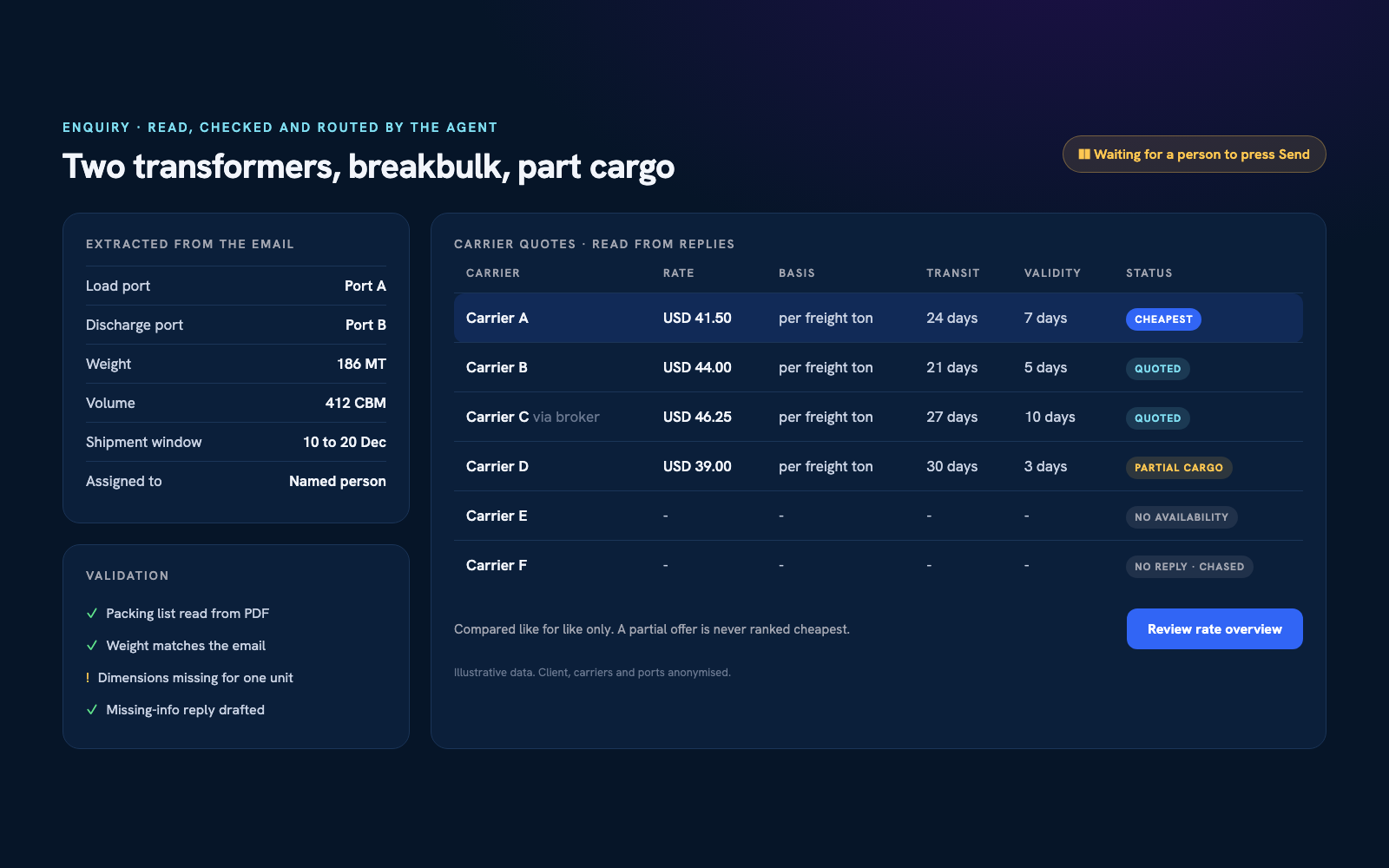

Got a workflow worth automating?
Tell us what your team does by hand every day. You'll get an honest answer about whether an agent, a rule or nothing at all is the right fix.