Artificial intelligence is no longer a future concept. It is already shaping how businesses attract customers, analyse data, create content, and scale digital performance. At the centre of this shift sits Google, whose ecosystem of AI-powered products continues to evolve rapidly.
This guide breaks down Google AI tools in a clear, practical way. The goal is to help you understand what these tools do, how they fit together, and how they can support real business growth.
At Saigon Digital, we focus on turning technology into measurable results. With that in mind, this guide goes beyond features and looks at how Google AI tools can be used strategically across SEO, marketing, operations, and product development.
What Are Google AI Tools?
Google AI tools are a collection of platforms, features, and services that use machine learning and artificial intelligence to automate tasks, uncover insights, and improve decision-making.
Unlike standalone AI products, Google’s tools are deeply integrated into platforms many businesses already use, including Search, Workspace, Ads, Analytics, Cloud, and Android. This makes them particularly powerful when used together.
In simple terms, Google AI tools help you:
- Process large volumes of data faster
- Identify patterns and opportunities humans might miss
- Automate repetitive or complex tasks
- Deliver more personalised and relevant user experiences
Why Google AI Tools Matter for Businesses
AI adoption is no longer about experimentation. It is about competitive advantage.
Google AI tools allow businesses to move faster, make smarter decisions, and improve performance across digital channels. For marketing and growth teams, they offer clear benefits:
- Efficiency: Automate time-consuming tasks such as reporting, bidding, and content assistance
- Accuracy: Use predictive models instead of assumptions
- Scalability: Maintain quality as campaigns, websites, and datasets grow
- User-centricity: Deliver more relevant experiences across touchpoints
Used correctly, Google AI tools support smarter strategy rather than replacing it.
Core Google AI Tools You Should Know
Google’s AI ecosystem is broad, but several tools stand out for their direct impact on digital strategy, marketing performance, and operational efficiency. Understanding what each tool does and how to use it strategically allows businesses to unlock real value rather than adopting AI in isolation.
Below, we explore the most important Google AI tools and how they can be applied in practice.
1. Google Search AI and SGE
Google Search itself is one of the most advanced AI products in the world. With developments such as the Search Generative Experience (SGE), Google now uses AI to summarise information, answer complex queries, and understand search intent more deeply.
How Google Search AI Works Today
At its core, Google Search AI is designed to understand meaning, not just words. Instead of matching exact keywords, it analyses context, relationships between concepts, and user intent.
Google’s AI systems evaluate:
- The search intent behind a query
- The relevance and depth of available content
- The credibility and usefulness of sources
- How users typically interact with similar results
As a result, ranking is no longer about repeating keywords. It is about clearly answering questions and demonstrating expertise.
Example: If a user searches for “how to improve website speed”, Google AI understands this as a problem-solving query. Pages that explain causes, solutions, and best practices in a structured way are more likely to surface than pages that simply list tools without explanation.
What Is the Search Generative Experience (SGE)?
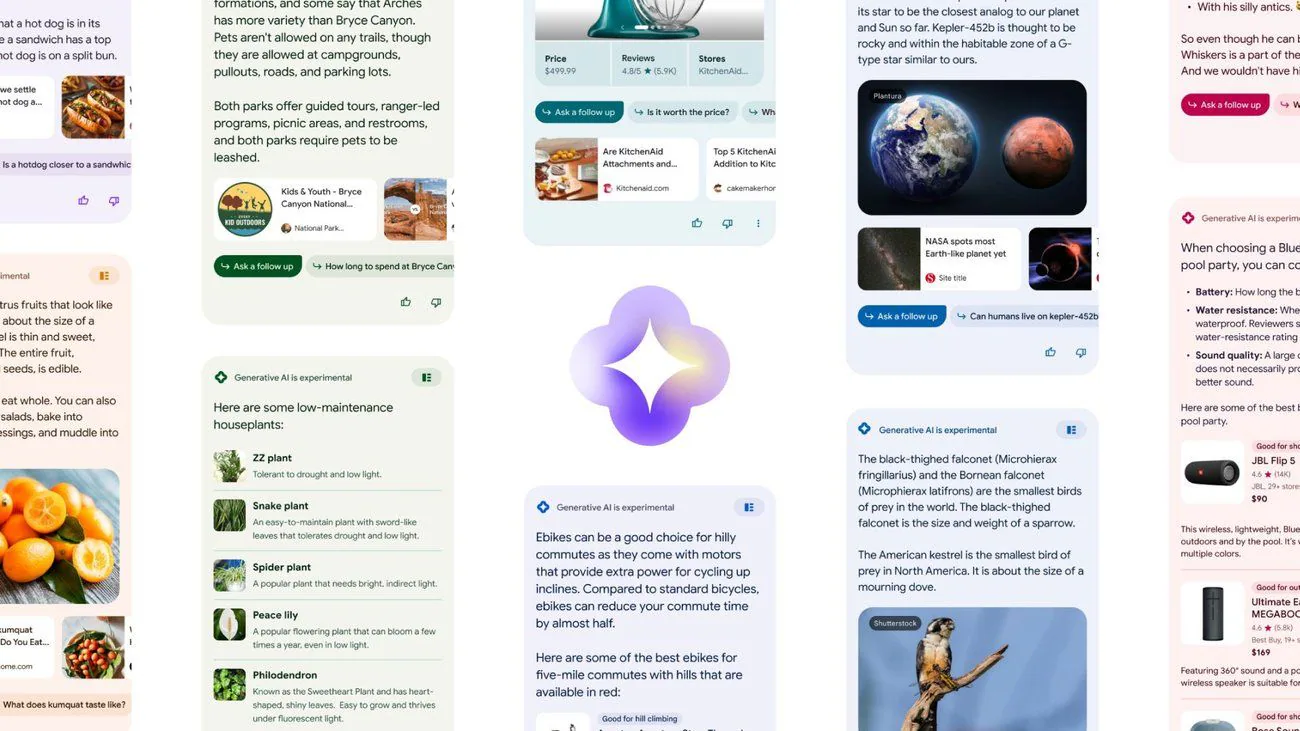
SGE uses generative AI to create summary-style answers directly within search results. Instead of showing only a list of links, Google may present an AI-generated overview that pulls insights from multiple sources.
These summaries:
- Combine information from trusted web pages
- Highlight key points quickly
- Link to supporting sources for deeper reading
While SGE does not replace traditional rankings, it changes how visibility works. Content may now contribute to AI-generated answers even if it is not the first organic result.
How SGE Changes User Behaviour
Because SGE surfaces answers immediately, users are more likely to:
- Scan summaries before clicking
- Ask more detailed, follow-up questions
- Expect clearer and more direct answers
This means content must work harder to demonstrate value beyond a surface-level explanation.
Example: For a query like “best CRM for small businesses”, SGE may summarise key features and considerations. However, users still click through to articles that offer:
- Real comparisons
- Pros and cons
- Use cases by business size or industry
This reinforces the importance of depth and specificity.
What Google Search AI Looks for in Content
Google’s AI prioritises content that is:
- Helpful and original
- Clearly structured
- Written with real users in mind
To align with this, content should:
- Answer the main question early
- Expand logically with supporting detail
- Avoid vague or overly promotional language
Practical checklist:
- Use clear headings that reflect real questions
- Include examples or explanations, not just statements
- Keep paragraphs focused and readable
At Saigon Digital, we approach content creation with clarity first, knowing that both users and AI benefit from structured thinking.
Practical SEO Actions for Search AI and SGE
To optimise for Google Search AI and SGE, businesses should adjust both content strategy and execution.
Key actions include:
- Writing comprehensive guides instead of short, isolated articles
- Covering topics holistically, not just single keywords
- Using natural language that mirrors how people search
Example: Instead of targeting “AI marketing tools” alone, create a guide that answers:
- What AI marketing tools are
- How they are used
- Who they are best suited for
- What limitations they have
This increases the likelihood of appearing in both traditional results and AI-generated summaries.
Key Takeaway for Businesses
Google Search AI and SGE reward clarity, usefulness, and authority. Rather than chasing algorithm updates, the most sustainable approach is to focus on solving real user problems with well-structured, experience-led content.
For brands that invest in quality and strategy, Search AI becomes an opportunity rather than a threat.
At Saigon Digital, we help businesses adapt their SEO strategies to evolving search technologies, ensuring visibility, relevance, and long-term growth in an AI-driven search landscape.
2. Google Gemini (formerly Bard)
Google Gemini is Google’s flagship conversational AI model, designed to support research, writing, problem-solving, and strategic thinking. Rather than functioning as a standalone chatbot, Gemini is positioned as an assistant that works across Google’s ecosystem, helping teams move faster without sacrificing quality.
For businesses, Gemini is most valuable when used thoughtfully as part of an existing workflow.
What Google Gemini Is Designed to Do
Gemini is built to understand context, generate structured responses, and assist with complex tasks. It can interpret prompts, analyse information, and provide suggestions across a wide range of topics.

Key capabilities include:
- Drafting and refining written content
- Summarising long or technical documents
- Generating ideas and outlines
- Supporting problem-solving and planning
Importantly, Gemini adapts to the way questions are asked, making it useful for exploratory and strategic tasks rather than just quick answers.
How Gemini Supports Content Creation
In content workflows, Gemini works best at the early and middle stages. It helps teams organise thoughts, explore angles, and improve clarity before final drafting.
Common use cases include:
- Creating article outlines and section ideas
- Refining tone and structure
- Simplifying complex topics for broader audiences
Example: A content team planning a guide on AI-powered marketing might use Gemini to:
- Identify key subtopics readers care about
- Suggest logical content flow
- Highlight areas that need deeper explanation
The final content, however, should always be written and reviewed by subject-matter experts to ensure originality and accuracy.
Using Gemini for Research and Insight Gathering
Gemini can significantly reduce research time by summarising information and identifying patterns across large volumes of text.
This is particularly useful for:
- Competitor analysis
- Trend exploration
- Understanding unfamiliar industries or technologies
Practical approach:
- Ask Gemini to summarise key themes or trends
- Use its output as a starting point, not a conclusion
- Cross-check important details with trusted sources
For example, when researching emerging SEO trends, Gemini can provide a high-level overview that helps shape deeper, more focused research.
Gemini as a Strategic Thinking Assistant
Beyond content, Gemini can support strategic planning by helping teams think through scenarios, challenges, and frameworks.
It can assist with:
- Campaign ideation
- Messaging refinement
- High-level planning discussions
Example: A marketing team may use Gemini to explore different messaging angles for a product launch, then evaluate each option against brand positioning and business goals.
This collaborative use of AI enhances human decision-making rather than replacing it.
Best Practices for Using Gemini Effectively
To get the most value from Gemini, it is important to provide clear instructions and context.
Effective prompts should:
- Specify the task clearly
- Include relevant background or constraints
- Define the desired format or outcome
Example prompt structure:
- “Create an outline for a blog post explaining [topic] to [audience], focusing on [goal].”
The clearer the input, the more useful the output.
How Gemini Fits Into a Smarter AI Workflow
When used correctly, Gemini becomes part of a balanced workflow that combines speed, insight, and expertise.
At Saigon Digital, we see Gemini as:
- A productivity enhancer
- A creative support tool
- A research accelerator
However, strategy, creativity, and accountability remain human-led.
Key Takeaway for Businesses
Google Gemini offers clear benefits for teams looking to work more efficiently and creatively. Its real value lies in supporting thinking, not automating it entirely.
Businesses that use Gemini thoughtfully will gain speed and clarity while maintaining quality and trust. When paired with strong strategy and human oversight, Gemini becomes a practical asset in modern digital growth.
At Saigon Digital, we help brands integrate tools like Gemini into AI-powered marketing workflows that deliver real, measurable results.
3. Google Workspace AI (Docs, Sheets, Gmail, Slides)
Google Workspace AI brings artificial intelligence directly into the tools teams use every day. Rather than introducing entirely new platforms, Google has embedded AI into Docs, Sheets, Gmail, and Slides to improve productivity, clarity, and decision-making.
For businesses, this means less time spent on administration and more time focused on strategy and growth.
How Google Workspace AI Works in Practice
Workspace AI is designed to assist users in real time. It observes patterns, understands context, and offers suggestions that help complete tasks more efficiently.
Across Workspace, AI supports:
- Writing and editing content
- Analysing and summarising data
- Organising communication
- Creating clear, structured presentations
Because these tools are already familiar to most teams, adoption is often seamless.
Google Docs: Writing, Editing, and Structuring Content Faster
In Google Docs, AI assists with drafting, rewriting, and refining text. It helps improve clarity while maintaining a natural tone.
Key features include:
- Smart writing suggestions
- Grammar and clarity improvements
- Content summarisation and restructuring
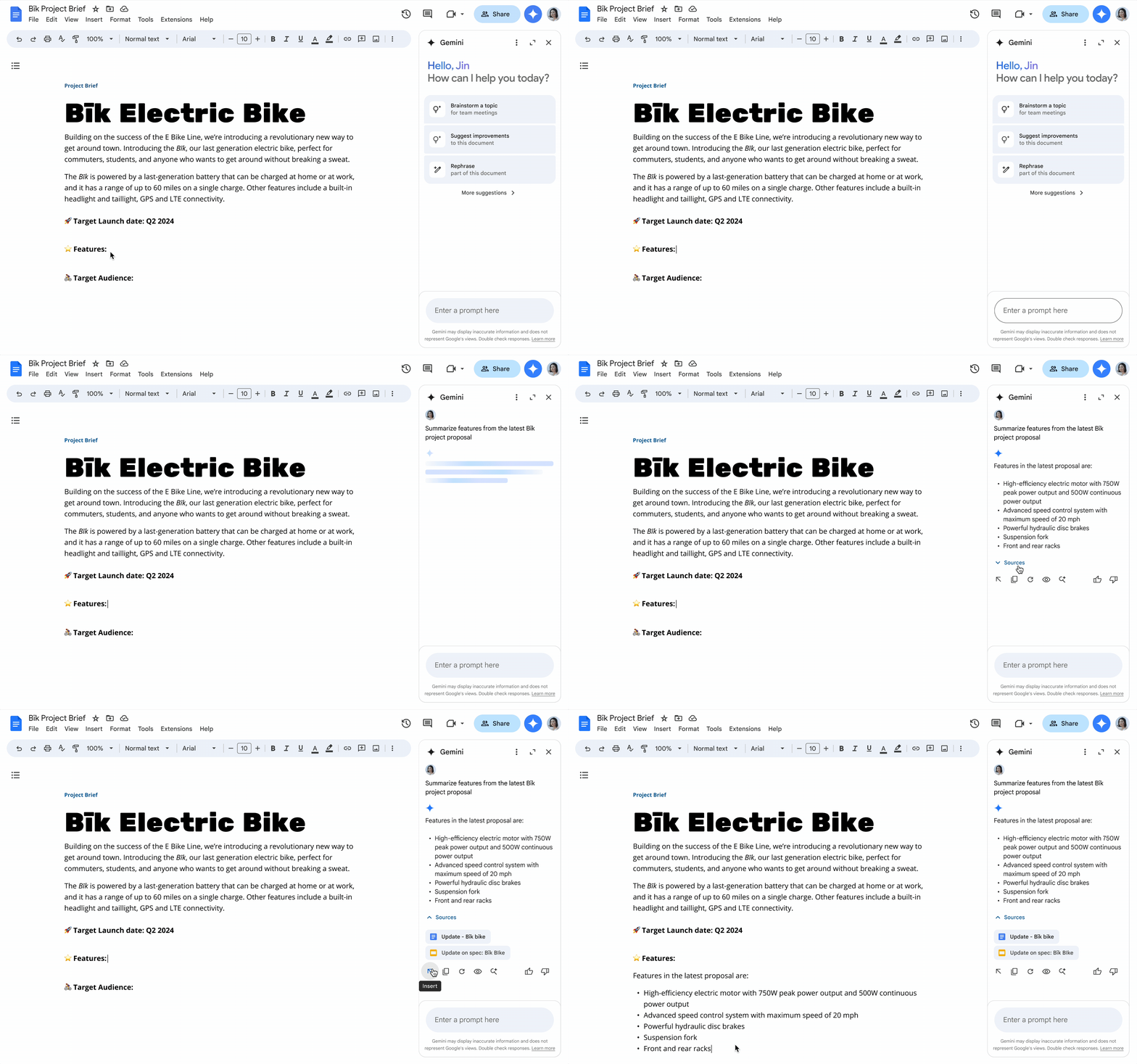
Example: When drafting a long-form article or proposal, AI can help rephrase complex sentences, suggest clearer wording, or summarise sections for executive review.
Best practice: Use AI suggestions as a guide, then refine the content to reflect brand voice and expertise. At Saigon Digital, we always ensure human review to maintain originality and strategic intent.
Google Sheets: Turning Data Into Actionable Insights
Google Sheets uses AI to make data analysis more accessible, even for non-technical users.
AI-powered capabilities include:
- Automatically identifying trends and anomalies
- Suggesting insights based on data patterns
- Helping create formulas using natural language
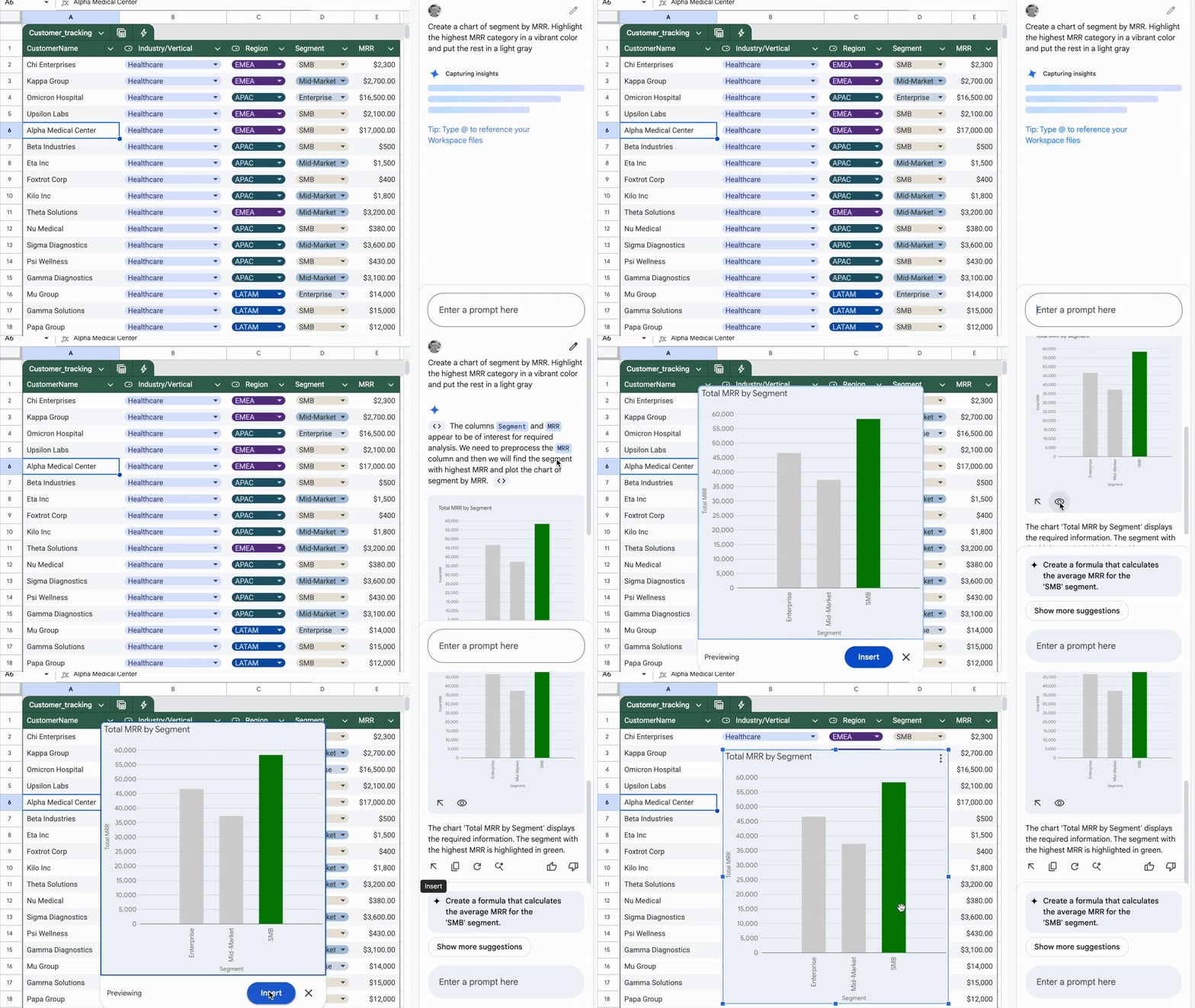
Example: A marketing team reviewing campaign performance can ask Sheets to highlight trends in conversion rates or identify underperforming channels without building complex formulas.
This allows teams to move from raw data to insight more quickly.
Gmail: Smarter, More Efficient Communication
Gmail’s AI features help teams manage communication at scale while maintaining clarity and professionalism.
AI supports:
- Drafting and refining email responses
- Adjusting tone for different audiences
- Summarising long email threads
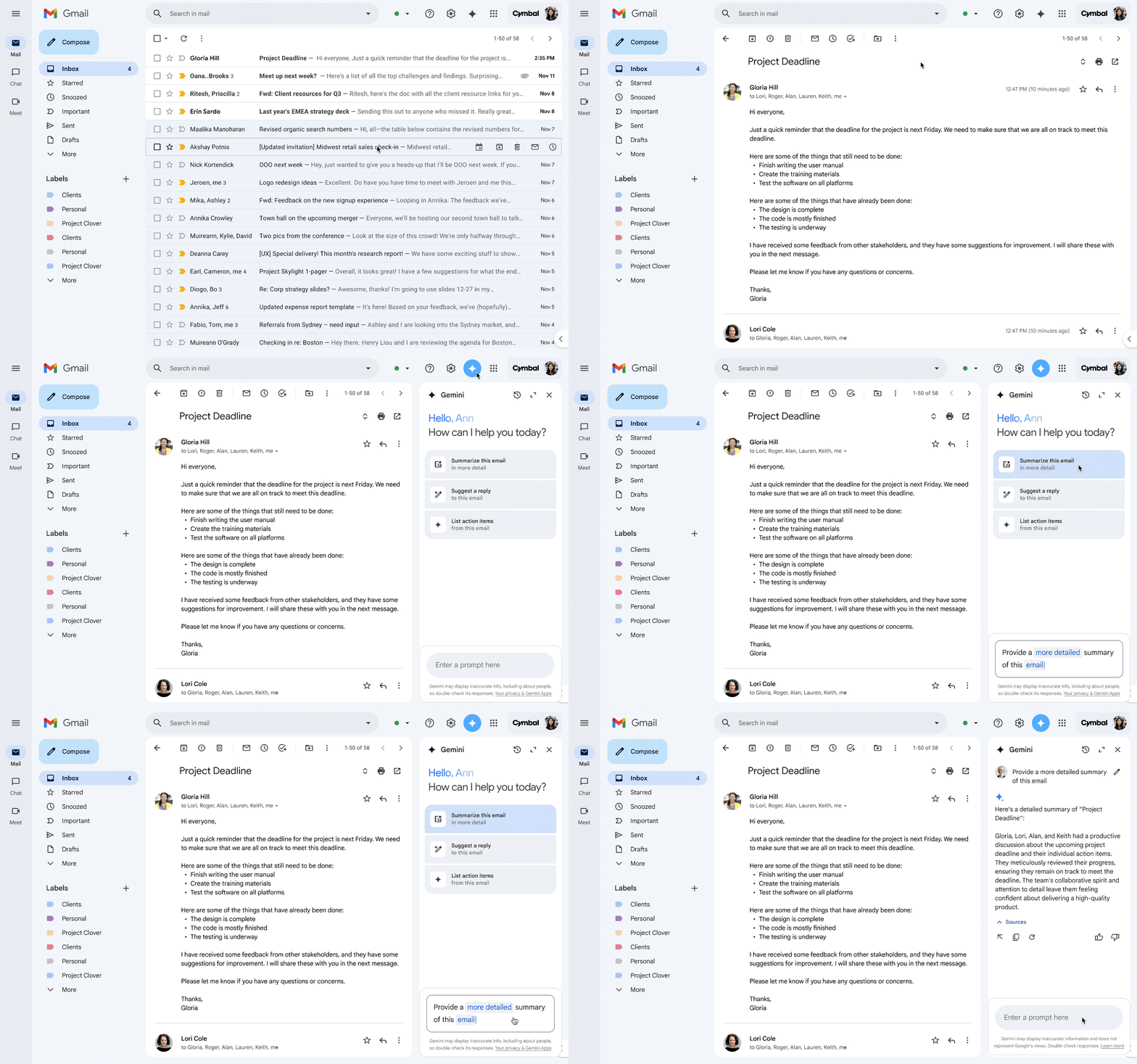
Example: When responding to client queries, AI can suggest polite, clear replies that save time while maintaining professionalism. Teams can then personalise messages as needed.
This reduces inbox fatigue without sacrificing quality.
Google Slides: Creating Clear and Impactful Presentations
Google Slides uses AI to assist with content structure and visual clarity.
AI features include:
- Suggesting slide layouts and structure
- Helping summarise content into key points
- Improving flow and readability
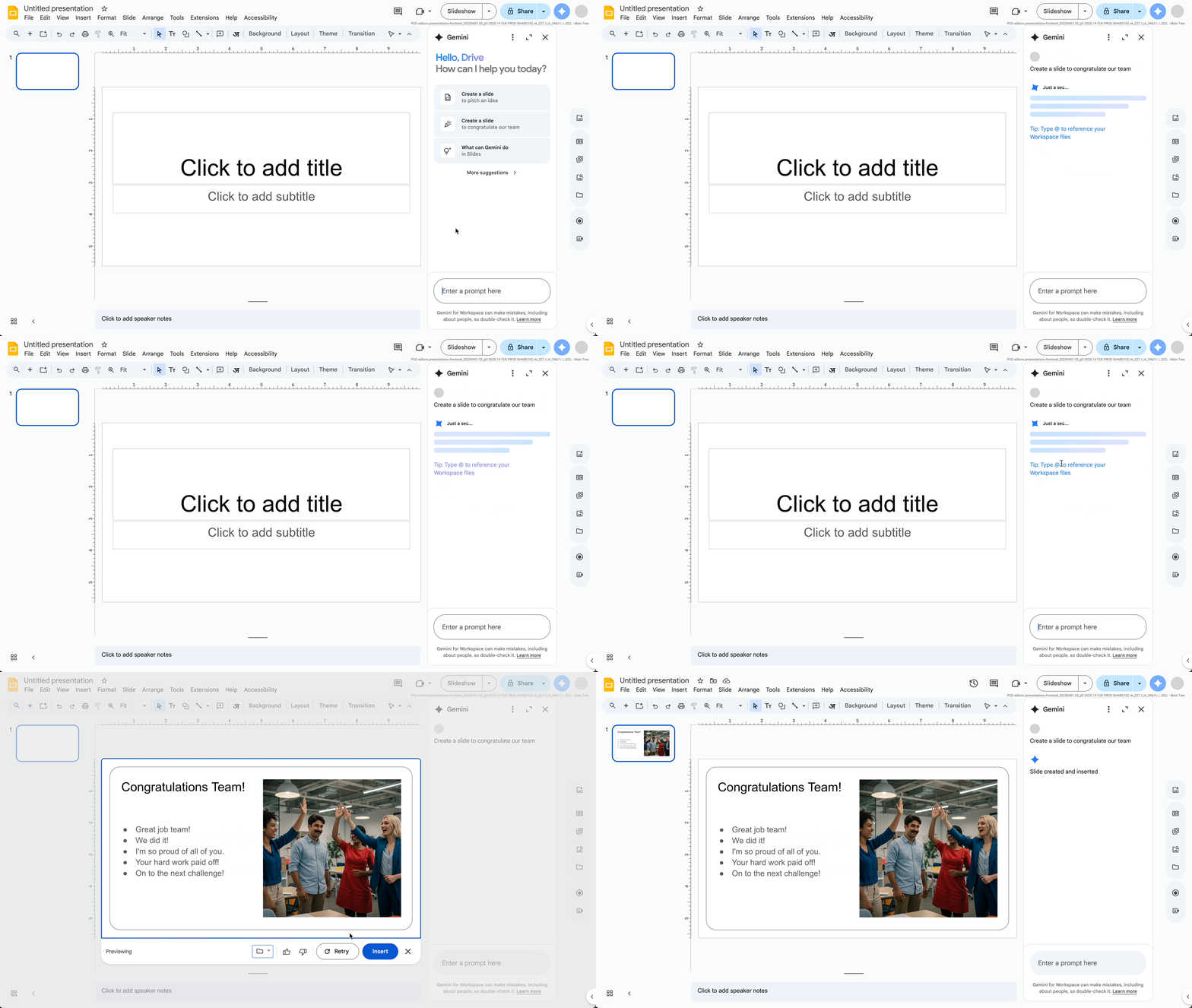
Example: When preparing a strategy presentation, AI can help turn detailed notes into concise slides that communicate key messages clearly to stakeholders.
This ensures presentations remain focused and effective.
How Workspace AI Supports Collaboration
Beyond individual productivity, Workspace AI improves collaboration by:
- Making shared documents clearer and more consistent
- Helping teams understand data faster
- Reducing miscommunication across emails and presentations
Because AI suggestions appear directly within shared files, teams stay aligned without additional tools or platforms.
Best Practices for Using Workspace AI Effectively
To maximise value, teams should use Workspace AI intentionally.
Recommended approach:
- Use AI for first drafts, summaries, and insights
- Apply human review for accuracy, tone, and strategy
- Establish guidelines for when and how AI is used
What to avoid:
- Accepting AI suggestions without review
- Using AI to replace critical thinking
- Ignoring brand voice and messaging consistency
Key Takeaway for Businesses
Google Workspace AI enhances everyday work by reducing friction, improving clarity, and speeding up routine tasks. When used properly, it supports smarter collaboration and better decision-making.
For growing businesses, this translates into efficiency without compromise.
At Saigon Digital, we help teams integrate Workspace AI into user-centric workflows that support performance, productivity, and long-term digital growth.
4. Google Analytics 4 (GA4) AI Insights
Google Analytics 4 represents a significant shift from traditional analytics. Rather than focusing solely on historical reporting, GA4 uses artificial intelligence and machine learning to help businesses understand behaviour, anticipate outcomes, and act more confidently on data.
For growth-focused teams, GA4 turns analytics into a strategic decision-making tool rather than a passive reporting platform.
How GA4 Uses AI and Machine Learning
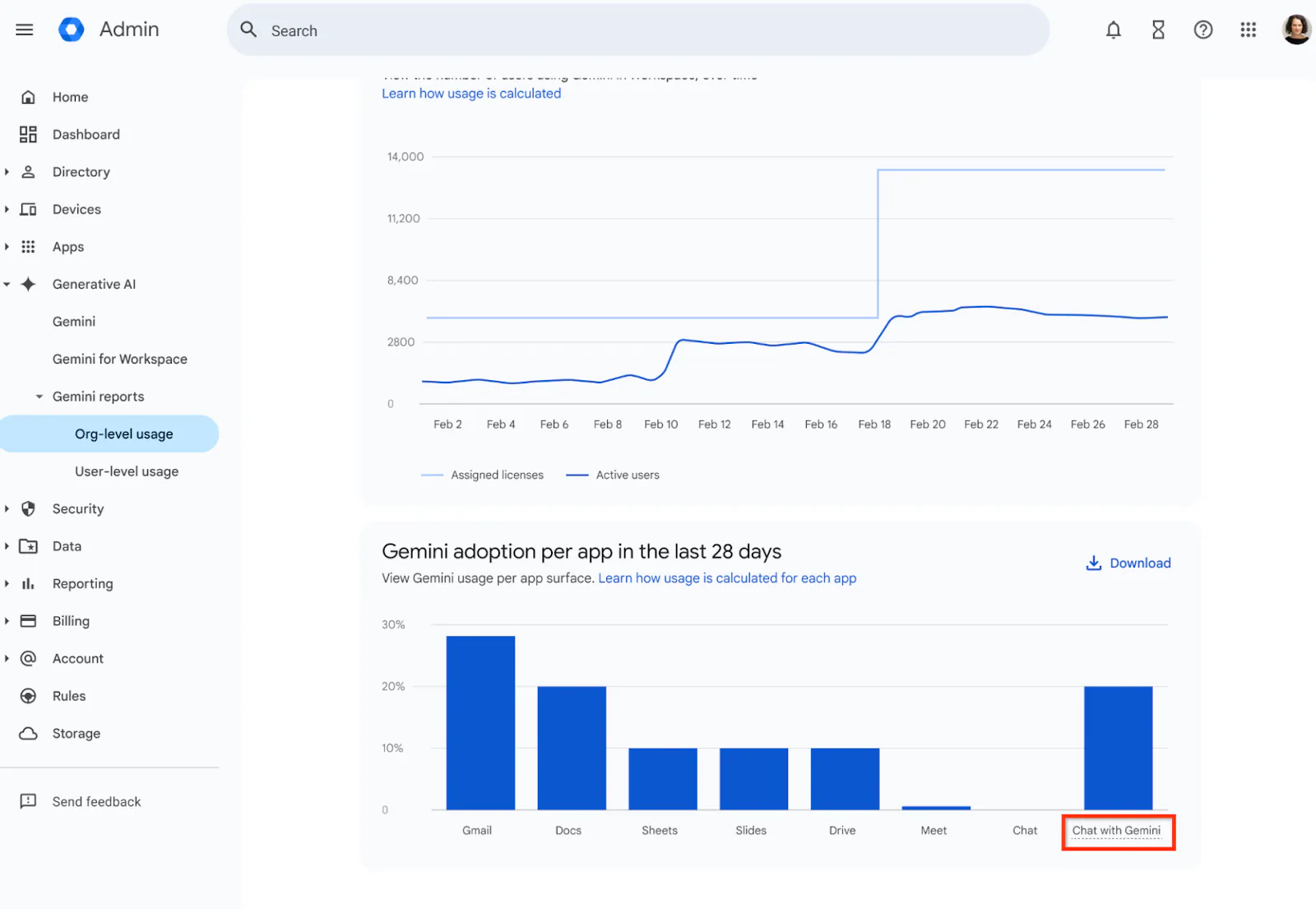
GA4 relies on machine learning models to interpret large volumes of user data and identify meaningful patterns. This allows it to surface insights that may otherwise go unnoticed.
GA4’s AI helps by:
- Detecting unusual changes in performance
- Filling data gaps caused by consent restrictions
- Predicting future user behaviour
As a result, teams spend less time searching for issues and more time responding to them.
Predictive Metrics: Understanding What Happens Next
One of GA4’s most powerful AI-driven features is predictive metrics. These metrics estimate the likelihood of future actions based on past behaviour.
Common predictive metrics include:
- Purchase probability
- Churn probability
- Predicted revenue
Example: An eCommerce brand can identify users with a high likelihood of purchasing in the next seven days and prioritise them in remarketing campaigns.
This shifts analytics from reactive reporting to proactive optimisation.
Automated Insights and Anomaly Detection
GA4 automatically flags significant changes in data, such as sudden drops or spikes in traffic, conversions, or engagement.
These insights:
- Appear directly within the GA4 interface
- Highlight potential causes
- Reduce the need for manual data checks
Example: If conversions drop unexpectedly, GA4 may alert you and indicate that traffic from a specific channel has declined, allowing faster investigation and response.
This capability is especially valuable for lean teams managing multiple channels.
Using GA4 AI Insights to Improve Marketing Performance
GA4’s AI insights are most effective when integrated into marketing workflows.
Practical applications include:
- Identifying high-value audiences for paid campaigns
- Optimising conversion paths based on behaviour patterns
- Evaluating content performance beyond pageviews
Example: A content team can use GA4 to see which articles contribute to conversions later in the journey, even if they are not the final touchpoint.
This supports smarter investment in content and channels.
Best Practices for Getting Accurate AI Insights from GA4
To ensure GA4’s AI delivers reliable insights, proper setup is essential.
Key actions include:
- Configuring events and conversions correctly
- Ensuring consistent data collection across platforms
- Allowing enough data volume for modelling
What to avoid:
- Relying on default settings without review
- Ignoring consent configuration
- Making decisions based on small or incomplete datasets
At Saigon Digital, we treat GA4 implementation as a strategic foundation, not a technical afterthought.
How GA4 Supports Long-Term Growth Strategy
GA4 is not just a reporting tool. It supports long-term planning by helping teams understand how users behave across devices, channels, and time.
By combining predictive insights with behavioural analysis, businesses can:
- Allocate budgets more effectively
- Improve user experience
- Measure growth more accurately
Key Takeaway for Businesses
GA4 AI insights help businesses move from hindsight to foresight. When used correctly, they provide clarity, direction, and confidence in decision-making.
For brands focused on sustainable digital growth, GA4 becomes a critical intelligence layer.
At Saigon Digital, we help businesses unlock the full value of GA4 by combining AI-driven insights with strategy, creativity, and user-centric thinking.
5. Google Ads AI and Performance Max
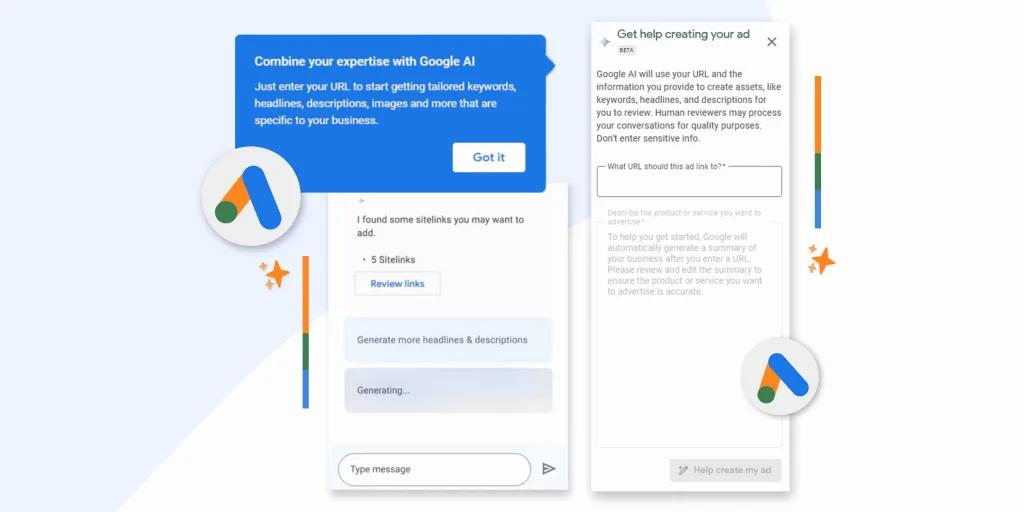
Google Ads has evolved into an AI-driven advertising platform. With the introduction of Performance Max, Google now uses machine learning to manage bidding, targeting, placements, and creative optimisation across its entire inventory.
For businesses, this shift offers scale and efficiency, but only when campaigns are built on strong strategy and clear objectives.
How Google Ads AI Works Behind the Scenes
Google Ads AI processes vast amounts of real-time data to optimise ad delivery. It evaluates signals such as user intent, device, location, time of day, and past behaviour to determine when and where ads should appear.
AI-driven optimisation covers:
- Automated bidding
- Audience targeting and expansion
- Creative combinations and placements
This allows campaigns to adapt dynamically rather than relying on static rules.
What Is Performance Max?
Performance Max is a goal-based campaign type that runs across all Google channels, including:
- Search
- Display
- YouTube
- Discover
- Gmail
- Maps
Instead of managing each channel separately, advertisers provide inputs and objectives, and Google’s AI determines the optimal mix.
Key inputs include:
- Conversion goals
- Creative assets (text, images, video)
- Audience signals
- Budget and bidding strategy
Performance Max then continuously tests and learns to improve results.
How Performance Max Changes Campaign Management
Traditional campaign management often involved granular control over keywords, placements, and bids. Performance Max shifts the focus from control to guidance.
Advertisers now:
- Define goals and guardrails
- Supply high-quality creative assets
- Analyse performance trends rather than individual placements
Example: An eCommerce brand running a Performance Max campaign focuses on revenue and ROAS. Google’s AI automatically prioritises placements and audiences most likely to convert, adjusting in real time.
This frees teams to focus on strategy rather than constant optimisation.
Using AI Bidding Effectively
Automated bidding is a core component of Google Ads AI. Strategies such as Maximise Conversions or Target ROAS rely on machine learning to predict conversion likelihood.
Best practices for AI bidding:
- Ensure accurate conversion tracking
- Choose bidding strategies aligned with business goals
- Allow sufficient learning time before making changes
Example: Switching to Target CPA without stable conversion data often leads to poor performance. AI bidding works best when given clear signals and time to learn.
Audience Signals: Guiding the AI Without Restricting It
Audience signals help Google Ads AI understand who is most relevant, without limiting reach.
Useful audience signals include:
- Website visitors
- Customer lists
- In-market or interest-based audiences
These signals accelerate learning but still allow AI to explore new opportunities.
Best practice: Use audience signals as guidance, not targeting constraints.
Measuring and Interpreting Performance Max Results
Because Performance Max consolidates channels, measurement requires a shift in mindset.
Focus on:
- Conversion quality, not just volume
- Incremental performance over time
- Alignment with broader marketing goals
Avoid overreacting to short-term fluctuations, especially during learning phases.
Key Takeaway for Businesses
Google Ads AI and Performance Max offer powerful opportunities to scale advertising efficiently. However, success depends on strong foundations, clear goals, and thoughtful guidance.
When strategy, data, and creative work together, AI becomes a growth accelerator rather than a black box.
At Saigon Digital, we help businesses harness Google Ads AI with structured strategies, robust tracking, and performance-focused creative to deliver measurable results.
6. Google Cloud AI and Vertex AI
Google Cloud AI and Vertex AI sit at the enterprise end of Google’s AI ecosystem. While other Google AI tools focus on productivity and marketing performance, these platforms enable businesses to build, train, and deploy custom AI solutions at scale.
For organisations ready to embed AI deeply into their operations or digital products, Google Cloud AI offers both flexibility and power.
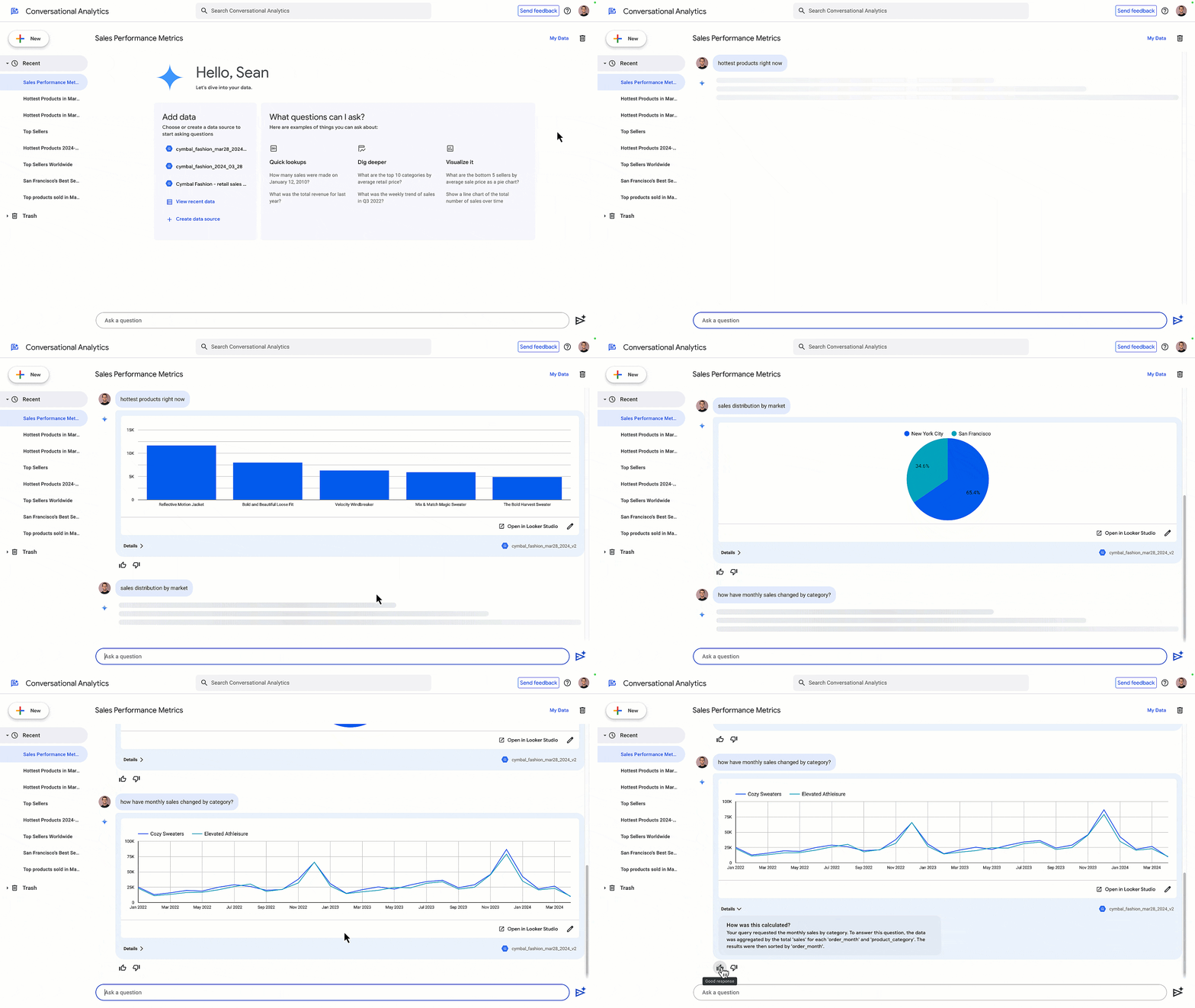
What Google Cloud AI and Vertex AI Are
Google Cloud AI provides a suite of machine learning and AI services, while Vertex AI acts as a unified platform that brings these capabilities together.
Vertex AI allows businesses to:
- Build custom machine learning models
- Use pre-trained models for common tasks
- Deploy and manage models securely
- Scale AI applications efficiently
This makes advanced AI accessible without requiring teams to build everything from scratch.
Key Capabilities of Vertex AI
Vertex AI supports the full machine learning lifecycle, from data preparation to deployment and monitoring.
Core capabilities include:
- Model training and evaluation
- Natural language processing and computer vision
- Predictive analytics and forecasting
- Model monitoring and performance optimisation
These tools are designed for flexibility, allowing teams to adapt AI solutions to specific business needs.
Common Business Use Cases
Google Cloud AI and Vertex AI are particularly valuable for businesses with complex data or high-volume processes.
Common use cases include:
- Demand forecasting and inventory planning
- Personalisation engines for websites or apps
- Customer sentiment analysis
- Fraud detection and risk modelling
Example: A retail brand can use Vertex AI to analyse historical sales data and predict future demand, helping optimise stock levels and reduce waste.
Integrating AI Into Products and Platforms
Unlike off-the-shelf AI tools, Vertex AI allows businesses to embed intelligence directly into their digital products.
This enables:
- Smarter recommendations
- Dynamic pricing models
- Personalised user experiences
Example: An eCommerce platform may use AI models to recommend products based on browsing behaviour, purchase history, and real-time signals.
This creates more relevant and engaging experiences for users.
When Vertex AI Makes Sense for Your Business
Vertex AI is not designed for every organisation. It is best suited to businesses that:
- Have large or complex datasets
- Require custom AI solutions
- Are ready to invest in long-term AI capability
Smaller teams may benefit more from Google’s built-in AI tools before moving into custom development.
Best Practices for Getting Started
For organisations considering Google Cloud AI, a phased approach works best.
Recommended steps:
- Start with a clear business problem
- Pilot AI on a single use case
- Measure impact before scaling
- Involve both technical and strategic stakeholders
This reduces risk while building internal confidence.
Key Takeaway for Businesses
Google Cloud AI and Vertex AI enable businesses to move beyond automation and into true AI-driven innovation. When implemented thoughtfully, they support smarter decisions, better products, and scalable growth.
At Saigon Digital, we help organisations identify where advanced AI adds real value, design practical use cases, and integrate AI solutions that align with long-term digital strategy and business goals.
Google AI Tools for SEO and Content Strategy
Google AI tools are reshaping how SEO and content strategy work together. Rather than focusing on surface-level optimisation, Google’s AI-driven systems now reward relevance, depth, and genuine usefulness. To succeed, businesses must understand how AI influences content discovery, evaluation, and performance.
Below, we break down the key areas that matter most and explain how to approach each one effectively.
1. AI Prioritises Helpful, Original, and Experience-Led Content
Google’s AI systems are designed to surface content that genuinely helps users, not content created purely to rank. This means originality, expertise, and real-world insight are no longer optional.
AI evaluates:
- Whether content answers the user’s question clearly
- If it demonstrates first-hand knowledge or experience
- How well it adds value beyond what already exists

For example, a generic article listing “SEO tips” without context or practical guidance is unlikely to perform well. In contrast, a guide that explains why each tactic works, when to apply it, and what results to expect signals higher quality to Google’s AI.
How to apply this in practice:
- Write from experience wherever possible
- Include examples, data, or observations from real projects
- Avoid rewording existing content without adding insight
At Saigon Digital, we focus on experience-led content that reflects how strategies work in the real world, not just in theory.
2. Search Rewards Clarity, Structure, and Topical Authority
Google AI does not read content the way humans do. It analyses structure, context, and relationships between topics to determine authority.
Well-structured content helps AI systems understand:
- What the page is about
- Which questions it answers
- How it relates to broader topics
Clear structure also improves user experience, which indirectly supports SEO performance.
Best practices include:
- Using logical headings (H2s and H3s) to break down topics
- Grouping related ideas into clear sections
- Covering a topic comprehensively rather than superficially
Example: Instead of publishing multiple short articles targeting similar keywords, create one in-depth resource that addresses the topic from multiple angles. This builds topical authority and reduces keyword cannibalisation.
In short, structure is not just for readability. It is a signal of quality and relevance.
3. User Engagement Signals Matter More Than Ever
Google AI systems increasingly rely on behavioural signals to assess content quality. These include how users interact with a page, not just whether they click on it.
Key engagement indicators include:
- Time spent on page
- Scroll depth
- Interaction with internal links
- Return visits

If users land on a page and leave quickly, AI may interpret this as a mismatch between intent and content.
To improve engagement:
- Address the main question early in the content
- Use clear introductions and summaries
- Guide readers with internal links to related content
Example: A blog post about technical SEO can include links to deeper guides on site speed, indexing, or structured data. This encourages exploration and signals relevance.
Ultimately, engaging content benefits both users and AI-driven rankings.
4. Use AI Tools for Research and Ideation, Not Final Output
Google AI tools, including Gemini, are highly effective for research and ideation. However, relying on them to generate final content often leads to generic and unoriginal output.
AI works best when it supports human thinking rather than replaces it.
Recommended uses include:
- Identifying common questions around a topic
- Structuring content outlines
- Summarising complex information quickly
What to avoid:
- Publishing AI-generated content without editing
- Using AI text as a shortcut to expertise
- Producing large volumes of similar content
Example: Use Gemini to brainstorm content angles for a guide on eCommerce SEO, then refine each section using your own insights, data, and experience.
This approach keeps content original, valuable, and aligned with Google’s quality expectations.
5. Structure Content to Answer Questions Clearly
Google AI increasingly focuses on question-based search and conversational queries. Content that directly answers specific questions performs better across both traditional and AI-enhanced search results.
To do this effectively:
- Identify key questions users are asking
- Answer them clearly and concisely
- Expand with supporting detail where necessary
Practical tips:
- Use question-based subheadings
- Include short, direct answers before deeper explanations
- Avoid burying answers under unnecessary filler
Example: Instead of a vague heading like “SEO Tools”, use “Which Google AI Tools Help Improve SEO Performance?” followed by a clear, structured answer.
This format improves readability while helping AI understand relevance.
6. Align Content with Real User Needs and Intent
Perhaps the most important principle is alignment with user intent. Google AI is highly effective at identifying whether content matches what users are actually looking for.
User intent typically falls into categories such as:
- Informational (learning something)
- Navigational (finding a specific resource)
- Commercial (comparing options)
- Transactional (ready to take action)
To align content properly:
- Analyse search queries and SERP features
- Match content format to intent (guide, comparison, checklist)
- Remove unnecessary sections that do not serve the user
Example: If users search for “Google AI tools for marketing”, they likely want explanations and use cases, not a sales pitch or overly technical documentation.
At Saigon Digital, we prioritise intent-first SEO strategies that serve users while driving sustainable growth.
Responsible and Effective Use of Google AI Tools
AI works best when guided by human expertise. Over-reliance leads to generic output and poor performance.
Best practices include:
- Always apply human review and strategic oversight
- Use AI to augment, not replace, creativity and insight
- Focus on user value rather than automation for its own sake
Google itself emphasises responsible AI use, particularly around data privacy, transparency, and accuracy.
How Saigon Digital Helps Brands Use Google AI Tools
Google AI tools are powerful, but they are most effective when aligned with a clear digital strategy.
At Saigon Digital, we help ambitious brands:
- Integrate AI into SEO and marketing workflows
- Use data and automation to drive measurable growth
- Balance innovation with user-centric design and strategy
From AI-enhanced SEO to automation and analytics, our approach focuses on real-world results, not trends.
Start Using Google AI Tools to Drive Smarter Digital Growth
Google AI tools are transforming how digital growth happens. From search and advertising to analytics and content, they offer opportunities for businesses willing to adapt and invest thoughtfully.
The key is not to chase every new feature, but to understand how each tool fits into your wider strategy.
When used with purpose, Google AI tools can help you move faster, work smarter, and build digital experiences that truly perform.
If you are ready to explore how AI can support your growth strategy, Saigon Digital is here to help.
Get in touch with us today!
Want to be the brand AI engines recommend?
We make businesses visible on Google and inside AI answers, measured in leads, not vanity metrics.