User experience plays a pivotal role in the success of any website. One of the key factors influencing user experience is site performance. Slow-loading pages can drive visitors away, impacting not only user satisfaction but also search engine rankings.
Using site audit to boost your website performance means systematically checking your site's speed, technical health, SEO, content and user experience, then fixing the issues that hold it back. This guide explains what a site audit covers, how to run one step by step, which tools to use, how often to audit, and how to prioritise fixes so they deliver measurable results.
Key Takeaways
- A site audit is a structured health check of your website's performance, technical SEO, content, user experience, security and conversion paths.
- Speed affects revenue. A Google-commissioned Deloitte study found a 0.1-second improvement in mobile site speed lifted retail conversions by 8.4% and travel conversions by 10.1%.
- Core Web Vitals targets are an LCP of 2.5 seconds or less, an INP of 200 milliseconds or less and a CLS of 0.1 or less, measured at the 75th percentile of real users.
- Google says good page experience helps, but relevance still comes first, so audits should cover content and SEO, not just speed scores.
- Most sites benefit from a full audit once or twice a year, plus monthly monitoring and checks after any redesign or migration.
- The value of an audit comes from prioritising fixes by impact and effort, then measuring the results.
What Is a Site Audit?
A site audit is a structured review of how well your website works for users, search engines and your business goals. It identifies issues that slow your site down, block search engines, confuse visitors or reduce conversions, and turns them into a prioritised action plan.
Unlike a one-off speed test, a full site audit looks at the whole website: every important template, page type and user journey.
Why Does Website Performance Matter?
Because of user experience. Users expect websites to load quickly and seamlessly. A slow site can lead to frustration and high bounce rates.
The commercial impact is measurable. In the Milliseconds Make Millions study, run by Deloitte and 55 for Google across 37 brands and more than 30 million sessions, a 0.1-second improvement in mobile speed increased:
- Retail conversions by 8.4% and average spend by 9.2%
- Travel conversions by 10.1%
- Lead generation progress to form submission pages by 21.6%
Performance also matters for search. Core Web Vitals are used by Google's ranking systems, but Google is clear that it always seeks to show the most relevant content, even when page experience is weaker. Fast pages help most when many results are equally relevant, so treat speed as one part of a wider audit.
Types of Site Audit
| Audit type | What it checks | Why it matters |
|---|---|---|
| Performance audit | Core Web Vitals, page weight, scripts, images, server response time | Faster pages improve experience and conversions |
| Technical SEO audit | Crawlability, indexation, redirects, canonical tags, sitemaps, robots.txt | Search engines must be able to find and understand your pages |
| On-page SEO audit | Titles, meta descriptions, headings, internal links, structured data | Clear signals help pages rank for the right queries |
| Content audit | Quality, accuracy, duplication, gaps, outdated pages | Helpful, current content earns rankings and trust |
| UX and accessibility audit | Navigation, mobile usability, readability, accessibility | Visitors can find what they need and complete tasks |
| Security audit | HTTPS, plugins, software updates, vulnerabilities | Protects users, data and your reputation |
| Conversion audit | Forms, calls to action, checkout and enquiry journeys | Turns traffic into leads and sales |
| AI search readiness | AI crawler access, structure, entity and schema signals | Helps your content get cited in AI-generated answers |
How to Use a Site Audit to Boost Your Website Performance: Step by Step
Step 1: Set Goals and Benchmarks
Start with what the audit should improve: faster key pages, more organic traffic, more enquiries or a smoother checkout. Record current figures for traffic, conversions, rankings and Core Web Vitals so you can measure progress. Our guide to SEO reports covers which metrics to track.
Step 2: Crawl the Website
Use a crawler such as Screaming Frog, Sitebulb or Semrush Site Audit to map every URL and surface broken links, redirect chains, missing tags, duplicate pages and orphan pages. On larger sites, check how efficiently search engines spend their crawl budget, and use log file analysis to see what Googlebot actually requests.
Step 3: Check Indexation in Google Search Console
Review the Page indexing report for pages that are excluded, blocked or marked noindex by mistake. Make sure only one version of your domain is indexed (https and either www or non-www), and that duplicate URLs created by URL parameters are handled with canonical tags.
Step 4: Measure Performance and Core Web Vitals
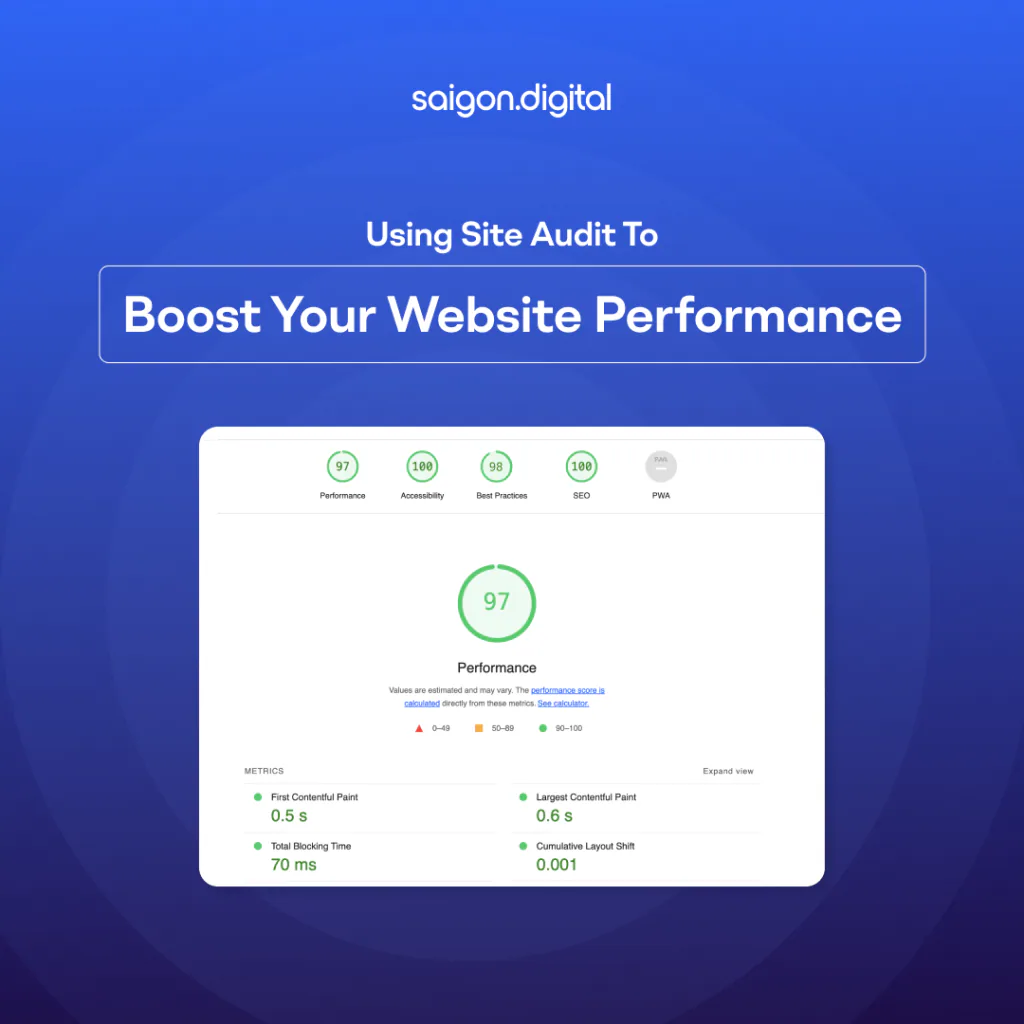
Check field data first, because Core Web Vitals are based on real users. Use the Core Web Vitals report in Search Console and PageSpeed Insights, which shows Chrome User Experience Report data. Then use Google Lighthouse to diagnose problems. Lighthouse cannot measure INP, so use Total Blocking Time as its lab proxy. Our Core Web Vitals guide explains each metric.
| Metric | What it measures | Good threshold |
|---|---|---|
| Largest Contentful Paint (LCP) | How quickly the main content loads | 2.5 seconds or less |
| Interaction to Next Paint (INP) | How quickly the page responds to user input | 200 milliseconds or less |
| Cumulative Layout Shift (CLS) | How visually stable the page is | 0.1 or less |
Also note Time to First Byte (TTFB) and First Contentful Paint (FCP). They are not Core Web Vitals, but they help diagnose slow servers and slow initial rendering.
Step 5: Review On-Page SEO and Site Structure
Check that each important page has a unique title, a clear H1, a helpful meta description and accurate schema markup. Review your website architecture and internal linking so key pages are no more than a few clicks from the homepage, supported by breadcrumb navigation where helpful.
Step 6: Audit Content Quality
Identify thin, outdated, duplicate or overlapping pages, and decide whether to update, merge, redirect or remove them. Compare your coverage with competitors to find content gaps, and plan refreshes using an SEO content lifecycle.
Step 7: Test Mobile, UX and Accessibility
Test key journeys on real phones. Look for small tap targets, intrusive pop-ups, hard-to-read text and confusing navigation. Our guides to mobile SEO and UX and SEO cover what to look for.
Step 8: Check Security
Confirm HTTPS is enforced site-wide, software and plugins are up to date, and there are no security warnings in Search Console. See our guide to website security.
Step 9: Review Conversion Paths
Walk through your main enquiry, booking or checkout journeys. Note slow steps, unclear calls to action and form friction, then test improvements with CRO testing.
Step 10: Check AI Search Readiness
Make sure AI search crawlers can access important pages, key content is available in the HTML, and pages are structured so answers are easy to extract. Our guides on managing AI crawlers and site architecture for AI explain the essentials.
How to Prioritise Your Audit Findings
An audit often produces hundreds of issues. Not all of them matter. Score each finding by impact and effort, and fix them in this order:
| Priority | Type of issue | Examples |
|---|---|---|
| High impact, low effort | Accidental noindex tags, blocked resources, broken key pages, missing redirects |
| High impact, high effort | Template speed improvements, site structure changes, major content consolidation |
| Low impact, low effort | Missing alt text, duplicate titles on minor pages, small internal link fixes |
| Low impact, high effort | Chasing a perfect Lighthouse score on low-traffic pages |
Google itself notes that chasing a perfect score purely for SEO may not be the best use of your time. Focus on templates and pages that drive traffic and revenue. An SEO roadmap helps turn priorities into a schedule.
Practical Ways to Improve Website Performance
Common fixes that audits uncover include:
- Compress and resize images, and serve modern formats such as WebP or AVIF
- Lazy-load images and videos below the fold
- Remove or defer unused JavaScript and third-party scripts
- Reserve space for images, ads and embeds to prevent layout shifts
- Use a content delivery network (CDN) and caching
- Improve server response times with better hosting
- Preload the main hero image or font that affects LCP
Our Solution
Embarking on a journey to enhance website speed, we employ a strategic approach that seamlessly integrates techniques and optimisation methodologies. Here are a few methods that we typically employ with NextJS.
- Server-Side Rendering (SSR): SSR in Next.js enables the server to render pages and send fully-rendered HTML to the client. This not only improves initial page load performance but also enhances search engine optimisation (SEO) by providing search engines with pre-rendered content.
- Static Site Generation: Next.js Static Generation is a powerful feature that allows you to pre-render pages during the build process, resulting in static HTML files that can be served directly to users.
- Built-in CDN Support: Next.js leverages automatic CDN support for static assets, such as images, when served from the public directory. During the build process, these assets are optimised and automatically deployed to a CDN for efficient delivery to users worldwide.
- Optimise Images: Next.js provides powerful image optimisation features that help enhance website performance. The built-in next/image component, combined with automatic optimisation, simplifies the process of delivering efficient and responsive images.
Server-rendered and static HTML also makes key content easier for AI crawlers to read, since many do not execute JavaScript.
Site Audit Tools
| Tool | Best for | Cost |
|---|---|---|
| Google Search Console | Indexation, Core Web Vitals field data, security issues, search performance | Free |
| PageSpeed Insights | Real-user and lab performance data for individual URLs | Free |
| Google Lighthouse | Lab diagnostics for performance, accessibility, SEO and best practices | Free |
| Google Analytics 4 | Engagement, conversions and user journeys | Free |
| Screaming Frog SEO Spider | Full technical crawls and log analysis | Free and paid versions |
| Semrush or Ahrefs Site Audit | Automated crawls, issue tracking and monitoring | Paid |
| Sitebulb | Visual technical audits with prioritised hints | Paid |
AI-powered tools can speed up analysis and prioritisation. See our guides to running an AI SEO audit and the best AI auditor tools.
How Often Should You Audit Your Website?
| Audit type | Recommended frequency |
|---|---|
| Full site audit | Every 6 to 12 months |
| Performance and Core Web Vitals monitoring | Monthly |
| Search Console checks | Weekly or monthly |
| Content review | Quarterly for key pages |
| After a redesign, replatform or migration | Before and immediately after launch |
Regular audits catch problems before they cost traffic. Our SEO maintenance checklist covers the ongoing checks between full audits.
Site Audit Checklist
- Goals and baseline metrics recorded
- Full crawl completed and errors exported
- Indexation issues and duplicates resolved
- Core Web Vitals reviewed using field data
- Titles, headings, meta descriptions and schema checked
- Internal links and site structure reviewed
- Thin, outdated and overlapping content identified
- Mobile, UX and accessibility tested
- HTTPS and security confirmed
- Conversion journeys tested
- AI crawler access and structure checked
- Fixes prioritised by impact and effort
How to Measure the Impact of Your Site Audit
Re-measure the same metrics you benchmarked in step 1, four to twelve weeks after fixes go live. Look at Core Web Vitals pass rates, indexed pages, organic clicks and impressions, conversion rate and leads. Field data in Search Console updates over a rolling 28-day window, so allow time before judging speed improvements.
Summary
Effectively monitoring the performance of your website is a crucial element in ensuring its success.
Using site audit to boost your website performance gives you a clear, prioritised plan to make your site faster, easier to find and better at converting visitors.
Saigon Digital helps international businesses in the UK, US, Australia, Europe and across Asia audit and improve their websites, from technical SEO and performance engineering to hosting and maintenance and AI visibility audits. Contact us to schedule a site audit and find out what is holding your website back.
FAQs About Using Site Audit to Boost Website Performance
1. What is the difference between a site audit and an SEO audit?
An SEO audit focuses on search visibility: crawlability, indexation, on-page signals and content. A site audit is broader and also covers speed, user experience, security and conversions.
2. How long does a website audit take?
A small website can be audited in a few days. Large or complex sites, such as e-commerce stores with thousands of URLs, can take several weeks, especially if log files and multiple templates need reviewing.
3. Does improving site speed improve rankings?
It can help, particularly where several pages are equally relevant, but Google prioritises relevance and helpful content. The bigger gains from speed usually come from better engagement and conversions.
4. Can I run a site audit myself?
Yes. Free tools such as Google Search Console, PageSpeed Insights and Lighthouse cover the basics. A specialist audit adds value for larger sites, migrations and complex technical issues.
5. Why is my Lighthouse score different from my Search Console data?
Lighthouse runs a single lab test on a simulated device, while Search Console reports real-user data over 28 days. Use Search Console and PageSpeed Insights field data to judge performance, and Lighthouse to diagnose causes.
Want to be the brand AI engines recommend?
We make businesses visible on Google and inside AI answers, measured in leads, not vanity metrics.