In the crowded Software-as-a-Service (SaaS) market, visibility can make or break a product. You might have the best solution in your niche, but if your ideal customer can’t find you, growth stalls. That’s where SaaS SEO becomes a game changer. Done right, it will not only drive traffic but also scales signups and fuels long term growth. Without further ado, let’s dive deep into SaaS SEO, explore why it’s different from traditional SEO, and unpack the smart search tactics that turn organic traffic into free trial users, demo requests, and ultimately, paying customers.
What Is SaaS SEO?
SaaS SEO refers to the strategic optimisation of your software business’s online presence to attract high-intent organic traffic, nurture that traffic with relevant content, and convert visitors into product users. Unlike ecommerce SEO, which often aims for product purchases, or local SEO, which focuses on geography, SaaS SEO revolves around:
- Educating prospects about problems and solutions
- Building trust in your product and brand
- Guiding visitors to free trials, demos or sign-up pages
- Scaling recurring revenue through long-term organic traffic
In short, SaaS SEO is not just about rankings, it’s about sustainable user acquisition.
Why SaaS SEO Matters More Than Ever
Most SaaS businesses are digital first, meaning their website is the front door. Paid channels like Google Ads or social media can bring short term results, but they become expensive quickly. Organic search, when done strategically, becomes a cost-efficient, compounding source of growth. Some key benefits of SaaS SEO include:
- Lower customer acquisition cost (CAC) over time
- Consistent lead generation even without ongoing ad spend
- Improved brand authority and trust
- Evergreen content that converts
But for these benefits to materialise, SaaS SEO must be approached with intentionality.
How SaaS SEO Differs from Traditional SEO
SaaS companies face a unique buyer journey. Unlike ecommerce, where users often purchase in one visit, SaaS conversions are usually slower, with potential customers researching, comparing, and testing before signing up. Here’s how SaaS SEO stands apart: Traditional SEO SaaS SEO Targets quick purchases Targets long sales cycles Often product-led Often content-led Transactional keywords Informational and solution-aware keywords Minimal nurturing Requires education and nurturing Optimised for checkout Optimised for sign-ups and demos Understanding these nuances is essential for crafting an SEO strategy that doesn’t just attract traffic but converts it.
Smart SaaS SEO Tactics to Scale Signups
Once you’ve established the foundations of SaaS SEO, it’s time to move beyond the basics and implement advanced strategies. These smart tactics focus on intent, scale, and user experience, designed specifically to help SaaS businesses increase visibility, improve relevance, and convert more organic visitors into signups.
Optimise for Feature-Specific Keywords
Instead of just targeting broad terms like “project management software”, zoom in on specific features or functionalities that your users care about. These long-tail keywords often have lower competition, higher conversion intent, and clearer alignment with user needs Why it works: Users searching for something like “CRM with email tracking” or “project management tool with time tracking” are often closer to making a buying decision since they know what they want. Example: Let’s say your SaaS offers automated invoice generation. You could create content around:
- “Best invoicing software with automatic tax calculation”
- “How to send automated invoices in Xero alternatives”
- “Top CRM tools with built-in invoicing features”
How to implement:
- Use your features list as inspiration for content topics
- Build dedicated landing pages or blog posts for each key feature
- Include customer use cases or success stories for added credibility
- Add schema markup to highlight FAQs or reviews for those pages
These pages can pull in highly qualified traffic and help users immediately connect with what your product can do for them.
Build SEO Landing Pages for Integrations
If your SaaS integrates with other tools such as Slack, Zapier, Google Drive, Shopify, etc. then good news! You’re sitting on an SEO goldmine. Users frequently search for tools that work together or have integration features, and having dedicated landing pages allows you to show up in those searches. Why it works: Search queries like “CRM that integrates with Slack” or “email platform with Zapier integration” are rich with intent. These users have an existing tech stack and are looking for solutions that complement it. Example: A SaaS company offering HR software might create:
- “How Our HR Platform Integrates with BambooHR”
- “Using Slack to Manage Employee Leave Requests via [SaaS name]”
- “Best Time-Tracking Software That Works with Google Calendar”
Each page should:
- Explain the value of the integration
- Include screenshots or short video demos
- Answer FAQs and provide setup instructions
- Feature CTAs to start a free trial or demo with that integration
Pro tip: Link these pages internally from help docs or integration directories to ensure strong internal SEO signals.
Use Programmatic SEO at Scale
Programmatic SEO involves using automation and templates to create large volumes of targeted landing pages based on a dataset. It’s especially powerful for SaaS businesses with templatable content structures. Why it works: It allows you to dominate SERPs for niche, long-tail queries at scale, without manually creating each page. Example: A recruiting SaaS could build out:
- “Interview Questions for [Job Title]”
- “Job Description Template for [Job Title]”
- “Performance Review Template for [Job Title]”
If you have a database of job titles, you can generate hundreds of unique, helpful pages using a structured content model. How to implement:
- Identify a repeatable content structure (e.g., title + tips + template + CTA)
- Build a spreadsheet with the data you want to scale
- Use scripts, a headless CMS, or a custom CMS setup to generate the pages
- Ensure content is unique and high-quality to avoid thin content penalties
Note : Always monitor programmatically created pages for indexability, engagement, and bounce rate. Google rewards value, not just scale.
Capture Featured Snippets and People Also Ask Boxes
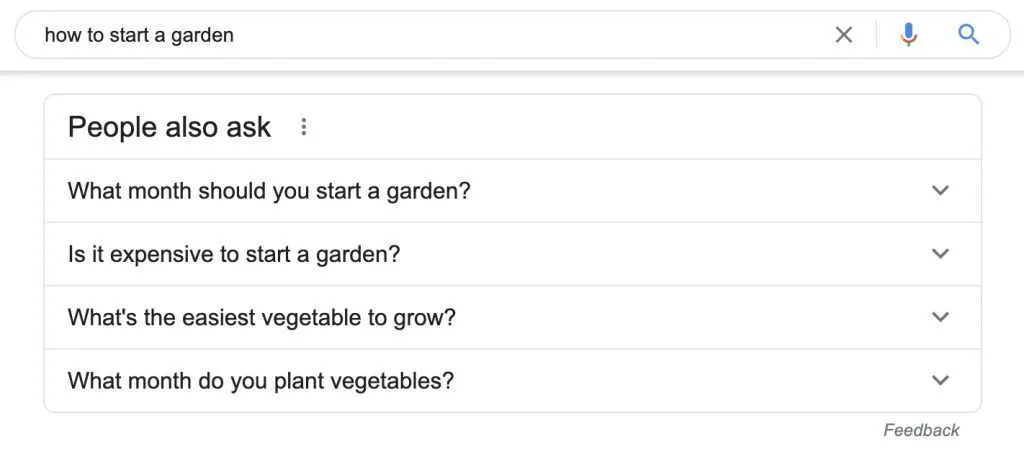
Featured snippets (position zero) and People Also Ask (PAA) boxes are prime real estate in Google’s search results. Targeting them can dramatically increase visibility and click-through rates, especially for informational content. Why it works: Appearing in a featured snippet positions your SaaS as an expert and increases the chance of attracting top-of-funnel traffic that can be nurtured toward conversion. Example: If you provide email automation software, you might target:
- “What is an email drip campaign?”
- “How to set up automated email sequences”
- “Best practices for SaaS onboarding emails”
Use concise definitions, numbered steps, and bullet points directly under keyword-aligned H2s. Format your content to match how Google tends to display snippets. How to implement:
- Use SEO tools like Ahrefs, Semrush or SurferSEO to find snippet opportunities
- Optimise content with snippet-friendly formatting: lists, tables, short answers
- Add schema markup for FAQs and How-Tos
- Monitor performance in Google Search Console and refine based on CTRs
Capturing snippets not only boosts traffic, it positions your brand as an authority on the subject.
Leverage Your Product Data for Original Insights
If you have user data, usage statistics, or behavioural trends within your platform, you can turn that into original, highly linkable content. Why it works: Original research is one of the most powerful ways to earn backlinks, drive shares, and build authority in your space. It positions your SaaS as a thought leader. Example: If you run a productivity tool used by thousands of teams, consider publishing:
- “Top 5 Productivity Trends from 20,000 Remote Teams”
- “The Average Time Lost in Meetings: Insights from 10 Million Logged Hours”
- “2025 SaaS Onboarding Benchmarks Based on User Data”
These kinds of insights are often cited in industry blogs, reports, and news articles, earning valuable backlinks. How to implement:
- Work with your data science or product teams to surface anonymised, aggregated insights
- Design charts or infographics for visual appeal
- Create press releases or pitch angles for relevant media outlets
- Turn the findings into downloadable resources or lead magnets
Original data helps you rank, but it also boosts referral traffic and brand equity.
Measuring SaaS SEO Performance
Investing in SaaS SEO without tracking performance is like flying blind. Unlike paid ads, where outcomes are more immediate, SEO requires ongoing monitoring to assess long term ROI, optimise strategies, and prove value to stakeholders. But measuring SEO for a SaaS business goes beyond simple traffic numbers. You need to track metrics that reflect business goals, especially signups, trials, and conversions. Here’s how to do it properly.
Organic Traffic Growth (But Look Beyond Vanity Metrics)
Organic traffic is the first signal of SEO progress. As your content ranks, you should see a steady increase in visits from search engines. But traffic alone isn’t enough. What to track:
- Total organic sessions (monthly)
- New vs returning organic users
- Organic landing pages with the highest entry volumes
- Branded vs non-branded keyword traffic
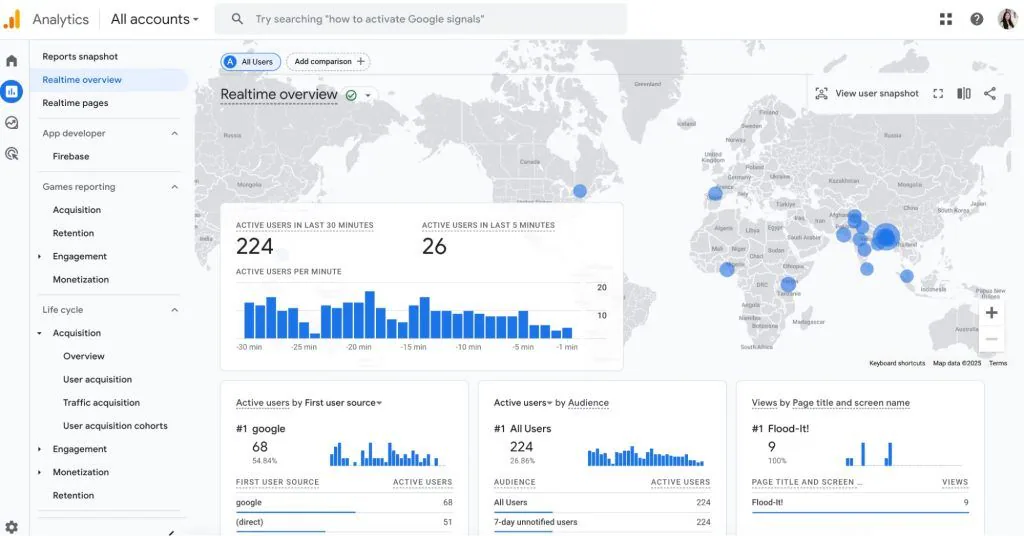
How to dig deeper to gain insights: Break down traffic by intent. Are your blog posts attracting early-stage users? Are your landing pages driving mid-to-bottom funnel visits? Use behaviour flow and entrance paths in Google Analytics (GA4) or other analytics tools to understand how users interact after arriving. Example: If a blog post brings in 5,000 monthly visitors, but only 1% click through to your product or signup page, you may need to optimise your internal links, CTAs, or relevance of the content.
Keyword Rankings and Visibility
Ranking improvements show whether your optimisation efforts are paying off. However, what matters more than just being on page one is ranking for the right keywords, those that lead to signups. What to track:
- Number of keywords in top 3, top 10, and top 100
- Keyword movement over time (gains/losses)
- Share of voice (your visibility vs competitors)
- Featured snippet and PAA box appearances
Recommended tools:
- Semrush or Ahrefs: for tracking keywords by URL or category
- Google Search Console (GSC): for impressions, clicks, CTR, and position data
- SurferSEO or Clearscope: for on-page optimisation and SERP competitors
Example: If your SaaS starts ranking in the top 3 for “best email marketing automation for startups”, expect not only more visibility, but also higher CTRs and potentially more qualified leads.
Organic Signups and Conversions
This is the real benchmark for SaaS SEO performance. How many organic visitors are becoming free trial users, demo bookings, or paid customers? What to track:
- Signups or demo requests from organic traffic
- Trial-to-paid conversion rate (segmented by traffic source)
- Goal completions and conversion paths in GA4
- Assisted conversions (multi-touch attribution)
Implementation tips:
- Set up conversion tracking in GA4 (use event-based goals like “signup”, “button click”, “form submit”)
- Use UTMs to track traffic from SEO pages if they link to signup forms hosted on subdomains
- Connect your CRM (like HubSpot or Salesforce) with attribution tools like Dreamdata, HockeyStack, or Segment to follow organic leads through the funnel
Example: You might discover that your “How to Build a Drip Campaign” blog post brings in 1,000 organic visits per month with a 4% signup rate, yielding 40 new trial users from just one article. That’s content ROI worth scaling.
Engagement Metrics (Quality of Traffic)
High rankings and traffic mean little if users bounce quickly or fail to take action. Engagement metrics help you understand if your content meets intent and whether your SaaS pages are persuasive enough to convert. What to monitor:
- Bounce rate (ideally under 60% for landing pages)
- Average session duration
- Pages per session
- Scroll depth (to evaluate content engagement)
- Event tracking (interactions with CTAs, videos, tabs, etc.)
Tools:
- GA4 for engagement rate and events
- Hotjar or Microsoft Clarity for heatmaps and session recordings
- Userflow or Pendo to track post-click actions on trial signups
Example: If your SEO landing page ranks well but users are bouncing within 10 seconds, consider improving headline clarity, page speed, CTA prominence, or content structure.
Technical SEO Health
If your site is technically flawed, or if your technical SEO is not sound, showing signs of delays, unstructured architecture, or is crawled poorly, this means your rankings will suffer. A solid technical foundation ensures that your quality content can be discovered and indexed by search engines. What to audit:
- Site speed (especially on mobile)
- Core Web Vitals (CLS, LCP, FID)
- Index coverage (monitor in GSC)
- Crawl errors (broken links, redirect chains)
- Sitemap and robots.txt accuracy
- Structured data and schema markup
Tools:
- Google Search Console (free)
- Screaming Frog or Sitebulb for in-depth audits
- Ahrefs Site Audit or Semrush Site Audit
- PageSpeed Insights or Lighthouse
Example: An SEO blog post that takes 8 seconds to load on mobile and lacks schema markup might never appear in a featured snippet, even if the content is perfect.
SaaS SEO is a Long Game, but Worth It
SaaS SEO isn’t about quick wins. It’s about laying the foundations for sustainable growth. When executed strategically, it builds brand authority, attracts quality leads, and reduces your reliance on paid acquisition. Investing in smart search tactics can turn your site into a signup-generating engine. At Saigon Digital, we craft scalable strategies that turn search visibility into real signups. Get in touch with us today and discover how we can help you turn organic search into your top-performing acquisition channel.
Want to be the brand AI engines recommend?
We make businesses visible on Google and inside AI answers, measured in leads, not vanity metrics.