Schema markup can be your powerful ally in the competitive world of digital marketing and web development. Not only will it help you build a smarter website but also search engine friendly that can boost your website traffic and brand visibility. We’ll explore what schema markup is, why it matters for SEO , how to implement it, and the tools available to validate your markup. We’ll also explain what is the recommended format for implementing schema markup, and how to future-proof your site with this often overlooked but incredibly valuable web enhancement.

What Is Schema Markup?
Schema markup is a form of structured data, a standardised way to annotate your website’s HTML with additional information that search engines can interpret more precisely. Schema markup was developed through a collaborative project called Schema.org, supported by major search engines like Google, Bing, Yahoo, and Yandex. The goal was to create a universal vocabulary that allows webmasters to provide clear, contextual data about their pages. This is an example of schema markup:
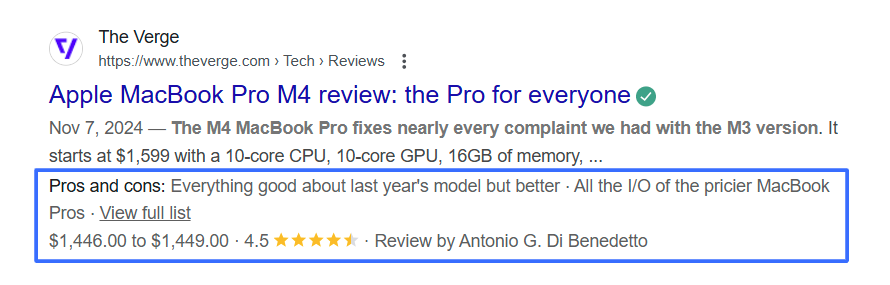
When you apply schema markup, you’re telling search engines exactly what type of information is on the page, whether it’s a recipe, an event, a person’s profile, a product, a business review, or even a frequently asked question. Example: Let’s say you own a restaurant in Saigon. Without schema markup, your homepage might just list your name, location, and opening hours in plain text. But with schema markup, you can define even more attributes:
- That your business is a restaurant
- Your specific cuisine type (e.g. Vietnamese, French)
- Your opening hours for each day of the week
- Your star rating from customer reviews
- A photo of your menu
- Booking or reservation links
This data is then eligible to appear in rich results in Google Search, making your website stand out and helping users find what they need faster.
What Is Schema Markup in SEO?
Many marketers and business owners ask: what is schema markup in SEO, and does it really improve rankings? While schema markup itself is not a direct ranking factor, it significantly enhances visibility in search results. By providing structured data, your site becomes eligible for rich snippets, which can lead to:
- Higher click-through rates (CTR)
- More qualified traffic
- Better user experience in search
- Enhanced voice search performance
Schema helps Google understand your content better, which can indirectly support your SEO by ensuring your pages are correctly indexed and categorised.
Does Your Website Have Schema Markup?
If you’re not sure whether your website already has schema markup set up or still needs to be updated, you can use these online tools to check.
- Google’s Rich Results Testhttps://search.google.com/test/rich-resultsTests whether your page is eligible for rich results and highlights errors or missing fields.
- Schema Markup Validator by Schema.orghttps://validator.schema.org/Provides detailed feedback on your JSON-LD, Microdata, or RDFa formats.
Since these tools are online, it’s easy and fast to test your website. You can also use these tools after implementing schema markup. Running a schema markup checker regularly ensures your structured data remains valid and optimised, especially when making changes to your website.
What Is the Recommended Format for Implementing Schema Markup?
Google’s preferred format is JSON-LD, as mentioned earlier. However, there are other options like Microdata and RDFa, which embed structured data within your HTML elements. Here’s how they compare: Format Placement Ease of Use Recommended? JSON-LD <head> or body tag High ✅ Yes Microdata Inline with HTML Moderate ❌ Not ideal RDFa Inline with HTML Low ❌ Rarely used JSON-LD separates the data from the HTML layout, which makes it easier to update, cleaner to read, and more compatible with modern JavaScript frameworks.
Common Types of Schema Markup (And How to Use Them)
Schema markup is versatile and adaptable to a wide range of industries and content types. Below are the most commonly used schema types, complete with explanations, their SEO benefits, and how to implement them effectively.
Article Schema
Explanation: The Article schema is used to define news articles, blog posts, and editorial content. It tells search engines that the page contains written content with a headline, author, publish date, and possibly an image. Purpose: Improves how your article appears in search results by enabling rich snippets. Google may display the article's title, image, author name, and published date directly in the search preview. Example (JSON-LD): <script type="application/ld+json"> { "@context": "https://schema.org", "@type": "BlogPosting", "headline": "10 Must-Visit Cafes in Saigon", "image": "https://example.com/images/saigon-cafes.jpg", "author": { "@type": "Person", "name": "Jane Nguyen" }, "publisher": { "@type": "Organization", "name": "Saigon Scene", "logo": { "@type": "ImageObject", "url": "https://example.com/images/logo.png" } }, "datePublished": "2025-06-01" } </script>
LocalBusiness Schema
Explanation: This schema identifies a website as a local business or small business , such as a café, gym, barbershop, or restaurant. It includes business name, address, phone number, hours, and other location-specific details. Purpose: It helps Google display your business in local search results, Google Maps, and enables rich snippets for hours, contact info, reviews, and more. Example (JSON-LD): <script type="application/ld+json"> { "@context": "https://schema.org", "@type": "Restaurant", "name": "Union Jack’s", "address": { "@type": "PostalAddress", "streetAddress": "45 Nguyen Hue", "addressLocality": "Ho Chi Minh City", "addressCountry": "Vietnam" }, "telephone": "+84-28-3823-4567", "openingHours": "Mo-Su 09:00-23:00" } </script>
Product Schema
Explanation: The Product schema is designed for items being sold online. It includes product name, description, price, availability, brand, SKU, and reviews. Purpose: It enables rich snippets in search results that display product prices, availability (in stock/out of stock), and review ratings, making it easier for users to make purchase decisions directly from search. Example: <script type="application/ld+json"> { "@context": "https://schema.org/", "@type": "Product", "name": "Custom Basketball Jersey", "image": "https://example.com/images/jersey.jpg", "description": "Lightweight custom jersey for your team.", "sku": "CBJ-001", "brand": { "@type": "Brand", "name": "Team Spirit Sports" }, "offers": { "@type": "Offer", "priceCurrency": "AUD", "price": "49.99", "availability": "https://schema.org/InStock" }, "aggregateRating": { "@type": "AggregateRating", "ratingValue": "4.8", "reviewCount": "128" } } </script>
Review Schema
Explanation: This schema is used to highlight individual reviews or ratings given by users to products, services, restaurants, etc. Purpose: Displays star ratings and review excerpts in search engine results, helping build trust and improve click-through rates. Example: <script type="application/ld+json"> { "@context": "https://schema.org", "@type": "Review", "reviewRating": { "@type": "Rating", "ratingValue": "5", "bestRating": "5" }, "author": { "@type": "Person", "name": "Liam Tran" }, "reviewBody": "Best burger in Saigon! The beef was juicy and flavourful." } </script>
FAQPage Schema
Explanation: The FAQPage schema is used to structure Frequently Asked Questions and their answers, typically on a help or support page. Purpose: Google can display your FAQs directly in search results as an expandable accordion, improving visibility and user engagement. Example: <script type="application/ld+json"> { "@context": "https://schema.org", "@type": "FAQPage", "mainEntity": [{ "@type": "Question", "name": "What is schema markup?", "acceptedAnswer": { "@type": "Answer", "text": "Schema markup is a type of structured data that helps search engines understand your website content." } }, { "@type": "Question", "name": "How do I implement it?", "acceptedAnswer": { "@type": "Answer", "text": "You can add schema markup using JSON-LD code embedded in your website’s HTML." } }] } </script>
How to Add Schema Markup to Your Website
If you’re wondering how to add schema markup, you’ll be pleased to know there are a few different ways, depending on your site structure and technical knowledge.
Method #1: Manually Adding JSON-LD (Recommended)
Google recommends using JSON-LD (JavaScript Object Notation for Linked Data). It’s a script-based format that sits in the <head> of your HTML document. Here’s a basic example for a local business: <script type="application/ld+json"> { "@context": "https://schema.org", "@type": "Restaurant", "name": "Pho Saigon Delight", "image": "https://example.com/photos/logo.jpg", "address": { "@type": "PostalAddress", "streetAddress": "123 Le Loi", "addressLocality": "Ho Chi Minh City", "addressCountry": "Vietnam" }, "telephone": "+84-90-123-4567", "openingHours": "Mo-Su 10:00-22:00" } </script> This code doesn’t alter the visual appearance of your page but provides search engines with deeper context.
Method #2: Using WordPress Plugins
If you’re using WordPress, several plugins can handle schema markup automatically:
- Yoast SEO – Includes basic structured data for articles and pages.
- Rank Math – Offers custom schema types with a visual builder.
- Schema Pro – A premium tool for adding advanced markups like reviews, recipes, FAQs, and more.
Method #3: Google Tag Manager (Advanced Users)
You can also deploy schema markup using Google Tag Manager, which is useful for managing tags and scripts without touching your site’s codebase. This is particularly handy for large-scale websites or A/B testing environments.
Schema Markup Is No Longer Optional
In a digital landscape where visibility is everything, schema markup gives your website the clarity and precision it needs to shine. Adding structured data is one of the smartest SEO moves you can make. At Saigon Digital , we craft high performing websites and digital strategies that don’t just look good, they deliver real results. From SEO to web development, we help you attract, engage, and convert. Stop guessing. Start growing. Get in touch with us today and discover what your business is truly capable of.
Want to be the brand AI engines recommend?
We make businesses visible on Google and inside AI answers, measured in leads, not vanity metrics.