



Artificial intelligence has moved from experimentation to everyday business use. In 2026, Google’s Gemini has become one of the most widely adopted AI tools for research, productivity, content creation, and decision-making. Yet many beginners still ask the same question: how to use Gemini effectively without technical expertise.
This guide explains how to use Gemini in 2026, step by step. It is written for beginners, marketers, business owners, and teams who want practical outcomes, not abstract theory. You will learn what Gemini is, how it works, and how to apply it confidently in real-world scenarios.
At Saigon Digital, we focus on turning technology into measurable growth. Gemini is no exception. Used correctly, it can support SEO, content strategy, automation, and smarter workflows across your organisation.

Key Takeaways
- Gemini in 2026 is accessed free or through Google AI Plus, Pro or Ultra plans, each unlocking more of the Gemini 3 model family, Nano Banana Pro image generation and higher usage limits.
- Strong prompts state the task, the context and the format you want. The best results usually come from refining an initial prompt rather than getting it right the first time.
- Beyond chat, Gemini's most useful business features include Deep Research, Canvas, Gems, Nano Banana Pro image generation and the newer Gemini Spark agent mode for multi-step tasks.
- The best use cases in 2026 go beyond writing: research, SEO support, data interpretation and industry analysis are where Gemini adds the most measurable value for businesses.
- Gemini works best as a starting point that a human reviews, not a final decision-maker, particularly for SEO, compliance and brand-facing content.
What Is Gemini and Why It Matters in 2026
Gemini is Google’s AI platform designed to understand and generate text, images, data insights, and code within a single ecosystem. Unlike earlier AI tools that focused on one task, Gemini is multimodal, meaning it can work across different formats and contexts.
In 2026, Gemini is deeply integrated into Google’s wider product environment. This makes it particularly valuable for businesses already using Google tools for marketing, analytics, and collaboration.
The current Gemini 3 model family also introduced a significant jump in reasoning and multimodal understanding compared with earlier versions. This is part of why Gemini now sits behind more of Google's own AI Overviews and AI Mode results in Search, which matters directly for anyone working in SEO or AI visibility.
Key reasons Gemini matters today:
- It supports faster research and decision-making
- It integrates naturally with existing Google workflows
- It enables non-technical users to access advanced AI capabilities
- It scales from simple tasks to complex business use cases
Understanding how to use Gemini is now less about novelty and more about gaining a competitive edge.
How to Access Google Gemini in 2026
Getting started with Gemini is straightforward, but choosing the right plan and access point makes a real difference to what you can actually do with it.
Where to Access Gemini
- The Gemini app or gemini.google.com, using any Google account
- The Gemini mobile app on iOS and Android
- Gemini in Chrome, which lets Gemini read and act on the page you are browsing
- Google Workspace apps such as Gmail, Docs, Sheets, Slides and Vids
- A dedicated Gemini app for macOS
- Google Search, where Gemini increasingly powers AI Overviews and AI Mode results
- Google AI Studio or Vertex AI, for developers building with the Gemini API
For beginners, the standalone Gemini interface is still the easiest place to start. It lets you interact directly with the AI and see exactly how it responds to prompts before adding it into other tools.
Which Gemini Plan Should You Choose in 2026
As of 2026, Google offers four tiers. Exact pricing varies slightly by country, so treat the figures below as a guide and check Gemini's official subscriptions page before committing a business budget to a plan.
- Free: no cost, includes a fast Gemini model, image generation and editing, Deep Research, Gemini Live, Canvas and Gems, with daily usage limits
- Google AI Plus, from around US$5 a month: roughly double the usage of the free plan, plus more Nano Banana image generation in Search and early access to Gemini in Chrome
- Google AI Pro, around US$20 a month: higher access to Gemini's most capable model, Deep Research, a 1 million token context window, and Gemini built into Gmail, Docs and other Workspace apps
- Google AI Ultra, from around US$100 a month: the highest usage limits, first access to Deep Think reasoning and the Gemini Spark agent, and the largest Google Flow and storage allowances
Google significantly restructured these plans and lowered Ultra pricing at its May 2026 developer event, so pricing you may have seen in older articles is likely out of date. For most beginners and small teams, the free plan or Google AI Pro is enough to test every feature covered in this guide. Reserve Ultra for teams already using Gemini daily and consistently hitting its usage limits.
Tip: treat Gemini as a collaborative assistant rather than a search engine. The quality of your results depends on how clearly you communicate your intent.
How to Use Gemini in 2026
Knowing how to use Gemini in 2026 requires more than basic familiarity with AI. Gemini has evolved into a multi-functional platform designed to support research, creativity, learning, and analysis within a single interface. For beginners, this may initially feel overwhelming. However, once each feature is understood in context, Gemini becomes an intuitive and highly practical tool.
The sections below explain Gemini’s key capabilities in detail, with clear guidance on how to use each feature effectively and responsibly.
1. How to Prompt Gemini Effectively
Prompting is the foundation of how Gemini works and the most important skill to master. A prompt is the instruction you give Gemini, but its quality directly determines the relevance and usefulness of the response. In 2026, Gemini is highly capable, yet it still relies on human clarity to deliver strong results.
When writing a prompt, start by clearly defining what you want Gemini to do. Then, provide enough context so the AI understands your situation, your audience, and your objective. Finally, guide the output by specifying tone, format, or level of detail.
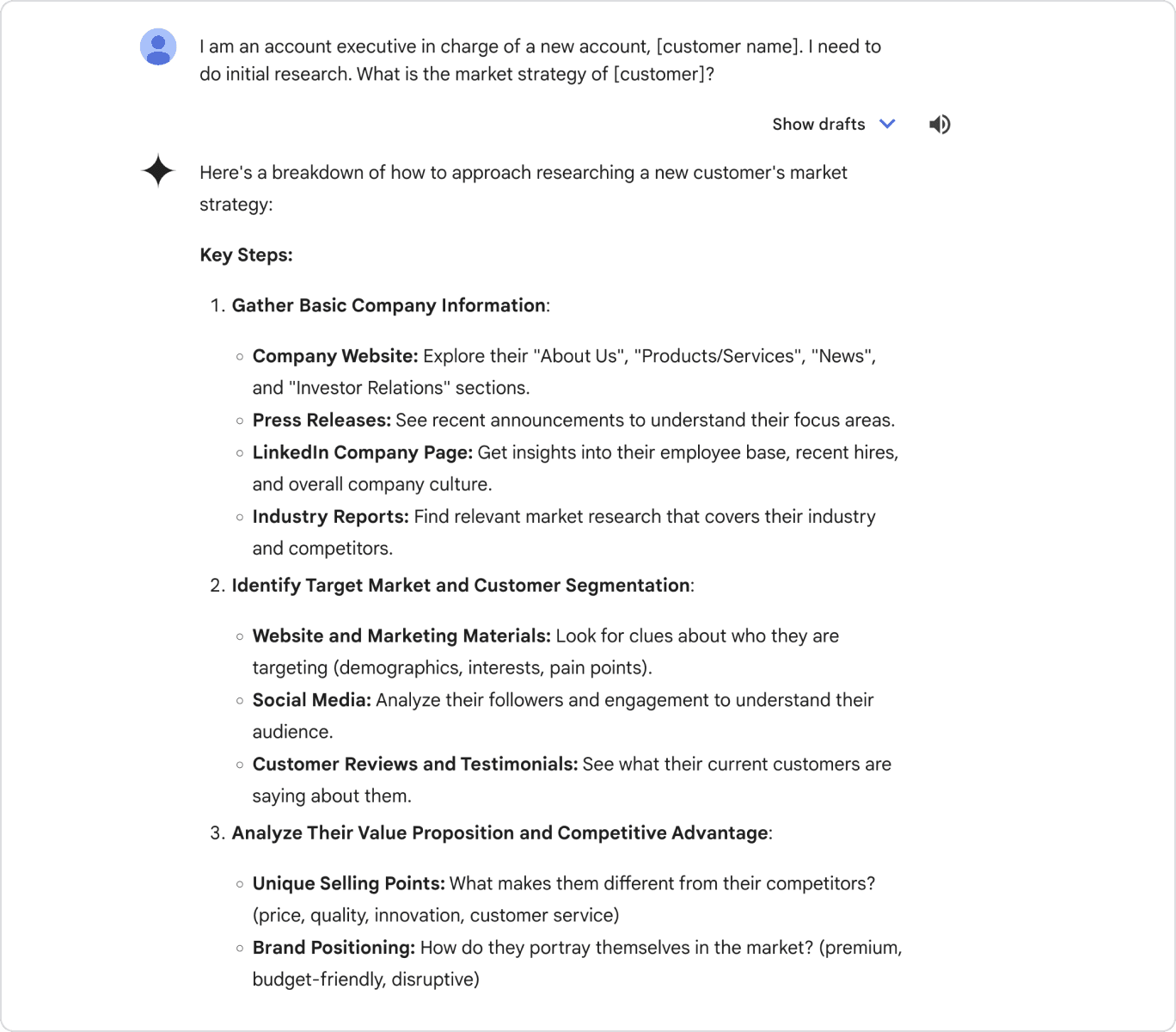
For example, instead of writing:
“Tell me about Gemini”
A more effective prompt would be:
“Explain how to use Gemini for SEO research in 2026, written for beginners, using a professional tone and UK spelling.”
Strong prompts often include:
- The task you want completed
- Relevant background or industry context
- The intended audience
- Any formatting or tone preferences
If the first response is not quite right, refine it. Follow-up prompts such as “expand on this point”, “simplify the language”, or “add a practical example” help guide Gemini closer to your desired outcome. Over time, this iterative approach becomes second nature and significantly improves efficiency.
A Simple Prompt Formula for Gemini
If you want a repeatable structure, rather than a one-off prompt, use this four-part formula. It works for almost any task you would ask Gemini to help with.
- Role: tell Gemini who it should act as, for example “act as an experienced SEO content editor”
- Task: state exactly what you want done, in one clear sentence
- Context: add the background Gemini needs, such as your audience, industry or existing content
- Format: specify the output you want, such as a table, a bullet list, or a set word count
For example: “Act as an experienced SEO content editor. Review this introduction for a B2B SaaS blog post and suggest three improvements. Explain each suggestion in one sentence and present them as a numbered list.”
2. How to Use Deep Research in Gemini
Deep Research is designed for situations where surface-level answers are not enough. Unlike standard responses, this feature allows Gemini to explore topics in greater depth, synthesising information across multiple dimensions and presenting it in a more structured way.
To begin using Deep Research, you can click on a button titled Tools which will list out a bunch of features that you can ask Gemini to do. The first one of those features is called Deep Research.
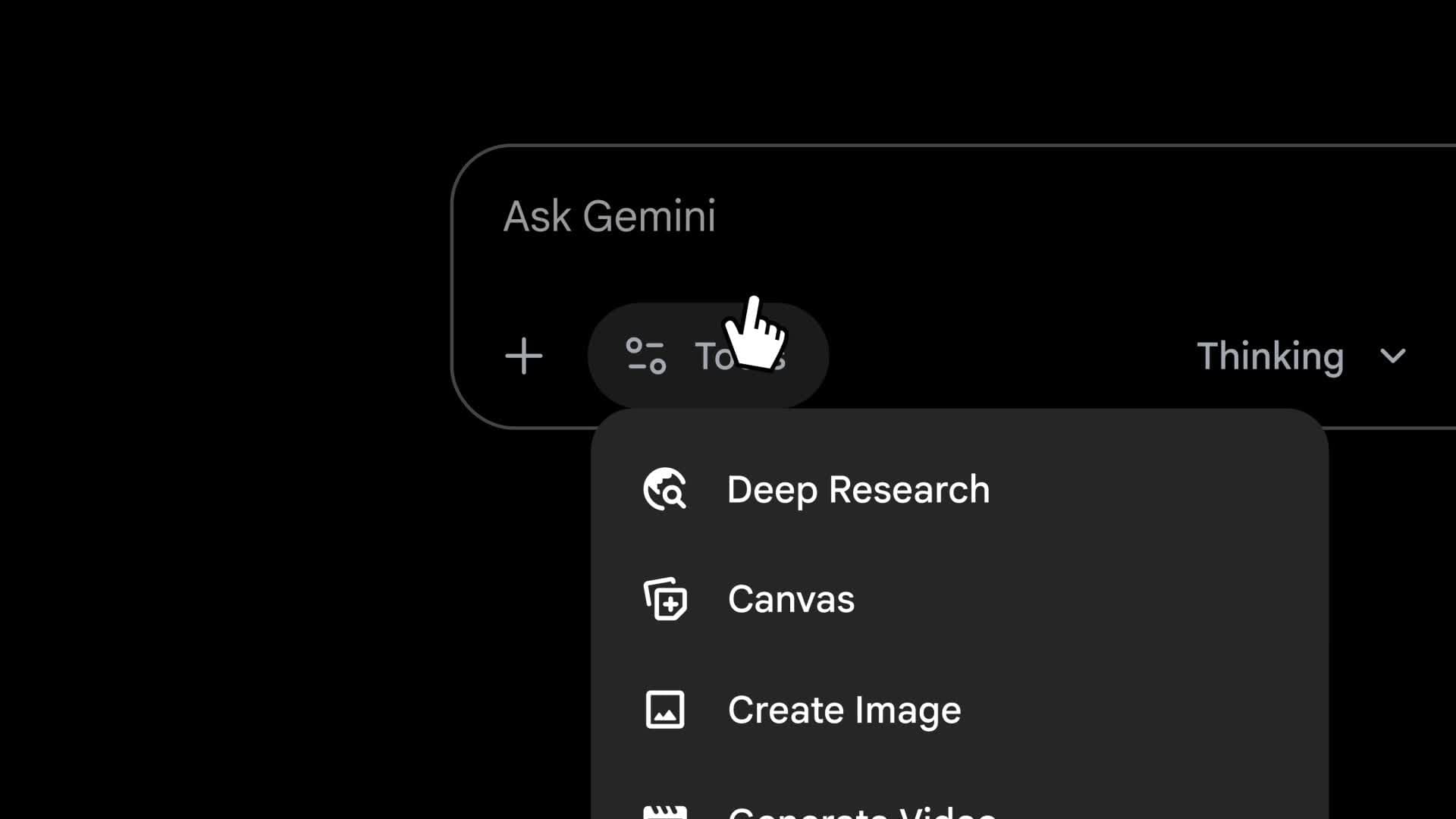
Begin with complex or strategic questions rather than simple definitions. This feature works best when you are analysing trends, evaluating approaches, or preparing for decision-making.
For example:
“Use deep research to analyse how AI tools like Gemini are changing SEO strategies for digital agencies in 2026.”
Gemini will respond with layered insights, contextual explanations, and clearer logical progression. This makes Deep Research particularly useful for:
- Market and industry analysis
- Strategy development and planning
- Thought leadership content
- Internal knowledge building
Although Deep Research saves significant time, it is important to review the output carefully. Validate insights against trusted sources and apply professional judgment before using findings in client-facing or strategic contexts.
3. How to Use Create Images With Gemini (Nano Banana Pro)
Similar to Deep Research, Gemini's image feature can be accessed by clicking Tools, then Create images. In 2026, this feature is powered by Nano Banana Pro, Google's most advanced image generation and editing model, which produces high-resolution visuals, renders legible text inside an image, and can blend several reference images into one new composition.
When prompting Gemini to create images, clarity is essential. Describe not only what the image should depict, but also its style, mood, and intended use. The more specific the prompt, the more relevant the output.

For example:
“Create a modern, minimal illustration showing how AI supports SEO, content, and analytics workflows for a digital agency website.”
Beyond generating new images from text, Nano Banana Pro is also useful for:
- Editing an existing image, such as changing the background, lighting or layout while keeping the subject consistent
- Combining multiple images into a single new visual, for example placing a product into a new scene
- Creating diagrams, infographics and comparison graphics with legible text and labels
- Producing several aspect ratios of the same concept for different platforms
This feature is commonly used for concept visuals, internal presentations, blog illustrations and social media ideation. Visual content such as diagrams and annotated screenshots is also one of the strongest content types to boost AI visibility, since AI systems increasingly reference well-structured visual explanations alongside text.
While AI-generated images are useful, they should be reviewed before external publication. Google adds an invisible SynthID watermark, and a visible mark on free and entry-level plans, to indicate an image was AI-generated, so check your organisation's brand and disclosure guidelines before publishing. In professional settings, these images often work best as a starting point rather than a final asset.
4. How to Use Canvas in Gemini
Canvas provides a dedicated workspace for longer, more complex tasks. Instead of receiving isolated responses, Canvas allows you to build, refine, and edit content over time while maintaining context.
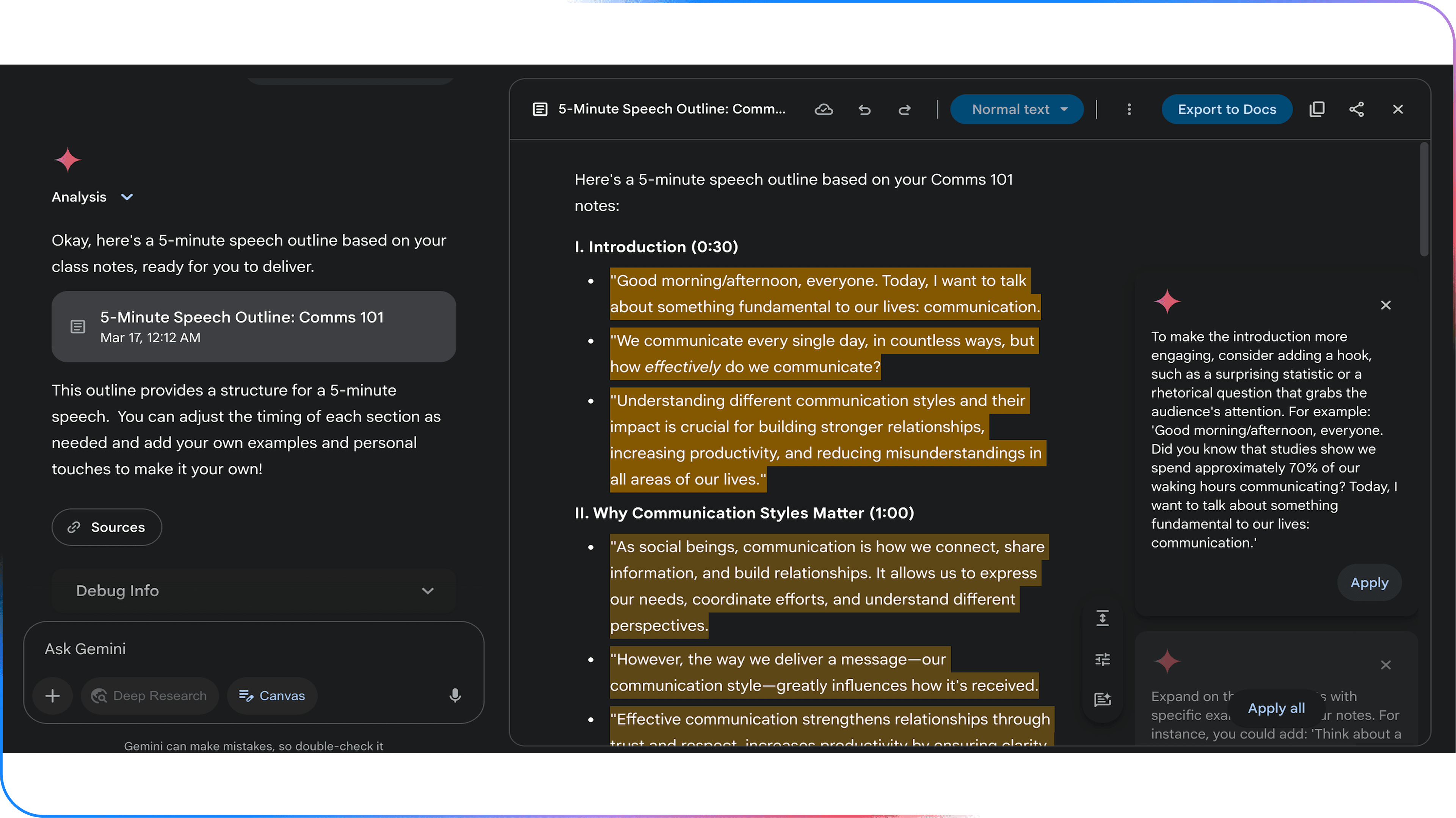
This feature is particularly valuable when working on:
- Blog posts and guides
- Reports and whitepapers
- Strategy documents
- Multi-section content pieces
A practical way to use Canvas is to start with structure before content. For example, you might prompt:
“Create a detailed outline for a beginner’s guide on how to use Gemini in 2026.”
Once the outline is in place, you can expand each section, adjust tone, improve flow, and request refinements without starting over. This makes Canvas ideal for content that requires consistency, depth, and polish.
For teams, Canvas also supports more efficient collaboration by reducing duplication and keeping work organised within a single workspace.
5. How to Use Guided Learning in Gemini
Guided Learning is designed to help users build knowledge progressively. Instead of presenting everything at once, Gemini breaks topics into manageable steps, making learning more approachable for beginners.
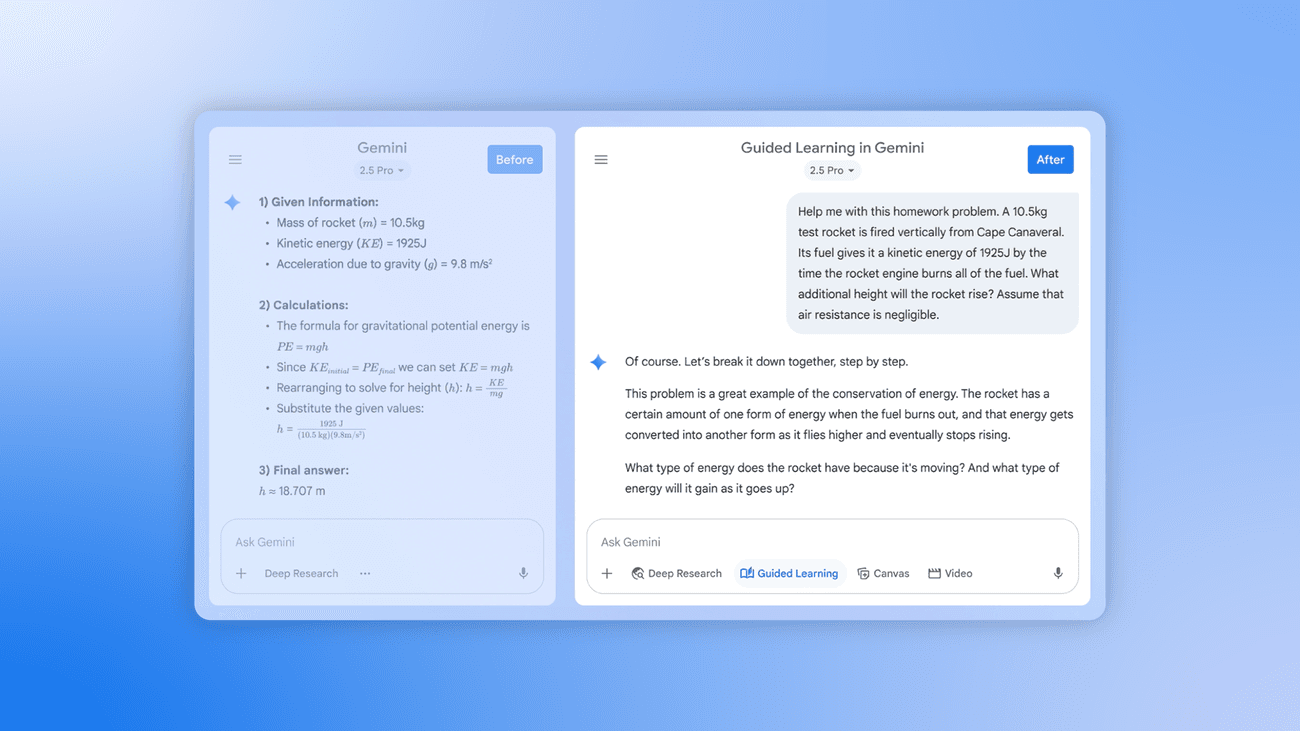
This feature is particularly useful when:
- Learning a new platform or concept
- Training junior team members
- Building foundational AI knowledge
For example:
“Guide me step by step on how to use Gemini for content marketing, assuming no prior experience.”
Gemini will introduce core concepts first, then gradually move towards more advanced applications. This structured approach reduces overwhelm and improves long-term understanding, especially for users who are new to AI tools.
Guided Learning also encourages better retention by allowing users to pause, ask follow-up questions, and explore topics at their own pace.
6. How to Use Visual Layout for Clearer Outputs
Visual Layout improves how Gemini presents information by structuring responses into tables, lists, or clearly separated sections. This is especially helpful when working with comparisons, processes, or data-heavy topics.
To activate this feature effectively, specify the format you want in your prompt.
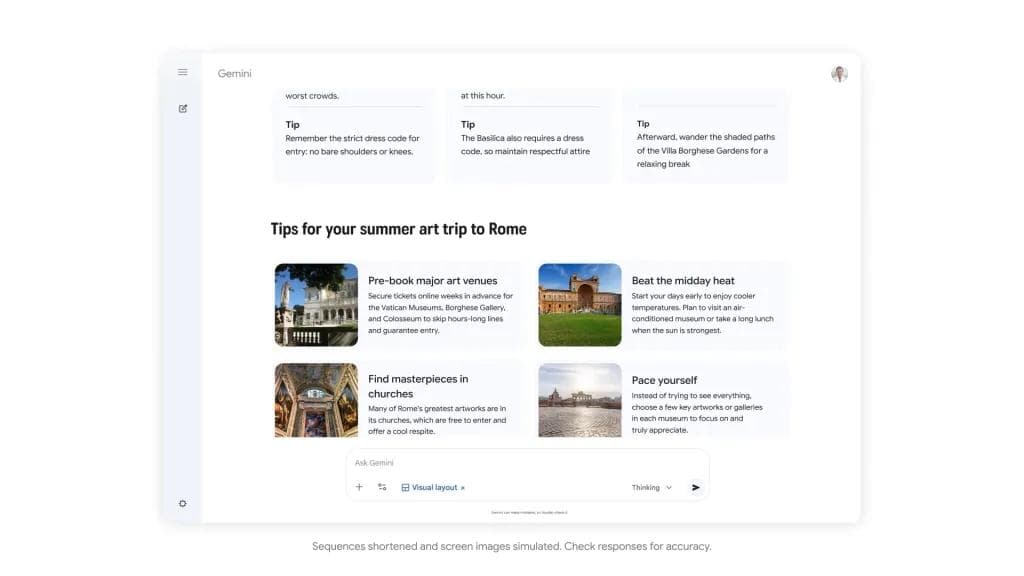
For example:
“Present the differences between Gemini and other AI tools in a comparison table.”
Visual layouts are particularly useful for:
- Internal documentation
- Strategy discussions
- Presentations and reporting
- Simplifying complex information
By improving readability, visual layouts help teams understand insights more quickly and make better-informed decisions.
7. How to Add Files for Gemini to Analyse
One of Gemini's most powerful features in 2026 is its ability to analyse uploaded files, now supporting uploads of up to 1,500 pages in a single conversation on paid plans. This allows Gemini to work directly with your documents, saving time and reducing manual effort.
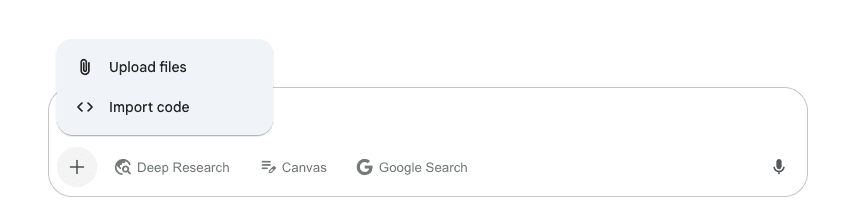
You can upload files such as:
- PDFs and reports
- Spreadsheets
- Text documents
- Presentations
Once uploaded, clearly explain what you want Gemini to do with the file.
For example:
“Analyse this SEO performance report and summarise key trends, risks, and opportunities for improvement.”
This feature is particularly valuable for:
- Reviewing large datasets
- Extracting insights from reports
- Preparing summaries for stakeholders
- Accelerating analysis workflows
However, it is important to remain mindful of data security. Avoid uploading sensitive or confidential information unless it aligns with your organisation’s data governance policies.
8. How to Use Gems to Build a Custom Gemini Assistant
Gems are saved, reusable versions of Gemini that you configure once and reuse repeatedly, without rewriting the same lengthy prompt every time. A Gem bundles a name, a description, a set of instructions and, optionally, reference files that Gemini should always use when responding.
To create a Gem, open the Gemini side menu, select Gems, then New Gem. Give it a clear name and description, write instructions describing exactly how it should behave, and attach any knowledge files it should reference, such as your brand guidelines or a style guide. Gemini can also rewrite rough instructions into a clearer prompt for you.
Gems are particularly useful for tasks your team repeats often, such as:
- A brand voice editor that rewrites drafts to match your tone of voice
- A meeting summary assistant that always outputs the same structure
- An SEO brief generator that follows your agency's content template
- A customer service assistant trained on your product documentation
Once built, a Gem is available from the same menu as Gemini's other tools, so using it becomes as simple as starting a normal chat. For teams already using Gemini regularly, Gems are one of the fastest ways to turn ad hoc prompting into a consistent, repeatable process.
9. How to Use Gemini Live for Voice Conversations
Gemini Live allows you to have a real-time, spoken conversation with Gemini rather than typing. On mobile, you can also share your camera or your screen while talking, so Gemini can see what you see and respond to it directly.
To start a Live session, open the Gemini app and select the Live icon. This mode suits brainstorming out loud, rehearsing a presentation or client pitch, or getting a quick spoken explanation of a document while your hands are busy. It is available on the free plan, with paid plans unlocking longer sessions and more natural voice options.
10. How to Use Gemini Spark for Automated Tasks
Gemini Spark, often described as agent mode, moves Gemini from answering questions to completing multi-step tasks on your behalf. Instead of a single prompt and response, you describe an outcome, and Spark plans and works through the steps needed to reach it, checking in with you before sensitive actions.
To use Spark, open Gemini, switch mode to Spark, and open Tasks. Describe the result you want, then attach any files, Drive content or connected apps Spark should use. You can monitor its progress and step in at any point.
As of 2026, Spark is rolling out to Google AI Pro and Ultra subscribers across an expanding list of countries, so availability can vary. This is one of the fastest-moving parts of Gemini, and businesses that build early comfort with agentic workflows like this one are likely to have an advantage as these tools mature. For content and SEO teams specifically, this mirrors the shift towards building a dedicated AI agent for SEO content creation, where prompts and logic replace manual, repetitive steps.
Using Gemini With Intent and Strategy
Ultimately, understanding how to use Gemini in 2026 is about applying the right feature to the right task. Each capability serves a specific purpose, and their combined value lies in strategic use rather than experimentation alone.
At Saigon Digital, we encourage businesses to view Gemini as part of a broader digital ecosystem. When integrated thoughtfully with SEO, content, automation, and human expertise, Gemini becomes a powerful driver of efficiency, clarity, and long-term digital growth.
Google Gemini Best Use Cases in 2026
Understanding how to use Gemini becomes far more valuable when you can apply it to real, everyday business tasks. In 2026, Gemini is no longer just an experimental AI tool, it is a practical assistant that supports research, content, SEO and strategic planning across digital teams.
Below are the most effective and most common uses of Gemini AI for beginners and businesses alike, with clear guidance on how to apply each one.
1. Research and Insight Gathering
One of the most accessible and impactful ways to use Gemini is for research. Instead of manually searching through dozens of articles, reports, or forums, Gemini can synthesise information and present it in a clear, structured way.
To begin, focus on asking specific, outcome-driven questions. Gemini performs best when it understands both the topic and the purpose of the research.

For example, instead of asking:
“What is digital marketing?”
A more effective prompt would be:
“Explain the key digital marketing trends affecting UK-based service businesses in 2026, with practical examples.”
This approach allows Gemini to provide contextually relevant insights rather than generic definitions.
Gemini can support research tasks such as:
- Summarising long-form reports or whitepapers
- Explaining complex topics in plain language
- Comparing tools, platforms, or strategies
- Identifying emerging trends within an industry
For beginners, a useful workflow is to start broad and then narrow down. You might first ask for an overview, then follow up with more detailed questions. This conversational approach mirrors how human research naturally unfolds and helps you extract deeper value from Gemini.
2. Content Creation and Optimisation
Another practical way to use Gemini in 2026 is to support content creation. While Gemini should not replace human writers or subject-matter expertise, it is highly effective as a content assistant.
A strong starting point is using Gemini to structure content before writing. For example:
“Create a detailed blog outline for the topic ‘how to use Gemini’ aimed at beginners, using a professional tone and UK spelling.”
From there, you can ask Gemini to expand individual sections, improve clarity, or suggest supporting examples. This staged approach helps maintain quality and consistency.
Gemini can assist with content tasks such as:
- Generating blog outlines and section ideas
- Rewriting paragraphs for clarity or tone
- Simplifying technical language for non-experts
- Creating FAQs, summaries, or introductions
For optimisation, Gemini is particularly useful when refining existing content. For instance:
“Rewrite this paragraph to sound more professional and informative, while keeping it natural and engaging.”
At Saigon Digital, we recommend always reviewing and editing AI-generated content. Human insight ensures accuracy, brand alignment, and originality, key factors for trust and SEO performance.
3. SEO and Keyword Support
When learning how to use Gemini for SEO, it is important to view it as a strategic support tool rather than a replacement for dedicated SEO platforms.
Gemini excels at explaining why users search for certain terms and how content can be structured to meet that intent.

For example, you might ask:
“Explain the search intent behind the keyword ‘how to use Gemini’ and suggest content angles for beginners.”
Gemini can then help you understand whether users are looking for:
- Basic introductions
- Step-by-step guides
- Comparisons or use cases
- Practical examples
This insight allows you to align content more closely with user needs, which is essential for long-term SEO success.
In practice, Gemini can support SEO by:
- Grouping keywords into logical topic clusters
- Suggesting internal linking opportunities
- Identifying content gaps in existing content
- Explaining SEO concepts to non-technical teams
When combined with professional SEO tools and expertise, Gemini becomes a valuable part of the planning and ideation process.
4. Data Interpretation and Strategic Planning
Beyond content and SEO, Gemini is increasingly used to interpret information and support planning. In 2026, many teams rely on Gemini to turn raw inputs into actionable insights.
For beginners, the key is to provide Gemini with clear context. For example:
“Based on this campaign summary, suggest areas for improvement and explain why.”
Gemini can then analyse patterns, highlight inefficiencies, and propose next steps in a way that is easy to understand.
Common applications include:
- Interpreting performance summaries
- Supporting campaign planning discussions
- Identifying risks or missed opportunities
- Translating data into plain-language insights
This is particularly useful for decision-makers who need clarity without technical complexity. For a more formal framework, this pairs well with structured approaches such as AI scoring, which explains how machines evaluate and rank information systematically. Rather than replacing strategic thinking, Gemini enhances it by accelerating analysis and improving visibility.
5. Understanding Industry Information and Market Trends
One of the most valuable, and most searched, ways to use Gemini is to make sense of an entire industry quickly, rather than researching it manually across dozens of sources. This is especially useful for international teams entering a new market or managing operations across several countries.
For example, a hospitality group expanding into Vietnam might ask:
“Summarise the key trends affecting the hospitality industry in Vietnam in 2026, including guest expectations, technology adoption and how international brands are adapting their marketing.”
Depending on your industry, Gemini can help you get up to speed on:
- F&B and hospitality: emerging dining trends, delivery platform behaviour, and guest experience expectations
- Retail and e-commerce: shifts in online shopping behaviour, marketplace dynamics, and seasonal demand patterns
- Education: how prospective students research and choose institutions, and changes in enrolment behaviour
- B2B and SaaS: category trends, how buying committees now research vendors, and how AI search visibility for B2B and SaaS is changing that research process
Always treat Gemini's industry summaries as a starting point rather than a verified source. Ask it to explain its reasoning, cross-check figures against named sources, and use the output to shape better questions for your own market research rather than as a final answer on its own.
How to Use Gemini for a Real Workflow in 2026
Reading about individual features only tells you so much. The real value of Gemini becomes clear when several features are combined into one workflow. Here is a realistic example of how a small marketing team might use Gemini to plan and draft a piece of content in a single working session.
Step 1: Research the Topic
Start in Deep Research and ask Gemini to investigate the topic, competitor coverage and current search intent. For example: “Use deep research to analyse how international retail brands are using AI search visibility in 2026, and summarise the main content gaps.”
Step 2: Build the Outline in Canvas
Open Canvas and ask Gemini to turn that research into a structured outline with clear headings and a logical flow. Refine the outline with follow-up prompts such as “add a section on measurement” or “reorder this to lead with the most search-relevant point”.
Step 3: Draft With Your Brand Voice
If you have built a Gem trained on your brand's tone of voice and templates, switch to it now and ask it to expand the outline into a full first draft. If not, prompt Gemini directly with clear instructions on tone, audience and format, in a similar way to our guide on how to use AI for writing articles.
Step 4: Generate Supporting Visuals
Use Create images, powered by Nano Banana Pro, to generate a hero image or a simple diagram that supports a key point in the piece.
Step 5: Review and Refine
Read the draft as a human editor would. Fact-check any statistics, tighten weak sections, and adjust anything that does not sound like your brand. Use follow-up prompts such as “make this paragraph more concise” or “add a practical example here” to speed up editing.
Step 6: Hand Off or Automate the Next Step
For repeatable parts of this process, such as formatting the final draft or preparing social captions, Gemini Spark can be set up to handle the next step automatically once you approve the draft.
This is only one example. The same pattern, research, structure, draft, visualise, review, applies equally well to reporting, campaign planning or customer research. The workflow matters more than any single feature. It is the difference between using Gemini occasionally and using it as a genuine part of how your team works.
Best Practices for Using Gemini Effectively
Learning how to use Gemini is not just about understanding its features; it is about using the tool in a way that delivers consistent, quality outcomes. In 2026, the most successful teams treat Gemini as a strategic assistant, one that complements human expertise rather than replacing it.
The following best practices will help you use Gemini more effectively, responsibly, and confidently across different digital tasks.
1. Be Clear and Intentional With Your Prompts
The quality of Gemini’s output depends heavily on the clarity of your instructions. Vague or overly broad prompts often lead to generic responses, whereas clear and intentional prompts produce more useful results.

When writing a prompt, consider three elements:
- Your role (for example, marketer, business owner, or content writer)
- Your goal (what you want to achieve)
- Your audience (who the output is for)
For example, instead of writing:
“Write about Gemini”
A more effective prompt would be:
“Explain how to use Gemini for SEO research in 2026, written for beginners using a professional tone and UK spelling.”
By providing context upfront, you guide Gemini towards producing content that is relevant, structured, and actionable.
2. Use Gemini as a Starting Point, Not the Final Output
One of the most important best practices when learning how to use Gemini is understanding its role in your workflow. Gemini works best as a starting point, helping you generate ideas, structure information, or explore different approaches.
For instance, you might use Gemini to:
- Create an initial draft or outline
- Suggest alternative phrasing
- Identify missing sections or gaps
However, before publishing or acting on the output, always review it through a human lens. This ensures accuracy, originality, and alignment with your brand voice.
At Saigon Digital, we emphasise this balance because strong digital performance comes from combining AI efficiency with strategic oversight.
3. Refine and Iterate Through Follow-Up Prompts
Effective use of Gemini is rarely a one-prompt process. Instead, it works best when you treat the interaction as a conversation.

After receiving an initial response, consider refining it with follow-up prompts such as:
- “Expand on this section with more detail.”
- “Rewrite this in a clearer, more professional tone.”
- “Provide a practical example for beginners.”
This iterative approach allows you to guide Gemini closer to your intended outcome. Over time, you will also develop a better understanding of which prompt structures work best for your specific needs.
4. Apply Human Judgment and Domain Expertise
While Gemini is powerful, it does not replace professional expertise. This is particularly important for areas such as SEO, strategy, compliance, and brand positioning.
Always apply human judgment when:
- Reviewing factual accuracy
- Assessing strategic recommendations
- Aligning content with business goals
- Ensuring compliance with regulations or guidelines
For example, if Gemini suggests an SEO tactic, treat it as a hypothesis rather than a final answer. Validate it against data, tools, and real-world experience before implementation.
This approach ensures AI supports informed decision-making rather than dictating it.
5. Maintain Consistency With Brand Voice and Tone
Another best practice when learning how to use Gemini is maintaining consistency across your content and communications. While Gemini can adapt to different tones, it needs clear guidance.

You can improve consistency by including instructions such as:
- “Use a professional and informative tone.”
- “Write in UK English.”
- “Align with a digital agency’s brand voice.”
For teams, it is also helpful to document preferred prompts and examples. This creates shared standards and reduces variation across outputs, especially when multiple people use Gemini within the same organisation.
6. Document Successful Prompts and Workflows
Over time, you will notice that certain prompts consistently produce strong results. Rather than rewriting these each time, document them as part of your internal processes.
This can include:
- Proven prompt templates
- Step-by-step AI workflows
- Examples of high-performing outputs
By building an internal prompt library, teams can use Gemini more efficiently and with greater confidence. This practice also supports scalability as AI becomes more embedded in daily operations.
7. Use Gemini Ethically and Transparently
Finally, effective use of Gemini includes responsible and ethical considerations. Be transparent when AI supports content creation, especially in professional or commercial contexts.
Avoid:
- Publishing AI-generated content without review
- Using Gemini to replicate proprietary or sensitive materials
- Relying on AI for decisions that require accountability
When used responsibly, Gemini enhances trust rather than undermines it, an essential principle for long-term digital growth. For a deeper look at maintaining credibility while using AI tools, see our guide on E-E-A-T for AI content.
8. Set Clear Boundaries for Agentic Features
As tools like Gemini Spark move from answering questions to taking actions on your behalf, treat every agentic task the way you would delegate work to a new team member.
Review what it plans to do before it starts, set clear limits on what it can access, and check in on sensitive actions such as sending messages, publishing content or spending budget. The convenience of automation is only valuable if you still trust the output.
The Future of Gemini for Businesses
Looking ahead, Gemini will continue to evolve alongside Google’s ecosystem. For businesses, this means greater opportunities to connect AI with SEO, automation, and digital experience design.
Expect this shift to accelerate through agentic features such as Gemini Spark, deeper integration with Google Search and Workspace, and continued progress in how AI remembers context across a conversation. Teams that build clear workflows, brand-trained Gems and good review habits now will find each new Gemini update easier to adopt, not harder.
Unlock Smarter Digital Growth With Gemini
Gemini is now a practical asset for modern digital teams. By learning how to use Gemini in 2026 with clarity and purpose, businesses can unlock faster insights, stronger content, and more efficient workflows.
At Saigon Digital, we believe the future of digital growth lies at the intersection of strategy, creativity, data, and AI. Gemini is one piece of that puzzle, powerful when used correctly, and transformative when aligned with clear business goals.
If you are exploring how AI can support your SEO, content, or digital strategy, the right approach matters as much as the technology itself.
Contact Saigon Digital today to kickstart your business digital growth!
FAQs About How to Use Gemini
1. What is the best way to prompt Gemini?
State the task clearly, give Gemini relevant context about your situation and audience, and specify the format or tone you want. If the first answer is not quite right, refine it with a follow-up prompt rather than starting again from scratch.
2. How do I access Google Gemini in 2026?
Sign in with any Google account at the Gemini app or gemini.google.com, or use the Gemini app on iOS and Android. Gemini is also built into Chrome, Gmail, Docs and other Workspace apps, with free and paid Google AI Plus, Pro and Ultra plans offering different usage limits and features.
3. What are the best use cases for Gemini AI in 2026?
The most valuable business use cases are research and industry analysis, content creation and editing, SEO and keyword support, data interpretation, and increasingly, automating multi-step tasks through Gemini Spark. Personal use cases include study support, planning and everyday writing help.
4. How do I use Gemini for image generation?
Open Tools and select Create images. This feature is powered by Nano Banana Pro, which can generate high-resolution images, render legible text, and edit or combine existing images. Describe the subject, style and intended use clearly for the best results.
5. Is Gemini free to use?
Yes. Gemini has a permanent free plan with daily usage limits that covers most everyday tasks. Paid plans, Google AI Plus, Pro and Ultra, raise those limits and unlock more advanced models, longer context windows and features such as Deep Think and Gemini Spark.
6. Can Gemini replace a human SEO or content strategist?
No. Gemini is highly effective at research, drafting and structuring content, but it does not replace strategic judgement, brand knowledge or accountability for results. The most effective approach combines Gemini's speed with human review and strategy, which is how we use it at Saigon Digital.
7. What is the difference between Gemini Free, Plus, Pro and Ultra?
Free gives everyday access with daily limits. Google AI Plus roughly doubles that usage. Google AI Pro adds higher access to Gemini's most capable model, Deep Research and Workspace integration. Google AI Ultra offers the highest usage limits and first access to features such as Deep Think and Gemini Spark.
8. How can I use Gemini to understand my industry or competitors?
Ask Gemini to summarise current trends, typical customer behaviour or how competitors are positioning themselves, using specific, well-scoped prompts. Treat the output as a starting point, and verify any statistics or claims against named, trustworthy sources before using them in strategy or client work.