Artificial intelligence has moved from experimentation to everyday business use. In 2026, Google’s Gemini has become one of the most widely adopted AI tools for research, productivity, content creation, and decision-making. Yet many beginners still ask the same question: how to use Gemini effectively without technical expertise.
This guide explains how to use Gemini in 2026, step by step. It is written for beginners, marketers, business owners, and teams who want practical outcomes, not abstract theory. You will learn what Gemini is, how it works, and how to apply it confidently in real-world scenarios.
At Saigon Digital, we focus on turning technology into measurable growth. Gemini is no exception. Used correctly, it can support SEO, content strategy, automation, and smarter workflows across your organisation.

What Is Gemini and Why It Matters in 2026
Gemini is Google’s AI platform designed to understand and generate text, images, data insights, and code within a single ecosystem. Unlike earlier AI tools that focused on one task, Gemini is multimodal, meaning it can work across different formats and contexts.
In 2026, Gemini is deeply integrated into Google’s wider product environment. This makes it particularly valuable for businesses already using Google tools for marketing, analytics, and collaboration.
Key reasons Gemini matters today:
- It supports faster research and decision-making
- It integrates naturally with existing Google workflows
- It enables non-technical users to access advanced AI capabilities
- It scales from simple tasks to complex business use cases
Understanding how to use Gemini is now less about novelty and more about gaining a competitive edge.
Getting Started: How to Access Gemini
To begin using Gemini, you simply need a Google account. Gemini is accessible through Google’s AI interface and, depending on your subscription or workspace setup, may also appear within tools such as Docs, Sheets, or other Google services.
For beginners, the best approach is to start with the standalone Gemini interface. This allows you to interact directly with the AI and learn how it responds to prompts.
You can access Google Gemini either by typing “Gemini” into the Google search bar or click Google Apps and choose Gemini from there.
Tip: Treat Gemini as a collaborative assistant rather than a search engine. The quality of your results depends on how clearly you communicate your intent.
How to Use Gemini in 2026
Knowing how to use Gemini in 2026 requires more than basic familiarity with AI. Gemini has evolved into a multi-functional platform designed to support research, creativity, learning, and analysis within a single interface. For beginners, this may initially feel overwhelming. However, once each feature is understood in context, Gemini becomes an intuitive and highly practical tool.
The sections below explain Gemini’s key capabilities in detail, with clear guidance on how to use each feature effectively and responsibly.
1. How to Prompt Gemini Effectively
Prompting is the foundation of how Gemini works and the most important skill to master. A prompt is the instruction you give Gemini, but its quality directly determines the relevance and usefulness of the response. In 2026, Gemini is highly capable, yet it still relies on human clarity to deliver strong results.
When writing a prompt, start by clearly defining what you want Gemini to do. Then, provide enough context so the AI understands your situation, your audience, and your objective. Finally, guide the output by specifying tone, format, or level of detail.
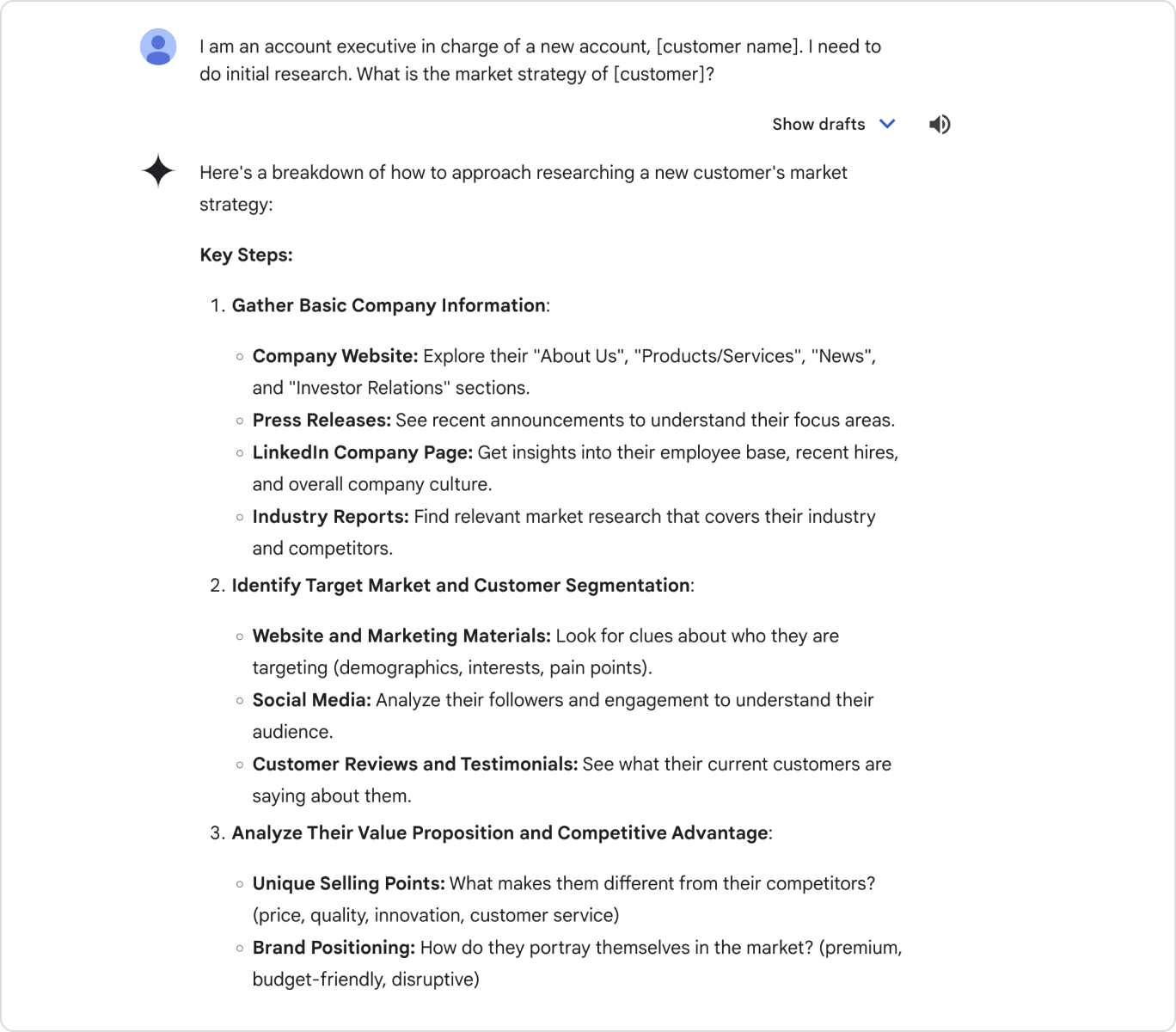
For example, instead of writing:
“Tell me about Gemini”
A more effective prompt would be:
“Explain how to use Gemini for SEO research in 2026, written for beginners, using a professional tone and UK spelling.”
Strong prompts often include:
- The task you want completed
- Relevant background or industry context
- The intended audience
- Any formatting or tone preferences
If the first response is not quite right, refine it. Follow-up prompts such as “expand on this point”, “simplify the language”, or “add a practical example” help guide Gemini closer to your desired outcome. Over time, this iterative approach becomes second nature and significantly improves efficiency.
2. How to Use Deep Research in Gemini
Deep Research is designed for situations where surface-level answers are not enough. Unlike standard responses, this feature allows Gemini to explore topics in greater depth, synthesising information across multiple dimensions and presenting it in a more structured way.
To begin using Deep Research, you can click on a button titled Tools which will list out a bunch of features that you can ask Gemini to do. The first one of those features is called Deep Research.
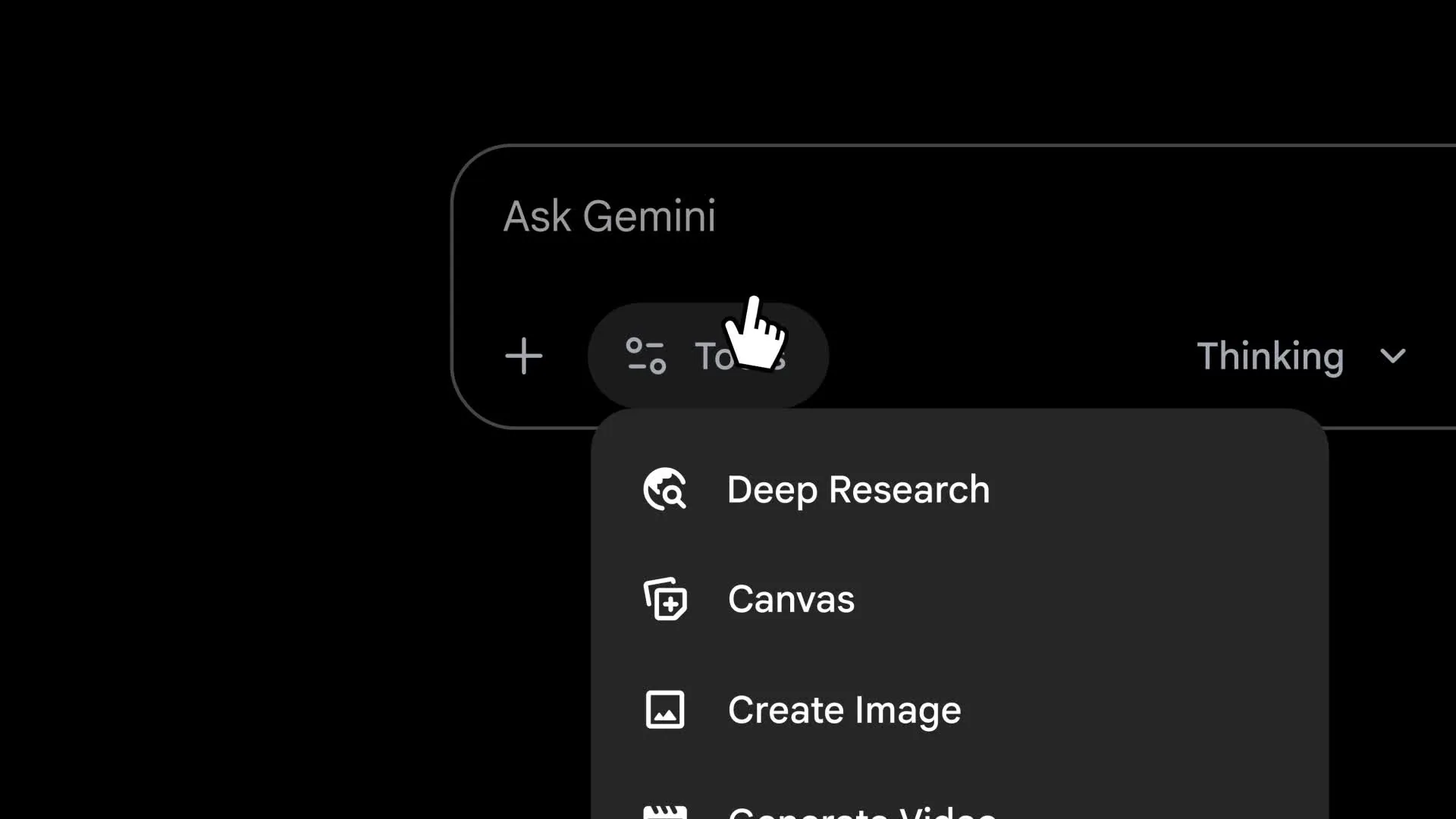
Begin with complex or strategic questions rather than simple definitions. This feature works best when you are analysing trends, evaluating approaches, or preparing for decision-making.
For example:
“Use deep research to analyse how AI tools like Gemini are changing SEO strategies for digital agencies in 2026.”
Gemini will respond with layered insights, contextual explanations, and clearer logical progression. This makes Deep Research particularly useful for:
- Market and industry analysis
- Strategy development and planning
- Thought leadership content
- Internal knowledge building
Although Deep Research saves significant time, it is important to review the output carefully. Validate insights against trusted sources and apply professional judgment before using findings in client-facing or strategic contexts.
3. How to Use Create Images With Gemini
Similar to Deep Research, Gemini’s Create image feature can also be accessed by clicking Tools then Create images. Images feature allows users to generate visual assets using text prompts. This capability is especially helpful during early-stage ideation, where visual clarity supports communication and alignment.
When prompting Gemini to create images, clarity is essential. Describe not only what the image should depict, but also its style, mood, and intended use. The more specific the prompt, the more relevant the output.

For example:
“Create a modern, minimal illustration showing how AI supports SEO, content, and analytics workflows for a digital agency website.”
This feature is commonly used for:
- Concept visuals and mock-ups
- Internal presentations
- Blog or article illustrations
- Social media ideation
While AI-generated images are useful, they should be reviewed before external publication. Ensure visuals align with brand guidelines, accessibility standards, and licensing considerations. In professional settings, these images often work best as inspiration rather than final assets.
4. How to Use Canvas in Gemini
Canvas provides a dedicated workspace for longer, more complex tasks. Instead of receiving isolated responses, Canvas allows you to build, refine, and edit content over time while maintaining context.
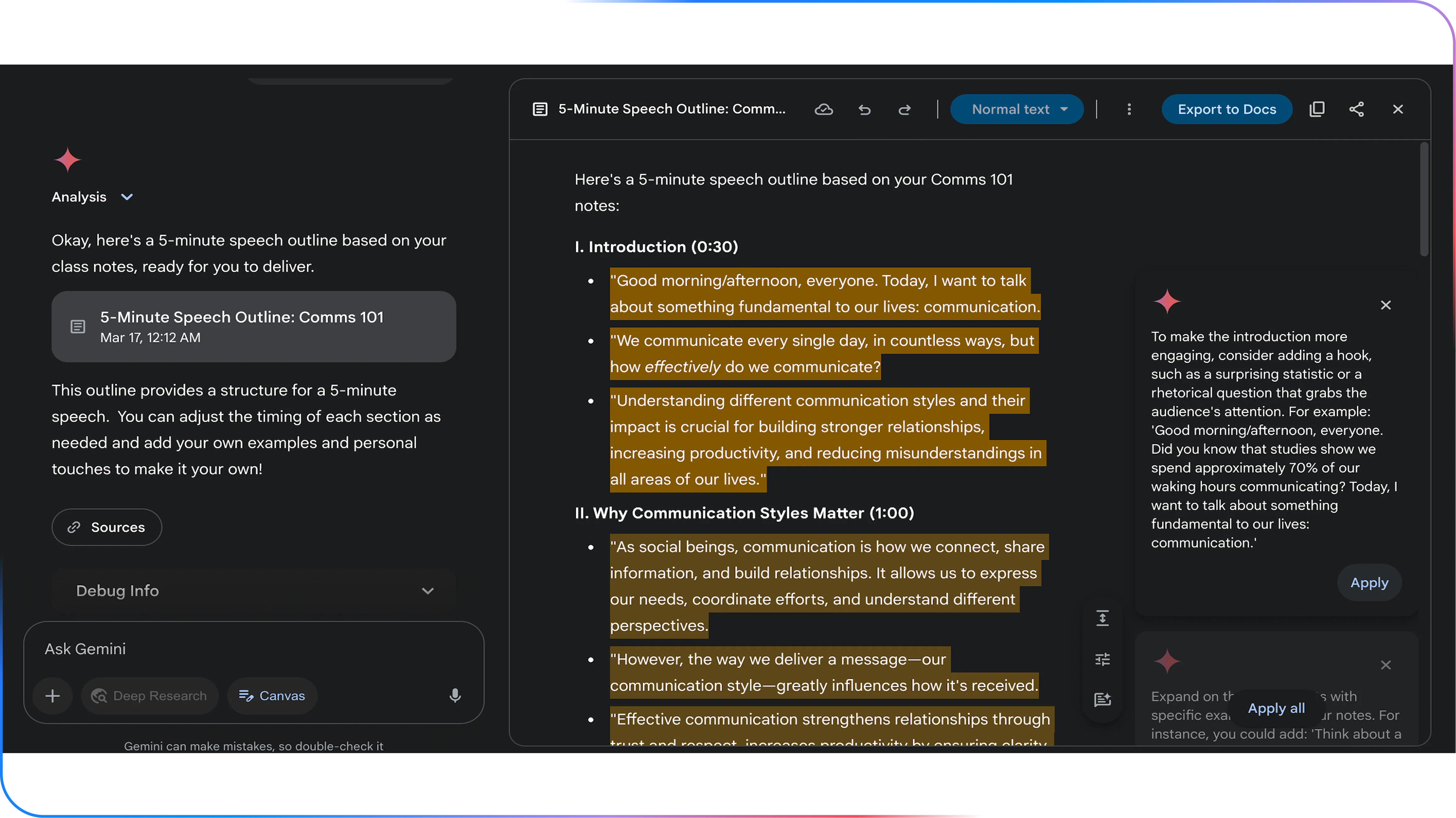
This feature is particularly valuable when working on:
- Blog posts and guides
- Reports and whitepapers
- Strategy documents
- Multi-section content pieces
A practical way to use Canvas is to start with structure before content. For example, you might prompt:
“Create a detailed outline for a beginner’s guide on how to use Gemini in 2026.”
Once the outline is in place, you can expand each section, adjust tone, improve flow, and request refinements without starting over. This makes Canvas ideal for content that requires consistency, depth, and polish.
For teams, Canvas also supports more efficient collaboration by reducing duplication and keeping work organised within a single workspace.
5. How to Use Guided Learning in Gemini
Guided Learning is designed to help users build knowledge progressively. Instead of presenting everything at once, Gemini breaks topics into manageable steps, making learning more approachable for beginners.
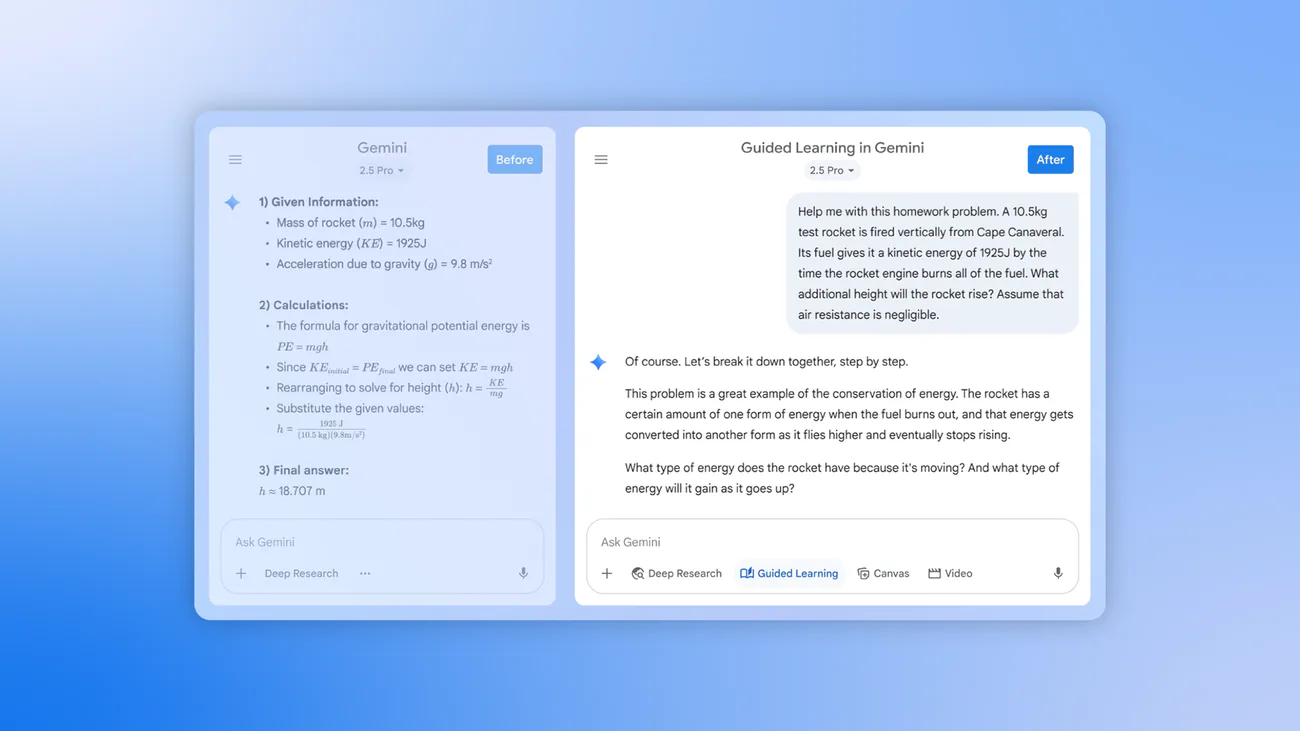
This feature is particularly useful when:
- Learning a new platform or concept
- Training junior team members
- Building foundational AI knowledge
For example:
“Guide me step by step on how to use Gemini for content marketing, assuming no prior experience.”
Gemini will introduce core concepts first, then gradually move towards more advanced applications. This structured approach reduces overwhelm and improves long-term understanding, especially for users who are new to AI tools.
Guided Learning also encourages better retention by allowing users to pause, ask follow-up questions, and explore topics at their own pace.
6. How to Use Visual Layout for Clearer Outputs
Visual Layout improves how Gemini presents information by structuring responses into tables, lists, or clearly separated sections. This is especially helpful when working with comparisons, processes, or data-heavy topics.
To activate this feature effectively, specify the format you want in your prompt.
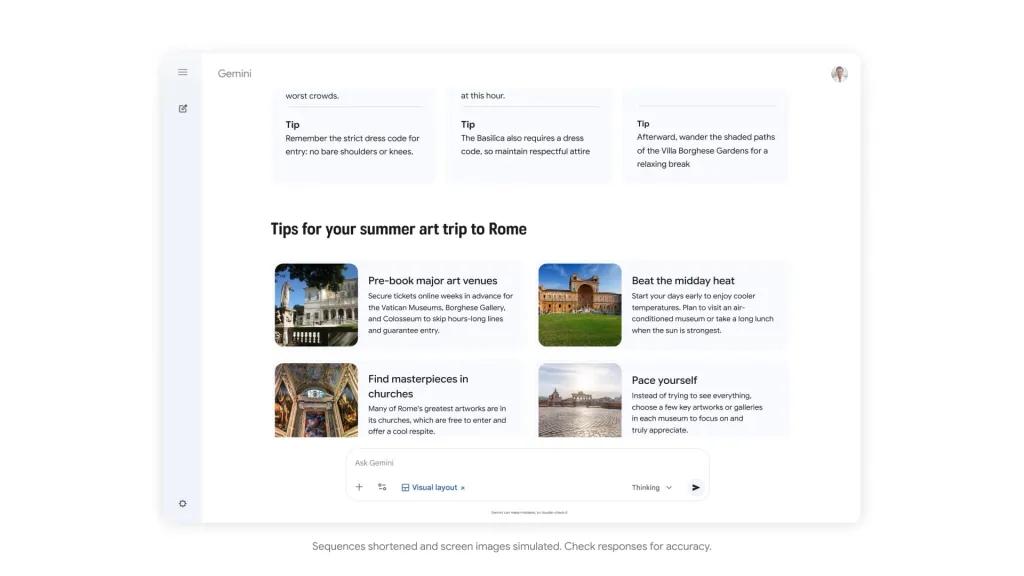
For example:
“Present the differences between Gemini and other AI tools in a comparison table.”
Visual layouts are particularly useful for:
- Internal documentation
- Strategy discussions
- Presentations and reporting
- Simplifying complex information
By improving readability, visual layouts help teams understand insights more quickly and make better-informed decisions.
7. How to Add Files for Gemini to Analyse
One of Gemini’s most powerful features in 2026 is its ability to analyse uploaded files. This allows Gemini to work directly with your documents, saving time and reducing manual effort.
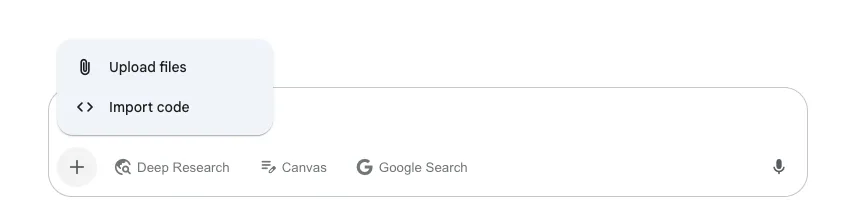
You can upload files such as:
- PDFs and reports
- Spreadsheets
- Text documents
- Presentations
Once uploaded, clearly explain what you want Gemini to do with the file.
For example:
“Analyse this SEO performance report and summarise key trends, risks, and opportunities for improvement.”
This feature is particularly valuable for:
- Reviewing large datasets
- Extracting insights from reports
- Preparing summaries for stakeholders
- Accelerating analysis workflows
However, it is important to remain mindful of data security. Avoid uploading sensitive or confidential information unless it aligns with your organisation’s data governance policies.
Using Gemini With Intent and Strategy
Ultimately, understanding how to use Gemini in 2026 is about applying the right feature to the right task. Each capability serves a specific purpose, and their combined value lies in strategic use rather than experimentation alone.
At Saigon Digital, we encourage businesses to view Gemini as part of a broader digital ecosystem. When integrated thoughtfully with SEO, content, automation, and human expertise, Gemini becomes a powerful driver of efficiency, clarity, and long-term digital growth.
Practical Ways to Use Gemini in 2026
Understanding how to use Gemini becomes far more valuable when you can apply it to real, everyday business tasks. In 2026, Gemini is no longer just an experimental AI tool, it is a practical assistant that supports research, content, SEO, and strategic planning across digital teams.
Below are the most effective ways beginners can use Gemini, with clear guidance on how to apply it step by step.
1. Research and Insight Gathering
One of the most accessible and impactful ways to use Gemini is for research. Instead of manually searching through dozens of articles, reports, or forums, Gemini can synthesise information and present it in a clear, structured way.
To begin, focus on asking specific, outcome-driven questions. Gemini performs best when it understands both the topic and the purpose of the research.

For example, instead of asking:
“What is digital marketing?”
A more effective prompt would be:
“Explain the key digital marketing trends affecting UK-based service businesses in 2026, with practical examples.”
This approach allows Gemini to provide contextually relevant insights rather than generic definitions.
Gemini can support research tasks such as:
- Summarising long-form reports or whitepapers
- Explaining complex topics in plain language
- Comparing tools, platforms, or strategies
- Identifying emerging trends within an industry
For beginners, a useful workflow is to start broad and then narrow down. You might first ask for an overview, then follow up with more detailed questions. This conversational approach mirrors how human research naturally unfolds and helps you extract deeper value from Gemini.
2. Content Creation and Optimisation
Another practical way to use Gemini in 2026 is to support content creation. While Gemini should not replace human writers or subject-matter expertise, it is highly effective as a content assistant.
A strong starting point is using Gemini to structure content before writing. For example:
“Create a detailed blog outline for the topic ‘how to use Gemini’ aimed at beginners, using a professional tone and UK spelling.”
From there, you can ask Gemini to expand individual sections, improve clarity, or suggest supporting examples. This staged approach helps maintain quality and consistency.
Gemini can assist with content tasks such as:
- Generating blog outlines and section ideas
- Rewriting paragraphs for clarity or tone
- Simplifying technical language for non-experts
- Creating FAQs, summaries, or introductions
For optimisation, Gemini is particularly useful when refining existing content. For instance:
“Rewrite this paragraph to sound more professional and informative, while keeping it natural and engaging.”
At Saigon Digital, we recommend always reviewing and editing AI-generated content. Human insight ensures accuracy, brand alignment, and originality, key factors for trust and SEO performance.
3. SEO and Keyword Support
When learning how to use Gemini for SEO, it is important to view it as a strategic support tool rather than a replacement for dedicated SEO platforms.
Gemini excels at explaining why users search for certain terms and how content can be structured to meet that intent.

For example, you might ask:
“Explain the search intent behind the keyword ‘how to use Gemini’ and suggest content angles for beginners.”
Gemini can then help you understand whether users are looking for:
- Basic introductions
- Step-by-step guides
- Comparisons or use cases
- Practical examples
This insight allows you to align content more closely with user needs, which is essential for long-term SEO success.
In practice, Gemini can support SEO by:
- Grouping keywords into logical topic clusters
- Suggesting internal linking opportunities
- Identifying content gaps in existing content
- Explaining SEO concepts to non-technical teams
When combined with professional SEO tools and expertise, Gemini becomes a valuable part of the planning and ideation process.
4. Data Interpretation and Strategic Planning
Beyond content and SEO, Gemini is increasingly used to interpret information and support planning. In 2026, many teams rely on Gemini to turn raw inputs into actionable insights.
For beginners, the key is to provide Gemini with clear context. For example:
“Based on this campaign summary, suggest areas for improvement and explain why.”
Gemini can then analyse patterns, highlight inefficiencies, and propose next steps in a way that is easy to understand.
Common applications include:
- Interpreting performance summaries
- Supporting campaign planning discussions
- Identifying risks or missed opportunities
- Translating data into plain-language insights
This is particularly useful for decision-makers who need clarity without technical complexity. Rather than replacing strategic thinking, Gemini enhances it by accelerating analysis and improving visibility.
Best Practices for Using Gemini Effectively
Learning how to use Gemini is not just about understanding its features; it is about using the tool in a way that delivers consistent, quality outcomes. In 2026, the most successful teams treat Gemini as a strategic assistant, one that complements human expertise rather than replacing it.
The following best practices will help you use Gemini more effectively, responsibly, and confidently across different digital tasks.
1. Be Clear and Intentional With Your Prompts
The quality of Gemini’s output depends heavily on the clarity of your instructions. Vague or overly broad prompts often lead to generic responses, whereas clear and intentional prompts produce more useful results.

When writing a prompt, consider three elements:
- Your role (for example, marketer, business owner, or content writer)
- Your goal (what you want to achieve)
- Your audience (who the output is for)
For example, instead of writing:
“Write about Gemini”
A more effective prompt would be:
“Explain how to use Gemini for SEO research in 2026, written for beginners using a professional tone and UK spelling.”
By providing context upfront, you guide Gemini towards producing content that is relevant, structured, and actionable.
2. Use Gemini as a Starting Point, Not the Final Output
One of the most important best practices when learning how to use Gemini is understanding its role in your workflow. Gemini works best as a starting point, helping you generate ideas, structure information, or explore different approaches.
For instance, you might use Gemini to:
- Create an initial draft or outline
- Suggest alternative phrasing
- Identify missing sections or gaps
However, before publishing or acting on the output, always review it through a human lens. This ensures accuracy, originality, and alignment with your brand voice.
At Saigon Digital, we emphasise this balance because strong digital performance comes from combining AI efficiency with strategic oversight.
3. Refine and Iterate Through Follow-Up Prompts
Effective use of Gemini is rarely a one-prompt process. Instead, it works best when you treat the interaction as a conversation.

After receiving an initial response, consider refining it with follow-up prompts such as:
- “Expand on this section with more detail.”
- “Rewrite this in a clearer, more professional tone.”
- “Provide a practical example for beginners.”
This iterative approach allows you to guide Gemini closer to your intended outcome. Over time, you will also develop a better understanding of which prompt structures work best for your specific needs.
4. Apply Human Judgment and Domain Expertise
While Gemini is powerful, it does not replace professional expertise. This is particularly important for areas such as SEO, strategy, compliance, and brand positioning.
Always apply human judgment when:
- Reviewing factual accuracy
- Assessing strategic recommendations
- Aligning content with business goals
- Ensuring compliance with regulations or guidelines
For example, if Gemini suggests an SEO tactic, treat it as a hypothesis rather than a final answer. Validate it against data, tools, and real-world experience before implementation.
This approach ensures AI supports informed decision-making rather than dictating it.
5. Maintain Consistency With Brand Voice and Tone
Another best practice when learning how to use Gemini is maintaining consistency across your content and communications. While Gemini can adapt to different tones, it needs clear guidance.

You can improve consistency by including instructions such as:
- “Use a professional and informative tone.”
- “Write in UK English.”
- “Align with a digital agency’s brand voice.”
For teams, it is also helpful to document preferred prompts and examples. This creates shared standards and reduces variation across outputs, especially when multiple people use Gemini within the same organisation.
6. Document Successful Prompts and Workflows
Over time, you will notice that certain prompts consistently produce strong results. Rather than rewriting these each time, document them as part of your internal processes.
This can include:
- Proven prompt templates
- Step-by-step AI workflows
- Examples of high-performing outputs
By building an internal prompt library, teams can use Gemini more efficiently and with greater confidence. This practice also supports scalability as AI becomes more embedded in daily operations.
7. Use Gemini Ethically and Transparently
Finally, effective use of Gemini includes responsible and ethical considerations. Be transparent when AI supports content creation, especially in professional or commercial contexts.
Avoid:
- Publishing AI-generated content without review
- Using Gemini to replicate proprietary or sensitive materials
- Relying on AI for decisions that require accountability
When used responsibly, Gemini enhances trust rather than undermines it, an essential principle for long-term digital growth.
The Future of Gemini for Businesses
Looking ahead, Gemini will continue to evolve alongside Google’s ecosystem. For businesses, this means greater opportunities to connect AI with SEO, automation, and digital experience design.
Those who invest time now in learning how to use Gemini strategically will be better positioned to adapt, scale, and innovate.
Unlock Smarter Digital Growth With Gemini
Gemini is now a practical asset for modern digital teams. By learning how to use Gemini in 2026 with clarity and purpose, businesses can unlock faster insights, stronger content, and more efficient workflows.
At Saigon Digital, we believe the future of digital growth lies at the intersection of strategy, creativity, data, and AI. Gemini is one piece of that puzzle, powerful when used correctly, and transformative when aligned with clear business goals.
If you are exploring how AI can support your SEO, content, or digital strategy, the right approach matters as much as the technology itself.
Contact Saigon Digital today to kickstart your business digital growth!
Want to be the brand AI engines recommend?
We make businesses visible on Google and inside AI answers, measured in leads, not vanity metrics.