Social media has never been more competitive. In 2026, brands are expected to publish faster, personalise content at scale, and maintain a consistent voice across multiple platforms, all while proving ROI. For marketing teams, this pressure often leads to a familiar challenge: creating quality posts consistently without draining time or resources.
This is where AI-powered tools have matured from “nice-to-have” to business-critical. Today’s best AI social media post generator tools do far more than write captions. They analyse audience behaviour, adapt tone of voice, repurpose content, and support campaign-level strategy.
In this article, we break down the top 5 AI social media post generators in 2026, highlighting how each tool fits different business needs and how to use them effectively.

What Makes the Best AI Social Media Post Generator in 2026?
Before exploring the tools, it’s worth clarifying what “best” really means in today’s landscape.
In our experience, the strongest AI social media tools share five key qualities:
- Platform awareness: Content should be tailored for LinkedIn, Instagram, TikTok, X, and Facebook, not recycled blindly.
- Brand voice control: AI must adapt to your tone, not overwrite it.
- Strategic support: The best tools help with content planning, not just writing.
- Ease of use: Clear workflows save time and reduce friction for teams.
- Measurable impact: Performance insights matter as much as content creation.
With these criteria in mind, here are our top picks for 2026.
1. Jasper Social AI – Best for Brand-Led Content at Scale
Jasper Social AI continues to set the benchmark in 2026 for brands that need to produce large volumes of social media content without diluting their identity. Rather than acting as a generic content generator, Jasper positions itself as a brand-aware AI assistant, making it a strong contender for businesses that value consistency, clarity, and long-term growth.

Why It Stands Out
What truly differentiates Jasper Social AI is its ability to understand and replicate a brand’s voice across platforms and campaigns. Instead of rewriting posts from scratch each time, Jasper learns from your existing content, brand guidelines, and preferred language style.
As a result, teams can scale output while maintaining a unified tone, something that is particularly difficult when multiple people are involved in content creation. Moreover, Jasper’s campaign-based structure ensures that posts feel connected rather than fragmented.
In practical terms, this means:
- Your LinkedIn posts remain professional and insight-led
- Your Instagram captions stay conversational and engaging
- Your brand personality remains consistent, regardless of volume
This level of control is essential for brands that see social media as a strategic asset rather than a posting exercise.
Best Use Case
Jasper Social AI is best suited for mid-sized to enterprise-level organisations that manage ongoing campaigns, multiple audiences, or regional markets.
It works particularly well for:
- B2B brands building thought leadership on LinkedIn
- SaaS companies launching features or updates regularly
- Agencies managing multiple client brand voices
- Marketing teams working across regions or departments
Because Jasper supports structured workflows, it helps teams move from reactive posting to planned, scalable social media execution.
Key Features (and How to Use Them)
Jasper’s strength lies in how its features work together. Below are the most valuable capabilities and how to apply them effectively:
- Brand Voice Memory: Upload brand guidelines, tone descriptions, and sample posts. Jasper then mirrors your writing style in future outputs.
- Tip: Start with your best-performing social posts to train the AI faster.
- Platform-Specific Post Generation: Jasper adapts content for LinkedIn, Instagram, Facebook, and X instead of copying the same caption everywhere.
- Tip: Always specify the platform to improve relevance and engagement.
- Campaign-Based Workflows: Create content clusters around launches, promotions, or themes. This ensures consistency across posts.
- Tip: Plan campaigns weekly or monthly rather than post-by-post.
- Content Variations at Scale: Generate multiple versions of the same message to test tone, CTA, or framing.
- Tip: Use variations for A/B testing rather than publishing everything at once.
Simple Example: How Jasper Works In Practice
Imagine a SaaS brand launching a new analytics feature.
Using Jasper Social AI, the process could look like this:
- Upload brand guidelines and past high-performing posts
- Define the campaign goal (e.g. product awareness)
- Request platform-specific posts, such as:
- A LinkedIn post highlighting business value
- An Instagram caption focusing on ease of use
- A short X post promoting speed and efficiency
- Generate 3–5 variations per platform
- Review, refine, and schedule within your content calendar
In under an hour, the team has a full week of on-brand, campaign-aligned content ready to publish.
How to Get The Best Results From Jasper Social AI
To maximise value, it’s important to treat Jasper as a strategic assistant, not an autopilot. We recommend:
- Reviewing and refining outputs to add human insight
- Updating brand guidelines as your messaging evolves
- Pairing Jasper with performance data to refine future prompts
- Using AI to accelerate execution, not replace strategy
When used thoughtfully, Jasper becomes a powerful extension of your marketing team.
2. Hootsuite OwlyWriter AI – Best for Social Teams Focused on Performance
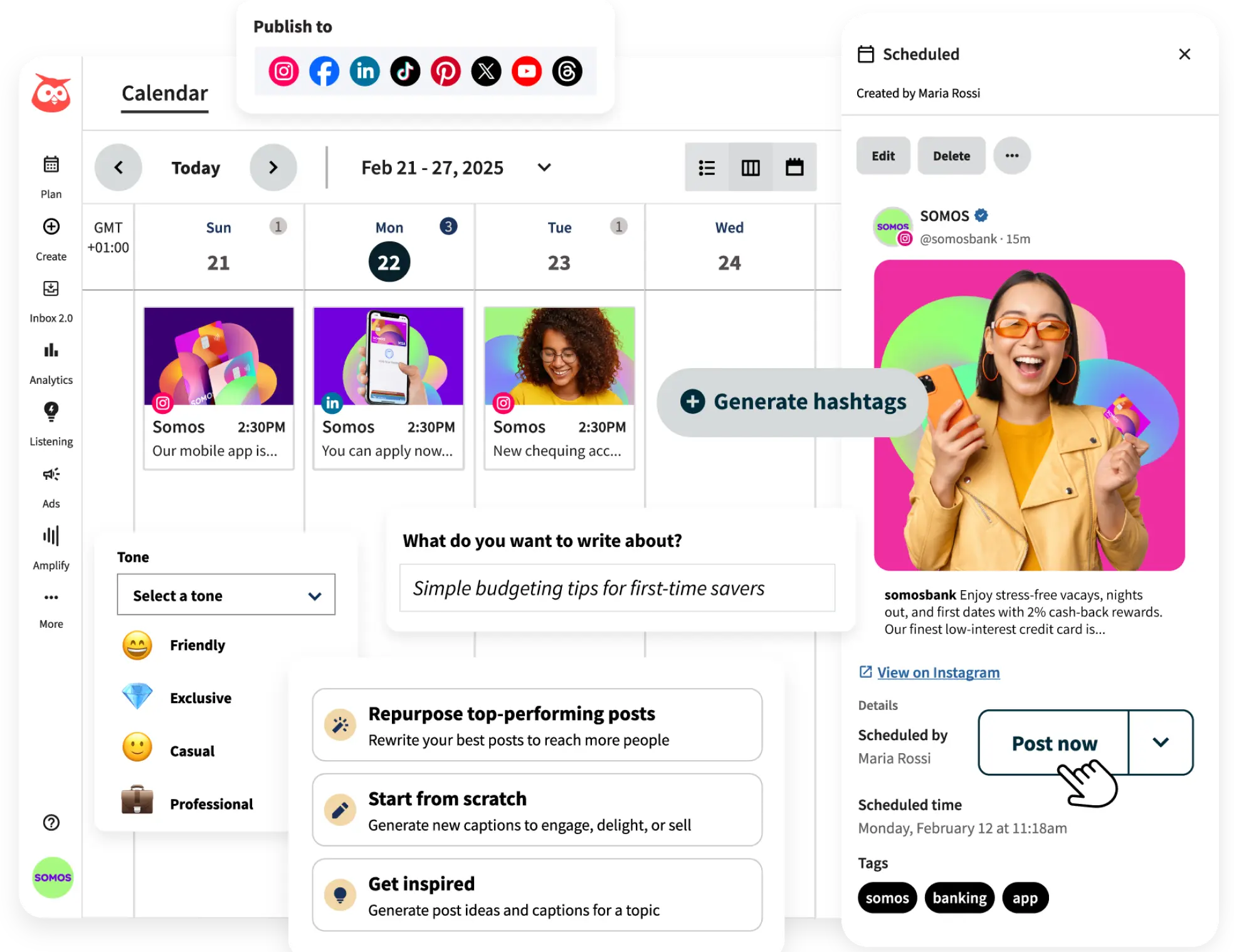
In 2026, social media performance isn’t just about publishing content, it’s about publishing the right content, at the right time, for the right audience. Hootsuite’s OwlyWriter AI is engineered with this philosophy at its core, combining AI content generation with deep performance insights. For teams that value not only creativity but measurable results, OwlyWriter AI stands out as a powerful ally.
Rather than operating as a standalone creative tool, OwlyWriter AI is fully embedded within the broader Hootsuite ecosystem. This integration ensures that content creation, scheduling, analytics, and optimisation live under one roof, delivering a seamless workflow for performance-driven social media teams.
Why It Stands Out
What sets OwlyWriter AI apart is its ability to blend content generation with real-time feedback and performance optimisation. Instead of generating posts in isolation, the tool uses historical engagement data, trending topic analysis, and platform-specific insights to suggest captions, formats, hashtags, and publishing times that are more likely to resonate with your audience.
This focus on performance makes OwlyWriter AI particularly useful for teams that need:
- Data-informed content suggestions instead of generic text
- Automated ideas tailored to trending topics and audience behaviour
- Quick optimisation without manual guesswork
The result is a system that not only helps you write posts, it helps you write better posts that perform.
Best Use Case
OwlyWriter AI is ideal for in-house social media teams and digital agencies that handle multiple client accounts or campaigns, especially when performance metrics such as engagement, reach, and conversions matter.
It fits best in scenarios where teams need to:
- Generate fresh content quickly
- Align posts with real-time trends
- Monitor and improve performance over time
For example:
- A retail brand planning seasonal campaigns can use data-backed captions to drive clicks and conversions.
- An agency managing several clients can maintain quality and relevance without spending hours manually analysing performance reports.
Because OwlyWriter AI lives inside Hootsuite’s dashboard, teams can generate, refine, schedule, and measure, all without switching tools.
Key Features (and How to Use Them)
OwlyWriter AI combines content generation with smart performance insights. Here’s how the key features work and how to make the most of them:
- Trend-Based Ideas and Captions: The AI suggests topics and captions based on what’s currently trending in your industry or among your audience.
- Actionable tip: Start with a recent blog post or product announcement and let OwlyWriter suggest several caption ideas tailored to what’s engaging right now.
- Optimised Hashtags and CTAs: Instead of generic hashtag recommendations, OwlyWriter uses data to suggest tags that align with your audience’s interests and behaviour.
- Actionable tip: Compare the suggested hashtags with your own research and select a blend, this often boosts discoverability and relevance.
- Best Time to Post Guidance: By analysing historical performance, OwlyWriter can suggest optimal publishing windows for different platforms.
- Actionable tip: Use this feature to set and adjust your posting schedule rather than relying on fixed time slots.
- Performance Feedback After Publishing: Once posts are live, OwlyWriter continues to track engagement and provides insight into what’s working and why.
- Actionable tip: Review this feedback weekly to refine future prompts and content themes.
Simple Example: Using OwlyWriter to Elevate a Campaign
Imagine a fashion brand preparing for a weekend sale across Instagram and Facebook:
1. The team enters the promotion details into OwlyWriter.
2. The AI produces:
- Multiple caption variations optimised for engagement
- Suggested hashtags based on current fashion trends
- Recommended posting times when followers are most active
3. The team reviews and selects their preferred versions.
4. Posts are scheduled directly from Hootsuite.
5. After publishing, performance data is gathered and OwlyWriter suggests adjustments for future posts.
Within one workflow, the team moves from ideation to execution, guided by performance insights that improve with each iteration.
How to Get The Best Results From OwlyWriter AI
To fully harness OwlyWriter AI, treat the tool as both a creative partner and a performance advisor. Here are practical ways to maximise its impact:
- Use historical analytics to guide content direction: Before generating content, review past performance trends so the AI has context.
- Blend AI suggestions with human insight: While OwlyWriter provides a strong starting point, final edits ensure your brand voice and strategic nuances shine through.
- Iterate often: Compare performance week-over-week to refine prompts and optimise future content.
- Leverage platform-specific insights: Just because a hashtag performs well on Instagram doesn’t guarantee the same on LinkedIn. Use OwlyWriter’s platform context for smarter choices.
3. Copy.ai Social Suite – Best for Speed and Ideation
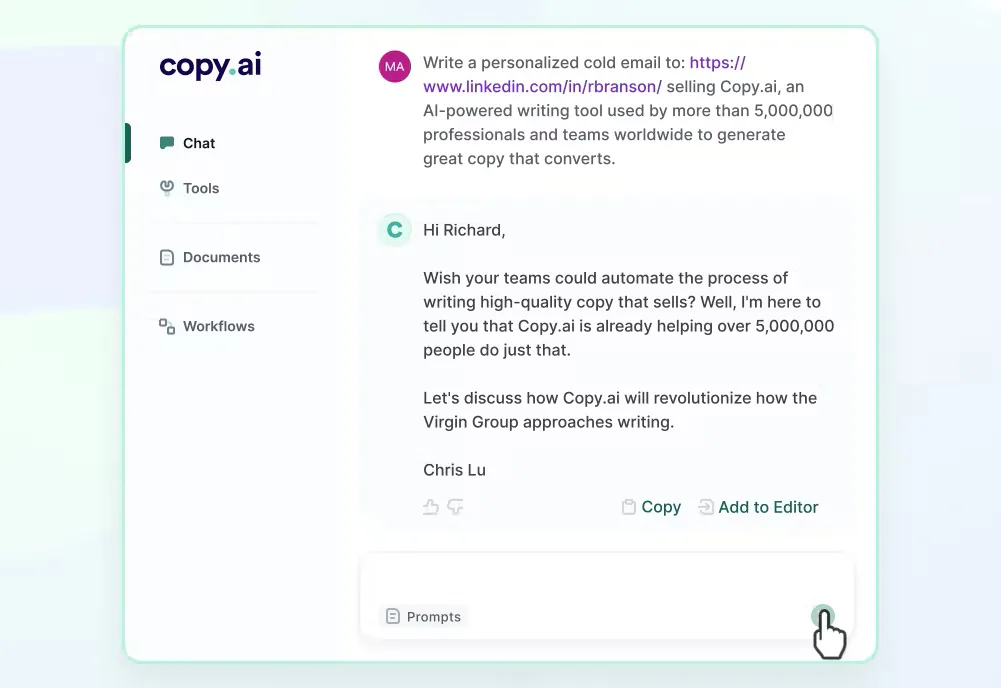
In today’s fast-paced digital landscape, the ability to generate fresh, creative content ideas quickly can be a genuine competitive advantage. That’s exactly where Copy.ai Social Suite shines.
Designed for content teams that need to ideate rapidly and produce engaging social media posts without friction, this tool strikes an excellent balance between speed and quality, making it one of the best AI social media post generator solutions in 2026.
Rather than focusing solely on long-form writing or complex workflows, Copy.ai zeroes in on what many teams struggle with most: idea generation, creative inspiration, and quick output for multiple platforms.
Why It Stands Out
Copy.ai differentiates itself with a straightforward promise: creative ideas without the blank page stress.
Instead of complex configurations, the platform provides intuitive tools and templates that help you generate social captions, content angles, and multiple variations in seconds. This speed is particularly valuable when you’re:
- Responding to trending topics
- Creating daily or weekly social schedules
- Repurposing existing content
Moreover, Copy.ai supports a variety of tone options, from playful and conversational to professional and concise. This adaptability allows teams to tailor voice and style depending on campaign goals, without needing to rewrite prompts every time.
The result is a tool that places creativity and speed at the forefront, enabling teams to focus on strategic decisions instead of getting bogged down in early drafts.
Best Use Case
Copy.ai Social Suite is especially effective for start-ups, small teams, and content creators who need to generate lots of ideas quickly or test different messaging approaches without a heavy planning overhead.
It works well in environments where:
- Campaign timelines are short
- Social calendars are flexible
- Content needs to be continuously refreshed
For example:
- A start-up preparing daily product updates on social platforms
- A marketing team running multiple experiments on Instagram and TikTok
- A solo creator needing fresh angles for weekly content
Because Copy.ai accelerates ideation, it allows teams to stay agile, producing ideas and turning them into publishable content faster than traditional workflows.
Key Features (and How to Use Them)
Copy.ai’s Social Suite includes several user-friendly features that enhance both creativity and output speed. Here’s how they work and how you can get the most from them:
- One-Click Post Generation: Create multiple caption options in seconds by inputting a brief description or key points.
- Actionable tip: Always include your audience and goal in the prompt (e.g. “Promote our new eco-friendly sneakers to environmentally conscious shoppers”).
- Multiple Tone Options: Select different tones such as playful, informative, inspiring, or professional to reshape messages depending on platform and audience.
- Actionable tip: Use professional tones for LinkedIn and conversational tones for TikTok or Instagram to match user expectations.
- Repurposing Tool: Turn a blog paragraph, newsletter snippet, or product description into social posts automatically.
- Actionable tip: Repurpose long-form content early in the workflow to save time and ensure consistency with your broader content strategy.
- Content Templates: Choose from ready-made templates like “Announcement post,” “Event reminder,” or “Engaging question” to structure your messaging.
- Actionable tip: Start with templates during brainstorming sessions and refine them to match your brand voice.
Simple Example: Generating Social Content Quickly
Let’s say you’re launching a new app feature and need social content for the next week.
Here’s how Copy.ai can help:
1. In the Copy.ai Social Suite, enter a short description: “New collaboration feature to streamline team workflows.”
2. Choose desired platforms (e.g. LinkedIn, Instagram).
3. Select a tone (e.g. insightful for LinkedIn, playful for Instagram).
4. Generate multiple caption options per platform.
Within moments, you’ll have curated post options such as:
- LinkedIn: “Unlock seamless teamwork with our latest collaboration feature, designed to help teams stay productive without switching tools.”
- Instagram: “Teamwork just got easier! 🚀 Try our new collaboration feature and stay in sync like never before.”
From here, you can refine, schedule, and publish, all without writer’s block.
How to Get The Best Results From Copy.ai Social Suite
To maximise the value of Copy.ai and truly harness its speed and creativity, consider these practical strategies:
- Start with clear prompts: The more context you give, including audience, goal, and desired emotion, the better the results. This reduces revision time and improves relevance.
- Iterate and combine ideas: Generate multiple versions and blend high-performing elements from different suggestions. For example, combine one caption’s tone with another’s call-to-action.
- Use templates as springboards, not final drafts: While templates are useful, always adapt outputs to reflect your brand voice and campaign specifics.
- Pair with visual design tools: Because Copy.ai focuses on text, combining output with engaging visuals (e.g. Canva, in-platform editors) improves overall performance.
4. Sprout Social AI Assist – Best for Data-Driven Brands
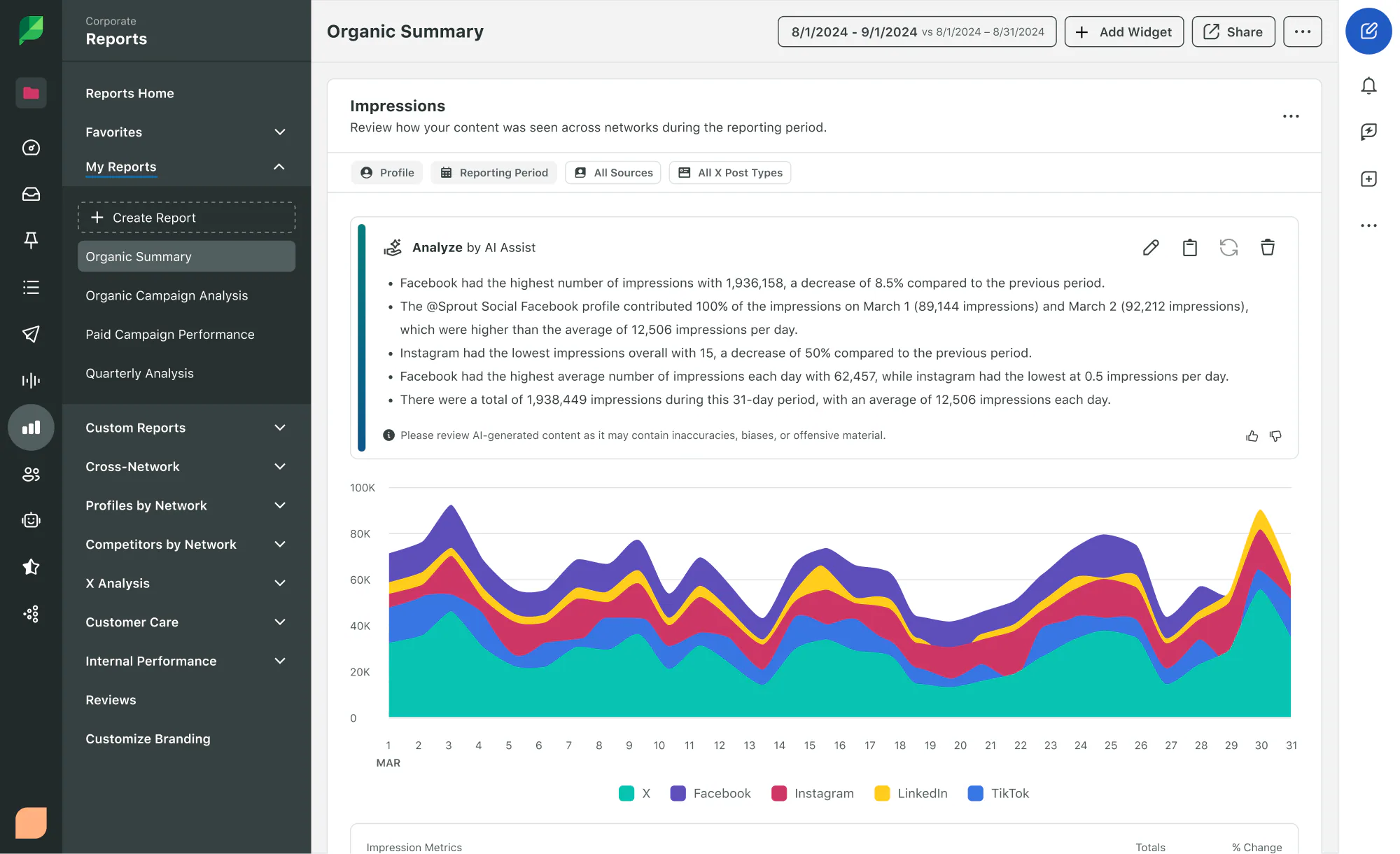
In 2026, social media success is increasingly defined by the ability to connect content with audience behaviour and measurable outcomes. Sprout Social AI Assist stands out as one of the most effective tools for brands that prioritise data-informed creativity. Rather than generating posts in isolation, Sprout’s AI Assist seamlessly integrates with analytics to produce content suggestions grounded in real performance insights.
This combination of AI-powered writing and data-driven strategy makes Sprout Social AI Assist one of the best AI social media post generator tools for organisations that view social media as a long-term channel for engaging communities and building relationships, not merely publishing posts.
Why It Stands Out
What makes Sprout Social AI Assist exceptional is its deep connection to a brand’s performance metrics. Instead of offering generic post templates or speed-first outputs, this tool uses historical data, audience interaction trends, and sentiment analysis to inform content recommendations. This means your posts are more likely to resonate, because they are backed by what has actually worked, not just what could work.
By blending analytics with creative writing, Sprout’s AI Assist helps teams move beyond guesswork. It provides context-aware suggestions, such as tone refinements, content angles, and targeted messaging that align with how different audience segments behave across platforms.
This approach matters because:
- Social media is no longer about quantity, it’s about quality backed by insights.
- Data-informed messaging improves relevance, engagement, and conversion.
- Teams can allocate time more effectively when creation is guided by performance signals.
In short, Sprout Social AI Assist helps brands be strategic, not just active.
Best Use Case
Sprout Social AI Assist is best suited for data-driven brands and medium to large organisations that invest in long-term engagement and audience development. It is especially valuable for:
- Marketing teams that prioritise performance metrics such as engagement, click-through rates, and sentiment
- Brands with established social media histories that want AI to leverage past performance
- Organisations looking to align messaging with deeper audience insights rather than trends alone
For example:
- An enterprise technology company seeking to tailor messaging according to audience sentiment on LinkedIn
- A consumer brand optimising seasonal campaigns based on previous engagement data
- A multi-location business adapting messaging per region based on local responses
In each scenario, Sprout’s AI Assist doesn’t just create posts, it helps refine them through a lens of measurable audience behaviour, making campaigns more relevant and impactful.
Key Features (and How to Use Them)
Sprout Social AI Assist stands out because its features combine content generation with analytics. Below are the key capabilities and how to apply them in practice:
- Performance-Informed Suggestions: Sprout uses historical engagement and trend data to tailor its writing suggestions.
- Actionable tip: When generating post drafts, review past engagement trends on similar topics to guide prompts and tone.
- Audience Sentiment Insights: AI Assist analyses sentiment patterns, helping you craft posts that align with your audience’s emotional preferences.
- Actionable tip: For sensitive or high-stakes topics, use sentiment data to adjust tone toward empathy or positivity.
- Cross-Platform Context: Suggestions account for differences in audience behaviour between platforms like LinkedIn, Instagram, or Facebook.
- Actionable tip: Don’t reuse the same post across platforms without refining it, Sprout can help tailor messages accordingly.
- Collaborative Workflows: Teams can comment, refine, and iterate directly within the platform, making it easy to align strategy with execution.
- Actionable tip: Use shared workspaces and review cycles to keep consistency while incorporating data insights.
Simple Example: Using Sprout Social AI Assist to Refine Messaging
Consider a lifestyle brand preparing a weekly campaign across multiple social channels:
1. The team reviews previous campaign performance data in Sprout Social.
2. Sprout AI Assist suggests post drafts that reflect past engagement peaks (e.g. topic preferences, optimal tone).
3. The AI highlights which posts are likely to resonate best with each platform’s audience.
4. The team refines the recommended posts based on brand voice and strategic goals.
5. Finalised posts are scheduled and monitored in the same ecosystem.
This process ensures posts are not only well-written but strategically optimised, grounded in data and aligned with audience behaviour.
How to Get The Best Results From Sprout Social AI Assist
To maximise the value of Sprout Social AI Assist, it’s important to use the tool as a creative strategist, not just a copywriter. Here are key approaches:
- Start with clear performance goals: Before generating content, define what you want to achieve (e.g. engagement, traffic, conversions). This helps frame prompts more effectively.
- Leverage historical data thoughtfully: Use insights from previous posts to help the AI understand what resonated, then iterate based on results.
- Refine tone based on audience segments: Sprout’s sentiment analysis informs tone, so make sure to adjust prompts using this context for better alignment.
- Collaborate within the platform: Centralise feedback and approval cycles in Sprout to reduce friction and improve cohesion across teams.
5. Canva Magic Write for Social – Best for Visual-First Content
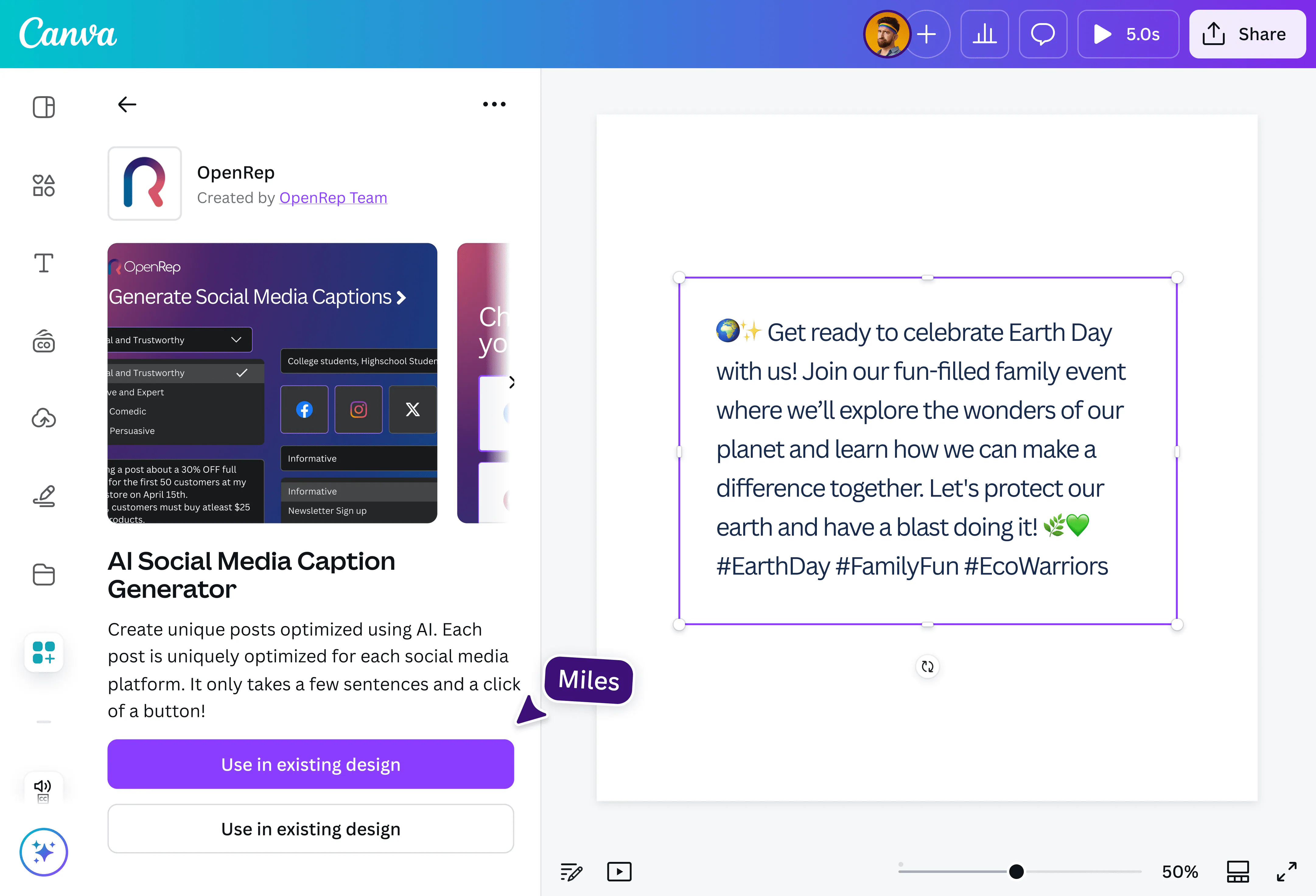
In social media today, visuals are no longer an add-on, they are the foundation of how audiences engage, interpret messaging, and make decisions. Canva has long been a go-to tool for visual creation, and in 2026 its Magic Write feature elevates the experience by blending AI-driven copy with design workflows. This integration positions Canva Magic Write as one of the best AI social media post generator solutions for brands that prioritise visual storytelling paired with compelling text.
Rather than separating design from writing, a workflow that often creates friction, Magic Write allows teams to generate thoughtful, platform-appropriate copy right where visuals are being crafted. This not only accelerates content production but also ensures alignment between imagery and messaging, a vital requirement in highly visual feeds like Instagram, Pinterest, and TikTok.
Why It Stands Out
What makes Canva Magic Write particularly compelling is its seamless connection between design and copy. Many tools specialise either in text or in visuals, forcing teams to juggle platforms and piece together outputs manually. Canva’s AI tackles both simultaneously.
As a result:
- Designers and marketers stay in one workspace.
- Messaging and visuals reinforce each other.
- Time spent switching between tools is significantly reduced.
This integrated workflow helps teams maintain a consistent brand identity while producing content that’s not only visually appealing but also strategically written. For brands where imagery plays a lead role, such as fashion, food and beverage, lifestyle, and e-commerce, Magic Write transforms drafting captions from a separate task into part of the creative process itself.
Best Use Case
Canva Magic Write is exceptionally useful for small businesses, e-commerce brands, and social teams that handle both design and copy internally. It’s especially effective when:
- You’re creating visual posts that rely on concise and engaging text
- You need to produce content quickly without compromising quality
- You want to align text with visuals in real time
- Your team has limited resources and prefers an all-in-one solution
For example:
- A boutique fashion brand producing daily Instagram posts and Stories
- A food service business designing carousel posts to showcase menu highlights
- A digital creator planning content that pairs short, catchy copy with strong visuals
In these scenarios, Magic Write removes common bottlenecks between copywriters and designers, enabling a smoother, faster creative flow.
Key Features (and How to Use Them)
Canva’s Magic Write enhances the creative process with features that are intuitive and practical. Here’s how they work and how to make the most of them:
- In-Design Copy Generation: Generate captions, headlines, or key messages directly within your design canvas.
- Actionable tip: When creating a post layout, start by opening Magic Write alongside your visual draft so text and imagery evolve together.
- Platform-Specific Suggestions: Magic Write considers the platform you’re designing for, adjusting tone and length accordingly (e.g. concise for TikTok, slightly more descriptive for Facebook).
- Actionable tip: Specify the intended platform in your prompt to improve relevance. For instance, prompt with “Instagram carousel caption about product launch” instead of just “caption”.
- Brand Kit Integration: When you’ve set up a brand kit in Canva, Magic Write can pull tone cues from your saved colours, fonts, and styles, helping maintain consistent messaging.
- Actionable tip: Keep your brand kit updated (including voice guidelines) to improve AI alignment.
- Instant Repurposing: Turn long-form content such as blog excerpts or product descriptions into short caption ideas effortlessly.
- Actionable tip: Copy and paste content from your website or marketing materials into Magic Write to automatically generate multiple caption variations based on the same core idea.
Simple Example: Designing a Visual Post With Magic Write
To illustrate how Magic Write enhances visual content creation, consider this scenario:
You are launching a new summer collection and want an Instagram carousel post paired with an engaging caption.
1. Open Canva and start building your carousel design using brand colours and product images.
2. While editing the first slide, launch Magic Write.
3. Input a prompt like: “Write a fun and energetic caption for an Instagram carousel showcasing our new summer collection, emphasising style and comfort.”
4. Magic Write produces multiple caption options that fit tone and length.
5. Select the best one and refine as needed, all without leaving your design canvas.
6. Publish with confidence knowing your visual and copy align in tone and intent.
This workflow removes the friction of moving between tools and drafts, saving valuable time while preserving quality.
How to Get The Best Results From Canva Magic Write
To maximise the value of Magic Write within Canva, we recommend these practical strategies:
- Define context clearly in prompts: The more specific you are about platform, audience, and campaign goals, the stronger and more relevant the text output will be.
- Pair copy with design early: Generate text at the start of your design process so visuals and messaging evolve together, not as afterthoughts.
- Review and personalise outputs: While Magic Write offers a great starting point, add human nuance to ensure your brand voice and emotional tone resonate with your audience.
- Leverage insights from performance data: If a particular style of caption performs well, save those structures and refer back to them and use similar prompts in future Magic Write sessions.
How to Choose the Best AI Social Media Post Generator for Your Business
Selecting the right best AI social media post generator is more than clicking the tool with the most features. Instead, it requires thoughtful alignment with your goals, workflows, and long-term strategy.
Below, we break down a practical framework for making that choice. We’ll help you focus on what matters most, understand how different tools serve different needs, and ensure your decision is grounded in both strategy and execution.
1. Start with Your Business Goals
The first and most important step is asking yourself: What are you trying to achieve with your social media content?

Different priorities demand different strengths:
- If your goal is brand storytelling and voice consistency, choose tools that excel in brand memory and tone control.
- Example: If you want to position your CEO as an industry thought leader on LinkedIn, a tool that understands long-form positioning and professional tone matters more than one optimised for short, playful captions.
- If your goal is data-driven performance, pick tools that merge analytics with content generation.
- Example: If engagement and conversion metrics directly impact KPIs for your team, an AI that suggests hashtags and posting times based on real performance will help you stay ahead.
- If your priority is rapid content ideation or agility, tools that prioritise speed and creativity can help teams generate ideas quickly without creative blocks.
Each of these priorities points to different strengths. Thinking in terms of business impact helps you choose tools that support your strategy, not distract from it.
2. Understand Your Workflow and Team Needs
Next, consider how your team actually works. The value of an AI tool is amplified when it fits seamlessly into existing workflows rather than adding complexity.
Ask yourself:
- Who will be using this tool: designers, copywriters, social managers, or all of them?
- Do you need a tool that integrates with your existing publishing and analytics platforms?
- Are you managing multiple brands or markets with different voices?
Here’s how different workflow considerations influence your choice:
Teams with specialised roles
If you have separate designers and copywriters, tools that distinguish between creative and editorial functions may be more efficient. Choose AI systems that allow collaboration and clear role definitions.
Integrated teams or solopreneurs
If one person manages both design and captioning, an integrated tool (e.g., a design platform with built-in AI writing) reduces platform switching and speeds up production.
Data-centric teams
If your team relies heavily on analytics and optimisation, choose tools that connect content creation with performance dashboards so analytics inform future content automatically.
Match the tool to how teams work, not just what they want.
3. Compare Features with Practical Use Cases
It’s easy to get overwhelmed by lists of features. The key is to compare them with real use cases in your business. Ask:
- Does it generate platform-specific content automatically?
- Can it learn and preserve your brand voice?
- Does it help with ideation, analytics, or both?
- Does it integrate into your publishing and scheduling tools?

4. Think Beyond the Tool, Think Integration
An AI tool on its own is useful, but its value multiplies when it fits into your larger ecosystem, including your content calendar, analytics stack, and publishing workflow.
Ask yourself:
- Does this tool integrate with scheduling platforms like Hootsuite or Sprout?
- Can it connect with analytics tools to measure performance over time?
- Does it work with your design tools to bridge the gap between visuals and messaging?
Integration capability determines whether the tool becomes a force multiplier or a siloed piece of software.
5. Test Before You Commit
Many platforms offer free trials or demos. Take advantage of these to see how a tool feels in everyday use. Practical testing helps you evaluate:
- How intuitive the interface is
- How well the AI understands your brand voice
- Whether the output quality meets expectations
- How easily teams can adopt it
Treat the trial period not as a passive evaluation but as a mini implementation project. Set specific tasks, such as generating a week of posts or aligning visuals with captions, and then assess efficiency gains.

AI as a Growth Enabler, Not a Replacement
AI social media tools in 2026 are powerful, but they work best when paired with human insight, clear strategy, and measurable objectives. Used correctly, they help brands publish smarter, stay consistent, and focus time where it matters most, on creativity, optimisation, and growth.
At Saigon Digital, we help ambitious brands integrate AI into SEO, content, and digital marketing in a way that delivers real results. If you’re exploring AI-powered social media or want guidance on choosing the right tools, our team is here to help.
Contact us today to start your AI-powered marketing journey!
Want to be the brand AI engines recommend?
We make businesses visible on Google and inside AI answers, measured in leads, not vanity metrics.